Java Maps
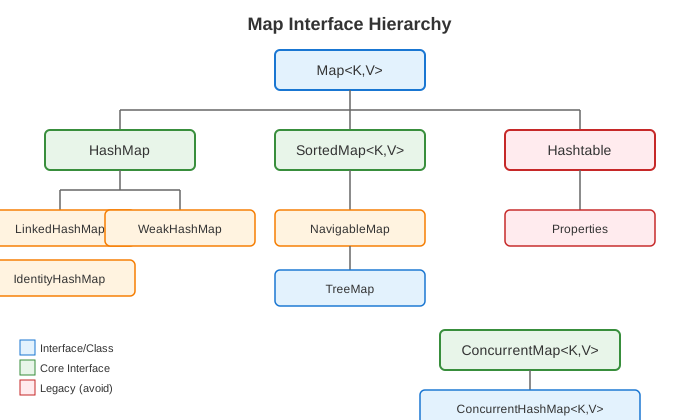
Map Interface Hierarchy
HashMap
Most commonly used Map implementation. Uses hash table for O(1) operations.
Map<String, Integer> map = new HashMap<>();

// Basic operations
map.put("apple", 1);             // O(1) average
map.put("banana", 2);
map.get("apple");                // 1, O(1)
map.getOrDefault("cherry", 0);   // 0 (default if not found)
map.containsKey("apple");        // true, O(1)
map.containsValue(1);            // true, O(n)
map.remove("apple");             // O(1)
map.size();                      // O(1)
map.isEmpty();                   // O(1)

// Bulk operations
map.putAll(otherMap);
map.clear();

// Java 8+ methods
map.putIfAbsent("cherry", 3);    // Only puts if key absent
map.computeIfAbsent("date", k -> k.length());  // Compute if absent
map.computeIfPresent("apple", (k, v) -> v + 1);  // Compute if present
map.compute("apple", (k, v) -> v == null ? 1 : v + 1);  // Always compute
map.merge("apple", 1, Integer::sum);  // Merge with existing

// Iteration
for (Map.Entry<String, Integer> entry : map.entrySet()) {
    String key = entry.getKey();
    Integer value = entry.getValue();
}

map.forEach((key, value) -> System.out.println(key + ": " + value));

// Views
Set<String> keys = map.keySet();
Collection<Integer> values = map.values();
Set<Map.Entry<String, Integer>> entries = map.entrySet();
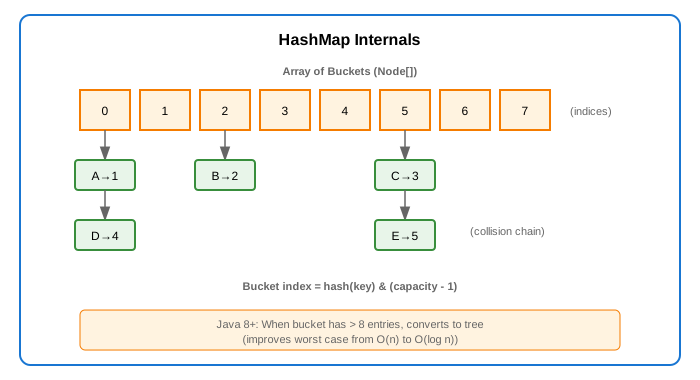
How HashMap Works
HashMap Configuration
// Default: capacity 16, load factor 0.75
Map<String, Integer> map1 = new HashMap<>();

// Custom initial capacity
Map<String, Integer> map2 = new HashMap<>(100);

// Custom capacity and load factor
Map<String, Integer> map3 = new HashMap<>(100, 0.5f);

// Resizing: when size > capacity * loadFactor
// New capacity = old capacity * 2
// All entries rehashed to new buckets
| Operation | Average | Worst Case |
|---|---|---|
| put(K, V) | O(1) | O(n)* |
| get(K) | O(1) | O(n)* |
| remove(K) | O(1) | O(n)* |
| containsKey(K) | O(1) | O(n)* |
| containsValue(V) | O(n) | O(n) |
*Worst case O(log n) in Java 8+ when bucket becomes tree
LinkedHashMap
HashMap that maintains insertion order (or access order).
// Insertion order (default)
Map<String, Integer> insertionOrder = new LinkedHashMap<>();
insertionOrder.put("C", 3);
insertionOrder.put("A", 1);
insertionOrder.put("B", 2);
// Iteration: C, A, B (insertion order)

// Access order (for LRU cache)
Map<String, Integer> accessOrder = new LinkedHashMap<>(16, 0.75f, true);
accessOrder.put("A", 1);
accessOrder.put("B", 2);
accessOrder.put("C", 3);
accessOrder.get("A");  // Moves "A" to end
// Iteration: B, C, A (access order)

// LRU Cache implementation
public class LRUCache<K, V> extends LinkedHashMap<K, V> {
    private final int capacity;

    public LRUCache(int capacity) {
        super(capacity, 0.75f, true);  // Access order
        this.capacity = capacity;
    }

    @Override
    protected boolean removeEldestEntry(Map.Entry<K, V> eldest) {
        return size() > capacity;  // Remove oldest when over capacity
    }
}

LRUCache<String, String> cache = new LRUCache<>(3);
cache.put("A", "1");
cache.put("B", "2");
cache.put("C", "3");
cache.get("A");        // Access A, moves to end
cache.put("D", "4");   // Adds D, removes B (least recently used)
Use When: Need HashMap performance + predictable iteration order, or implementing LRU cache.
TreeMap
Red-Black tree implementation. Keys are sorted.
// Natural ordering
Map<String, Integer> map = new TreeMap<>();
map.put("banana", 2);
map.put("apple", 1);
map.put("cherry", 3);
// Iteration: apple, banana, cherry (sorted)

// Custom comparator
Map<String, Integer> byLength = new TreeMap<>(
    Comparator.comparingInt(String::length).thenComparing(Comparator.naturalOrder())
);

// NavigableMap operations
TreeMap<Integer, String> scores = new TreeMap<>();
scores.put(90, "A");
scores.put(80, "B");
scores.put(70, "C");
scores.put(60, "D");

scores.firstKey();           // 60 (smallest)
scores.lastKey();            // 90 (largest)
scores.lowerKey(80);         // 70 (strictly less)
scores.floorKey(80);         // 80 (less or equal)
scores.higherKey(80);        // 90 (strictly greater)
scores.ceilingKey(80);       // 80 (greater or equal)

scores.firstEntry();         // 60=D
scores.lastEntry();          // 90=A
scores.pollFirstEntry();     // Removes and returns 60=D
scores.pollLastEntry();      // Removes and returns 90=A

// Range views
scores.headMap(80);          // {60=D, 70=C} (keys < 80)
scores.tailMap(80);          // {80=B, 90=A} (keys >= 80)
scores.subMap(70, 90);       // {70=C, 80=B} (70 <= key < 90)

// Descending order
NavigableMap<Integer, String> descending = scores.descendingMap();
| Operation | Time Complexity |
|---|---|
| put(K, V) | O(log n) |
| get(K) | O(log n) |
| remove(K) | O(log n) |
| containsKey(K) | O(log n) |
| firstKey/lastKey | O(log n) |
Use When: Need sorted keys, range queries, finding nearest keys.
Hashtable (Legacy)
Synchronized, thread-safe, but slow. Don't use in new code.
// Legacy - avoid
Hashtable<String, Integer> table = new Hashtable<>();
table.put("key", 1);

// Use ConcurrentHashMap instead
Map<String, Integer> concurrent = new ConcurrentHashMap<>();
Why Avoid: - Synchronizes every operation (slow) - Doesn't allow null keys or values - ConcurrentHashMap is faster for concurrent access
ConcurrentHashMap
Thread-safe HashMap with better performance than Hashtable.
ConcurrentHashMap<String, Integer> map = new ConcurrentHashMap<>();

// Basic operations (thread-safe)
map.put("key", 1);
map.get("key");
map.remove("key");

// Atomic operations
map.putIfAbsent("key", 1);
map.replace("key", 1, 2);  // Only if current value is 1
map.computeIfAbsent("key", k -> expensiveComputation(k));

// Atomic increment
map.merge("counter", 1, Integer::sum);

// Bulk operations (parallel)
map.forEach(2, (k, v) -> System.out.println(k + ": " + v));  // Parallelism threshold: 2
long sum = map.reduceValues(2, Integer::sum);
String result = map.search(2, (k, v) -> v > 100 ? k : null);

// Iterators are weakly consistent (don't throw ConcurrentModificationException)
for (String key : map.keySet()) {
    // Safe even if map is modified by other threads
}
ConcurrentHashMap Internals (Java 8+)
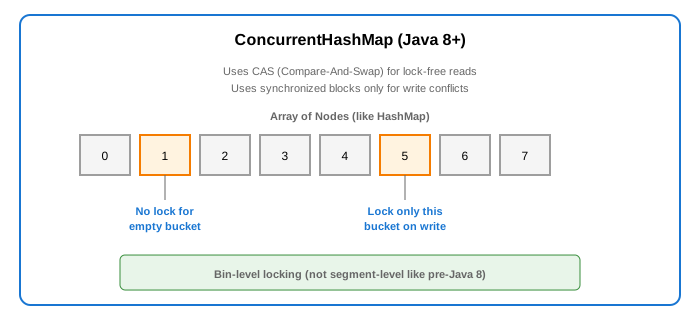
Use When: Need thread-safe map with high concurrency.
WeakHashMap
Keys are held by weak references - entries removed when key is garbage collected.
WeakHashMap<Object, String> map = new WeakHashMap<>();

Object key = new Object();
map.put(key, "value");
System.out.println(map.size());  // 1

key = null;  // Key now eligible for GC
System.gc();  // Request GC

// After GC, entry may be removed
System.out.println(map.size());  // 0 (entry removed)
Use When: Implementing caches where entries should be automatically removed when keys are no longer in use.
IdentityHashMap
Uses reference equality (==) instead of equals() for key comparison.
IdentityHashMap<String, Integer> map = new IdentityHashMap<>();

String s1 = new String("key");
String s2 = new String("key");

map.put(s1, 1);
map.put(s2, 2);

System.out.println(map.size());  // 2 (different references)
System.out.println(s1.equals(s2));  // true
System.out.println(s1 == s2);       // false

// In regular HashMap, size would be 1 (same key by equals)
Use When: Need reference equality, implementing object graphs, serialization.
EnumMap
Specialized Map for enum keys. Very fast and compact.
enum Day { MON, TUE, WED, THU, FRI, SAT, SUN }

EnumMap<Day, String> map = new EnumMap<>(Day.class);
map.put(Day.MON, "Monday");
map.put(Day.TUE, "Tuesday");

// Iteration in enum declaration order
for (Map.Entry<Day, String> entry : map.entrySet()) {
    System.out.println(entry.getKey() + ": " + entry.getValue());
}
Use When: Keys are enum values - much faster than HashMap.
Map Comparison
| Feature | HashMap | LinkedHashMap | TreeMap | ConcurrentHashMap |
|---|---|---|---|---|
| Ordering | None | Insertion/Access | Sorted | None |
| get/put | O(1) | O(1) | O(log n) | O(1) |
| Null keys | Yes (1) | Yes (1) | No* | No |
| Null values | Yes | Yes | Yes | No |
| Thread-safe | No | No | No | Yes |
| Memory | Medium | Higher | Higher | Higher |
*TreeMap allows null key only if Comparator handles it
Common Map Patterns
Counting / Frequency Map
Map<String, Integer> frequency = new HashMap<>();

// Traditional way
for (String word : words) {
    frequency.put(word, frequency.getOrDefault(word, 0) + 1);
}

// Using merge
for (String word : words) {
    frequency.merge(word, 1, Integer::sum);
}

// Using compute
for (String word : words) {
    frequency.compute(word, (k, v) -> v == null ? 1 : v + 1);
}
Grouping
Map<String, List<Person>> byCity = new HashMap<>();

// Traditional way
for (Person p : people) {
    byCity.computeIfAbsent(p.getCity(), k -> new ArrayList<>()).add(p);
}

// Using Streams
Map<String, List<Person>> byCity2 = people.stream()
    .collect(Collectors.groupingBy(Person::getCity));
MultiMap (Key to Multiple Values)
// Using Map of Lists
Map<String, List<String>> multiMap = new HashMap<>();
multiMap.computeIfAbsent("fruits", k -> new ArrayList<>()).add("apple");
multiMap.computeIfAbsent("fruits", k -> new ArrayList<>()).add("banana");

// Using Guava Multimap (if available)
// Multimap<String, String> multiMap = ArrayListMultimap.create();
Bidirectional Map
// Manual implementation
Map<String, Integer> nameToId = new HashMap<>();
Map<Integer, String> idToName = new HashMap<>();

public void put(String name, Integer id) {
    nameToId.put(name, id);
    idToName.put(id, name);
}

// Or use Guava BiMap
// BiMap<String, Integer> biMap = HashBiMap.create();
Cache with Expiration
// Simple TTL cache
public class TTLCache<K, V> {
    private final Map<K, CacheEntry<V>> cache = new ConcurrentHashMap<>();
    private final long ttlMillis;

    private record CacheEntry<V>(V value, long expirationTime) {}

    public TTLCache(long ttlMillis) {
        this.ttlMillis = ttlMillis;
    }

    public void put(K key, V value) {
        cache.put(key, new CacheEntry<>(value, System.currentTimeMillis() + ttlMillis));
    }

    public V get(K key) {
        CacheEntry<V> entry = cache.get(key);
        if (entry == null || System.currentTimeMillis() > entry.expirationTime()) {
            cache.remove(key);
            return null;
        }
        return entry.value();
    }
}
Common Interview Questions
- HashMap vs Hashtable?
- HashMap: Not synchronized, allows null, faster
-
Hashtable: Synchronized, no null, legacy (don't use)
-
How does HashMap handle collisions?
- Chaining: Multiple entries in same bucket as linked list
-
Java 8+: Converts to tree when bucket > 8 entries
-
What happens when HashMap resizes?
- Creates new array 2x size, rehashes all entries
-
This is why initial capacity matters for performance
-
Why is String a good HashMap key?
- Immutable: hash code never changes
- Caches hash code: faster subsequent lookups
-
Good equals() and hashCode() implementation
-
HashMap vs TreeMap?
- HashMap: O(1) operations, no ordering
-
TreeMap: O(log n) operations, sorted keys
-
How to make HashMap thread-safe?
- Collections.synchronizedMap() - slower
- ConcurrentHashMap - better performance