Java Common Questions
Core Java Concepts
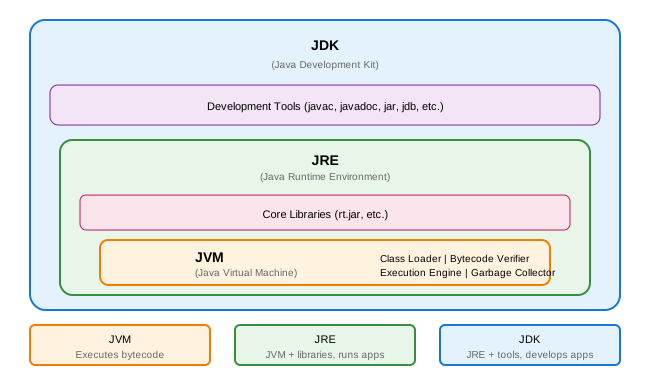
1. What is the difference between JDK, JRE, and JVM?
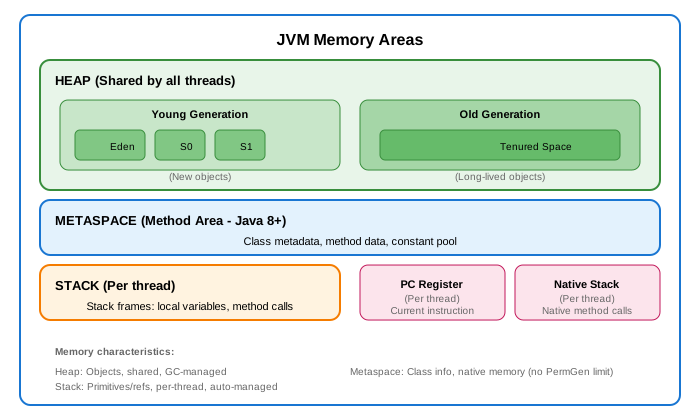
2. Explain Java Memory Model
3. What is Garbage Collection?
// GC automatically reclaims memory from unreachable objects

// Object becomes eligible for GC when:
// 1. Nullifying reference
Object obj = new Object();
obj = null;  // Object eligible for GC

// 2. Reassigning reference
Object obj1 = new Object();
Object obj2 = new Object();
obj1 = obj2;  // First object eligible for GC

// 3. Objects created inside method
void method() {
    Object obj = new Object();
}  // obj eligible after method returns

// 4. Island of isolation
class Node {
    Node next;
}
Node a = new Node();
Node b = new Node();
a.next = b;
b.next = a;
a = b = null;  // Both eligible (circular reference)

// GC Types
// - Serial GC: Single-threaded, small heaps
// - Parallel GC: Multi-threaded, throughput-focused
// - G1 GC: Low latency, large heaps (default Java 9+)
// - ZGC: Ultra-low latency (Java 11+)
// - Shenandoah: Low latency alternative
4. Explain equals() and hashCode() contract
// Contract:
// 1. If a.equals(b) is true, then a.hashCode() == b.hashCode()
// 2. If hashCode differs, objects are NOT equal
// 3. If hashCode same, objects MAY OR MAY NOT be equal

public class Person {
    private String name;
    private int age;

    @Override
    public boolean equals(Object o) {
        if (this == o) return true;
        if (o == null || getClass() != o.getClass()) return false;
        Person person = (Person) o;
        return age == person.age && Objects.equals(name, person.name);
    }

    @Override
    public int hashCode() {
        return Objects.hash(name, age);
    }
}

// Why both must be overridden together:
Map<Person, String> map = new HashMap<>();
Person p1 = new Person("John", 30);
map.put(p1, "value");

Person p2 = new Person("John", 30);
map.get(p2);  // Returns null if only equals() overridden!
// HashMap uses hashCode first to find bucket, then equals()
5. What is the difference between == and equals()?
// == compares references (memory addresses)
// equals() compares content (if overridden)

String s1 = new String("hello");
String s2 = new String("hello");
String s3 = "hello";
String s4 = "hello";

s1 == s2;        // false (different objects)
s1.equals(s2);   // true (same content)

s3 == s4;        // true (String pool - same object)
s3.equals(s4);   // true

// For primitives, use ==
int a = 5, b = 5;
a == b;          // true

// For objects, use equals() for content comparison
Integer i1 = 128, i2 = 128;
i1 == i2;        // false (outside Integer cache -128 to 127)
i1.equals(i2);   // true

Integer i3 = 100, i4 = 100;
i3 == i4;        // true (inside Integer cache)
6. Explain String immutability
// Strings are immutable - content cannot be changed after creation

String s1 = "Hello";
s1.concat(" World");  // Creates new String, original unchanged
System.out.println(s1);  // "Hello"

s1 = s1.concat(" World");  // Reference now points to new String
System.out.println(s1);  // "Hello World"

// Benefits of immutability:
// 1. Thread-safe (can be shared without synchronization)
// 2. Can be cached (String pool)
// 3. Security (credentials, file paths can't be modified)
// 4. Hash code can be cached

// String Pool
String a = "hello";          // Goes to pool
String b = "hello";          // Reuses from pool
String c = new String("hello");  // New object in heap
String d = c.intern();       // Returns pooled "hello"

a == b;  // true (same pool object)
a == c;  // false (c is in heap)
a == d;  // true (intern returns pool object)

// For mutable strings, use StringBuilder (not thread-safe)
// or StringBuffer (thread-safe)
StringBuilder sb = new StringBuilder("Hello");
sb.append(" World");  // Modifies same object
7. What is the difference between final, finally, and finalize?
// FINAL - constant/immutable

// final variable - cannot be reassigned
final int MAX = 100;
// MAX = 200;  // Compile error

// final method - cannot be overridden
class Parent {
    final void cannotOverride() { }
}

// final class - cannot be extended
final class ImmutableClass { }
// class Child extends ImmutableClass { }  // Compile error

// final reference - reference cannot change, object can
final List<String> list = new ArrayList<>();
list.add("item");  // OK - modifying object
// list = new ArrayList<>();  // Compile error

// FINALLY - cleanup code that always executes
try {
    // risky code
} catch (Exception e) {
    // handle exception
} finally {
    // always executes (even if return in try/catch)
    // cleanup resources
}

// FINALIZE - deprecated, called by GC before reclaiming object
@Override
protected void finalize() throws Throwable {
    // cleanup (DON'T USE - unpredictable, deprecated)
    super.finalize();
}
// Use try-with-resources or Cleaner instead
8. What is the difference between throw and throws?
// throw - actually throws an exception
void method() {
    if (condition) {
        throw new IllegalArgumentException("Bad input");
    }
}

// throws - declares that method might throw exception
void riskyMethod() throws IOException, SQLException {
    // method body
}

// Checked vs Unchecked exceptions
// Checked: Must be declared or caught (IOException, SQLException)
// Unchecked: RuntimeException and its subclasses (NullPointerException)

class CheckedExample {
    void method() throws IOException {  // Must declare
        throw new IOException();
    }
}

class UncheckedExample {
    void method() {  // No declaration needed
        throw new RuntimeException();
    }
}
9. Explain abstract class vs interface
// ABSTRACT CLASS
abstract class Animal {
    private String name;  // Can have state

    public Animal(String name) {  // Can have constructor
        this.name = name;
    }

    public void eat() {  // Concrete method
        System.out.println("Eating");
    }

    abstract void makeSound();  // Abstract method
}

// INTERFACE
interface Flyable {
    // All fields are public static final
    int MAX_ALTITUDE = 10000;

    // Abstract method (public abstract implicit)
    void fly();

    // Default method (Java 8+)
    default void land() {
        System.out.println("Landing");
    }

    // Static method (Java 8+)
    static void info() {
        System.out.println("Flyable interface");
    }

    // Private method (Java 9+)
    private void helper() { }
}

// KEY DIFFERENCES
// 1. State: Abstract class can have instance variables
// 2. Constructor: Abstract class can have constructors
// 3. Inheritance: Class extends one class, implements many interfaces
// 4. Access: Interface methods are public, abstract class can have any
// 5. Fields: Interface fields are public static final only

// WHEN TO USE
// Abstract class: IS-A relationship, share code among related classes
// Interface: CAN-DO relationship, define capability contract
10. Explain method overloading vs overriding
// OVERLOADING - Same name, different parameters (compile-time polymorphism)
class Calculator {
    int add(int a, int b) { return a + b; }
    double add(double a, double b) { return a + b; }
    int add(int a, int b, int c) { return a + b + c; }
}

// OVERRIDING - Same signature in subclass (runtime polymorphism)
class Animal {
    void speak() {
        System.out.println("Animal speaks");
    }
}

class Dog extends Animal {
    @Override
    void speak() {
        System.out.println("Dog barks");
    }
}

// RULES FOR OVERRIDING
// 1. Same method signature
// 2. Return type must be same or covariant (subtype)
// 3. Access cannot be more restrictive
// 4. Cannot throw broader checked exceptions
// 5. Cannot override static, final, or private methods

class Parent {
    protected Number getValue() throws IOException {
        return 1;
    }
}

class Child extends Parent {
    @Override
    public Integer getValue() throws FileNotFoundException {  // Valid
        // public (wider) - OK
        // Integer (covariant) - OK
        // FileNotFoundException (narrower) - OK
        return 2;
    }
}
11. What is the Java ClassLoader?
// ClassLoaders load classes into JVM

// Bootstrap ClassLoader - loads core Java classes (rt.jar)
// Extension ClassLoader - loads extension classes (ext folder)
// Application ClassLoader - loads application classes (classpath)

// Delegation model (Parent-first)
// 1. Request goes to Application ClassLoader
// 2. Delegates to Extension ClassLoader
// 3. Delegates to Bootstrap ClassLoader
// 4. If Bootstrap can't find, Extension tries
// 5. If Extension can't find, Application tries
// 6. If none find, ClassNotFoundException

// Check which classloader loaded a class
Class<?> clazz = String.class;
ClassLoader loader = clazz.getClassLoader();
// null for Bootstrap ClassLoader

ClassLoader appLoader = MyClass.class.getClassLoader();
ClassLoader parent = appLoader.getParent();  // Extension ClassLoader
12. Explain the Singleton pattern and its thread-safety
// Eager initialization (thread-safe, simple)
public class EagerSingleton {
    private static final EagerSingleton INSTANCE = new EagerSingleton();
    private EagerSingleton() {}
    public static EagerSingleton getInstance() {
        return INSTANCE;
    }
}

// Lazy initialization with double-checked locking
public class LazySingleton {
    private static volatile LazySingleton instance;
    private LazySingleton() {}

    public static LazySingleton getInstance() {
        if (instance == null) {
            synchronized (LazySingleton.class) {
                if (instance == null) {
                    instance = new LazySingleton();
                }
            }
        }
        return instance;
    }
}

// Bill Pugh Singleton (recommended)
public class BillPughSingleton {
    private BillPughSingleton() {}

    private static class SingletonHelper {
        private static final BillPughSingleton INSTANCE = new BillPughSingleton();
    }

    public static BillPughSingleton getInstance() {
        return SingletonHelper.INSTANCE;
    }
}

// Enum Singleton (best - handles serialization, reflection)
public enum EnumSingleton {
    INSTANCE;

    public void doSomething() {
        // singleton methods
    }
}
13. Explain serialization and its issues
// Serialization - converting object to byte stream
public class Person implements Serializable {
    private static final long serialVersionUID = 1L;
    private String name;
    private transient String password;  // Not serialized
    private static int count;  // Not serialized (static)
}

// Issues:
// 1. Security - sensitive data can be exposed
// 2. Version compatibility - serialVersionUID
// 3. Inheritance - parent must be Serializable or have no-arg constructor
// 4. Performance - slower than other formats (JSON, Protobuf)

// Prevent subclass serialization
private void writeObject(ObjectOutputStream out) throws IOException {
    throw new NotSerializableException();
}

// Custom serialization
private void writeObject(ObjectOutputStream out) throws IOException {
    out.defaultWriteObject();
    out.writeObject(encrypt(password));
}

private void readObject(ObjectInputStream in) throws IOException, ClassNotFoundException {
    in.defaultReadObject();
    password = decrypt((String) in.readObject());
}

// Singleton serialization issue
// readResolve prevents new instance creation during deserialization
private Object readResolve() {
    return INSTANCE;
}
14. What is reflection and when to use it?
// Reflection - inspect and modify runtime behavior

Class<?> clazz = Person.class;
// or Class.forName("com.example.Person");
// or person.getClass();

// Get class info
clazz.getName();
clazz.getSimpleName();
clazz.getSuperclass();
clazz.getInterfaces();
clazz.getModifiers();

// Fields
Field[] fields = clazz.getDeclaredFields();
Field field = clazz.getDeclaredField("name");
field.setAccessible(true);  // Access private
Object value = field.get(instance);
field.set(instance, newValue);

// Methods
Method[] methods = clazz.getDeclaredMethods();
Method method = clazz.getDeclaredMethod("getName");
method.setAccessible(true);
Object result = method.invoke(instance, args);

// Constructors
Constructor<?>[] constructors = clazz.getDeclaredConstructors();
Constructor<?> constructor = clazz.getDeclaredConstructor(String.class);
constructor.setAccessible(true);
Object instance = constructor.newInstance("value");

// Use cases:
// - Frameworks (Spring, Hibernate)
// - Serialization/deserialization
// - Testing (accessing private members)
// - Dependency injection
// - Plugin systems

// Drawbacks:
// - Performance overhead
// - Security restrictions
// - Breaks encapsulation
// - No compile-time type checking
15. Explain Comparable vs Comparator
// Comparable - natural ordering (implemented by the class itself)
public class Person implements Comparable<Person> {
    private String name;
    private int age;

    @Override
    public int compareTo(Person other) {
        return this.name.compareTo(other.name);  // Natural order by name
    }
}

List<Person> people = new ArrayList<>();
Collections.sort(people);  // Uses compareTo

// Comparator - custom ordering (external)
Comparator<Person> byAge = new Comparator<>() {
    @Override
    public int compare(Person p1, Person p2) {
        return Integer.compare(p1.getAge(), p2.getAge());
    }
};

// Lambda
Comparator<Person> byAge = (p1, p2) -> Integer.compare(p1.getAge(), p2.getAge());

// Method reference
Comparator<Person> byAge = Comparator.comparingInt(Person::getAge);

// Chaining
Comparator<Person> complex = Comparator
    .comparing(Person::getLastName)
    .thenComparing(Person::getFirstName)
    .thenComparingInt(Person::getAge);

// Reverse
Comparator<Person> reverseAge = Comparator.comparingInt(Person::getAge).reversed();

// Null handling
Comparator<Person> nullsFirst = Comparator.nullsFirst(Comparator.comparing(Person::getName));

Collections.sort(people, byAge);
people.sort(byAge);
Quick Reference Table
| Concept |
Key Points |
| JVM |
Executes bytecode, manages memory, GC |
| Heap vs Stack |
Heap: objects (shared), Stack: primitives/references (per thread) |
| GC |
Automatic memory management, generational collection |
| equals/hashCode |
Must override together, used by HashMap/HashSet |
| String Pool |
Reuses string literals, immutable strings |
| final |
Variable: constant, Method: no override, Class: no inherit |
| Abstract vs Interface |
Abstract: state + behavior, Interface: contract |
| Overload vs Override |
Overload: compile-time, Override: runtime polymorphism |
| Checked vs Unchecked |
Checked: must handle, Unchecked: RuntimeException |
| Serialization |
Convert object to bytes, serialVersionUID |
| Reflection |
Runtime class inspection/modification |
| Comparable vs Comparator |
Natural vs custom ordering |