Service Mesh
What is a Service Mesh?
A Service Mesh is a dedicated infrastructure layer for handling service-to-service communication in microservices architectures. It provides traffic management, security, and observability without requiring changes to application code.
- Type: Infrastructure / Networking Layer
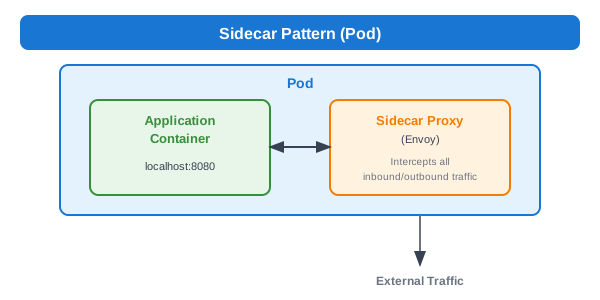
- Pattern: Sidecar Proxy
- Key Implementations: Istio, Linkerd, Consul Connect, AWS App Mesh
- Protocol: HTTP/1.1, HTTP/2, gRPC, TCP
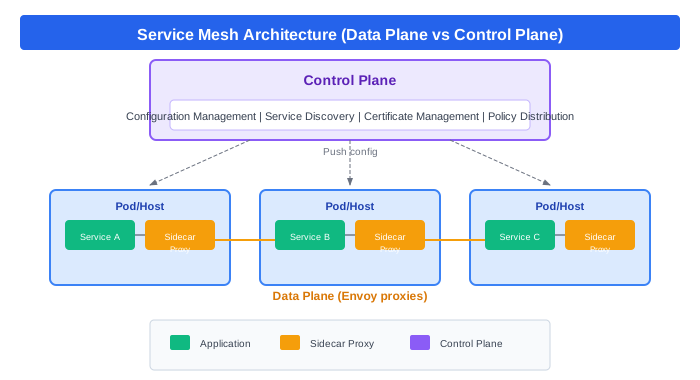
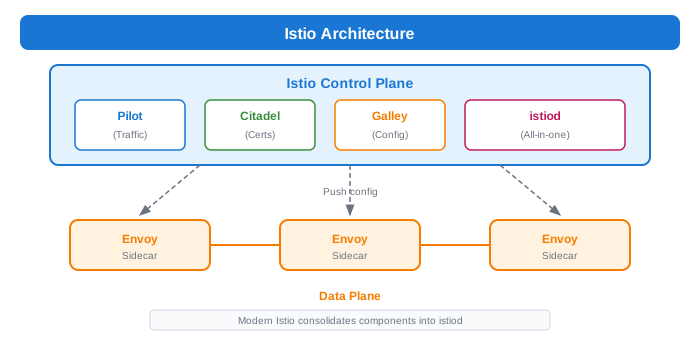
- Plane Architecture: Control Plane + Data Plane
Why Service Mesh?
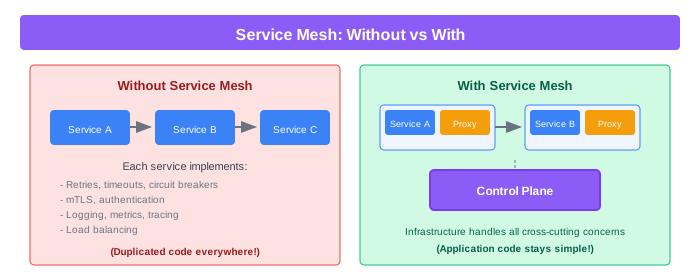
Architecture
Data Plane vs Control Plane
Sidecar Pattern
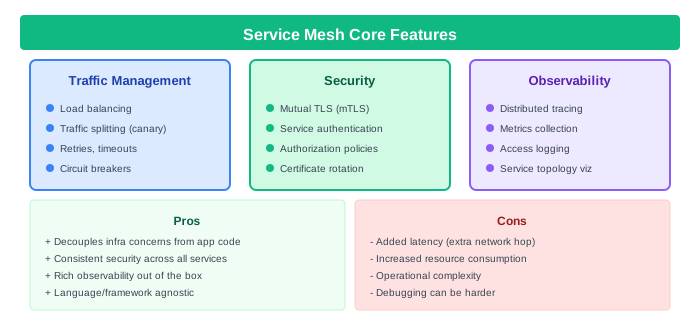
Core Features
Traffic Management
Load Balancing
# Istio DestinationRule - Load Balancing
apiVersion: networking.istio.io/v1beta1
kind: DestinationRule
metadata:
  name: payment-service
spec:
  host: payment-service
  trafficPolicy:
    loadBalancer:
      simple: LEAST_CONN  # ROUND_ROBIN, RANDOM, PASSTHROUGH
    connectionPool:
      tcp:
        maxConnections: 100
      http:
        h2UpgradePolicy: UPGRADE
        http1MaxPendingRequests: 100
        http2MaxRequests: 1000
Traffic Splitting (Canary Deployments)
# Istio VirtualService - Canary Release
apiVersion: networking.istio.io/v1beta1
kind: VirtualService
metadata:
  name: payment-service
spec:
  hosts:
    - payment-service
  http:
    - match:
        - headers:
            x-canary:
              exact: "true"
      route:
        - destination:
            host: payment-service
            subset: v2
    - route:
        - destination:
            host: payment-service
            subset: v1
          weight: 90
        - destination:
            host: payment-service
            subset: v2
          weight: 10
---
apiVersion: networking.istio.io/v1beta1
kind: DestinationRule
metadata:
  name: payment-service
spec:
  host: payment-service
  subsets:
    - name: v1
      labels:
        version: v1
    - name: v2
      labels:
        version: v2
Circuit Breaker
# Istio DestinationRule - Circuit Breaker
apiVersion: networking.istio.io/v1beta1
kind: DestinationRule
metadata:
  name: payment-service
spec:
  host: payment-service
  trafficPolicy:
    outlierDetection:
      consecutive5xxErrors: 5
      interval: 30s
      baseEjectionTime: 30s
      maxEjectionPercent: 50
      minHealthPercent: 30
Retries and Timeouts
# Istio VirtualService - Retries & Timeouts
apiVersion: networking.istio.io/v1beta1
kind: VirtualService
metadata:
  name: payment-service
spec:
  hosts:
    - payment-service
  http:
    - route:
        - destination:
            host: payment-service
      timeout: 10s
      retries:
        attempts: 3
        perTryTimeout: 3s
        retryOn: 5xx,reset,connect-failure,retriable-4xx
Fault Injection (Chaos Testing)
# Istio VirtualService - Fault Injection
apiVersion: networking.istio.io/v1beta1
kind: VirtualService
metadata:
  name: payment-service
spec:
  hosts:
    - payment-service
  http:
    - fault:
        delay:
          percentage:
            value: 10
          fixedDelay: 5s
        abort:
          percentage:
            value: 5
          httpStatus: 503
      route:
        - destination:
            host: payment-service
Security
Mutual TLS (mTLS)
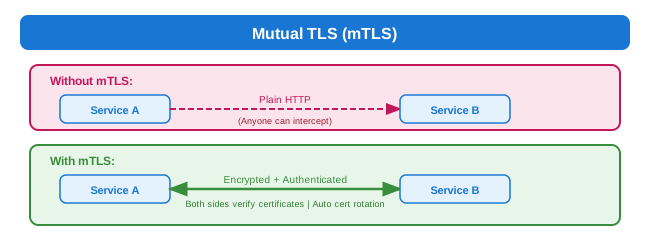
# Istio PeerAuthentication - Enable mTLS
apiVersion: security.istio.io/v1beta1
kind: PeerAuthentication
metadata:
  name: default
  namespace: production
spec:
  mtls:
    mode: STRICT  # PERMISSIVE, DISABLE
Authorization Policies
# Istio AuthorizationPolicy - Allow specific services
apiVersion: security.istio.io/v1beta1
kind: AuthorizationPolicy
metadata:
  name: payment-policy
  namespace: production
spec:
  selector:
    matchLabels:
      app: payment-service
  action: ALLOW
  rules:
    - from:
        - source:
            principals: ["cluster.local/ns/production/sa/order-service"]
      to:
        - operation:
            methods: ["POST"]
            paths: ["/api/v1/charge"]
    - from:
        - source:
            principals: ["cluster.local/ns/production/sa/refund-service"]
      to:
        - operation:
            methods: ["POST"]
            paths: ["/api/v1/refund"]
JWT Validation
# Istio RequestAuthentication - JWT
apiVersion: security.istio.io/v1beta1
kind: RequestAuthentication
metadata:
  name: jwt-auth
  namespace: production
spec:
  selector:
    matchLabels:
      app: api-gateway
  jwtRules:
    - issuer: "https://auth.example.com"
      jwksUri: "https://auth.example.com/.well-known/jwks.json"
      audiences:
        - "api.example.com"
Observability
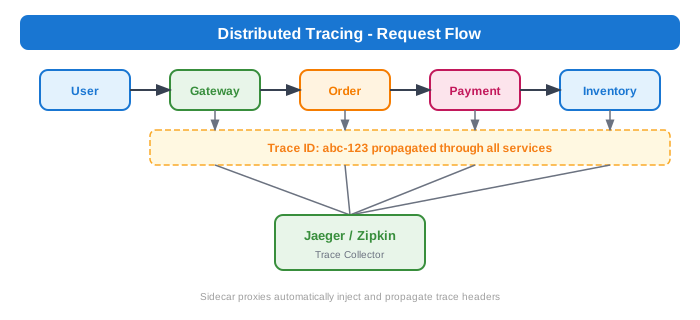
Distributed Tracing
Metrics (Prometheus Integration)
Service Mesh automatically collects:

• Request count by source, destination, response code
• Request duration (latency percentiles)
• Request size, response size
• TCP connections opened/closed
• Circuit breaker state
• Retry statistics

No code instrumentation required!
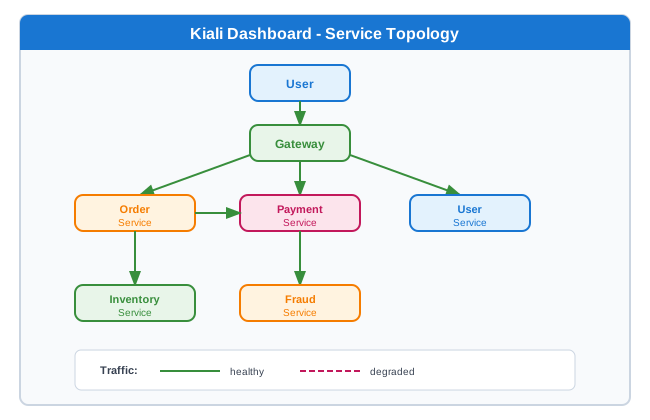
Kiali - Service Topology
Popular Service Mesh Implementations
Comparison
| Feature | Istio | Linkerd | Consul Connect | AWS App Mesh |
|---|---|---|---|---|
| Data Plane | Envoy | linkerd2-proxy | Envoy | Envoy |
| Complexity | High | Low | Medium | Medium |
| Performance | Good | Excellent | Good | Good |
| mTLS | Yes | Yes | Yes | Yes |
| Multi-cluster | Yes | Yes | Yes | Yes |
| Platform | Any K8s | Any K8s | Any | AWS |
| Learning Curve | Steep | Gentle | Medium | Medium |
| Resource Usage | Higher | Lower | Medium | Medium |
Istio Architecture
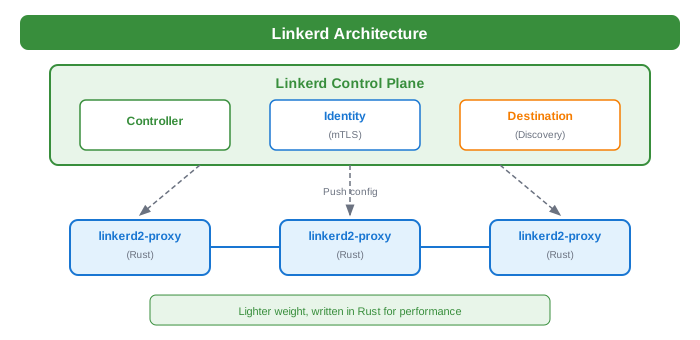
Linkerd Architecture
Common Use Cases
1. Zero-Trust Security
# Deny all by default
apiVersion: security.istio.io/v1beta1
kind: AuthorizationPolicy
metadata:
  name: deny-all
  namespace: production
spec:
  {}  # Empty spec = deny all
---
# Allow specific paths only
apiVersion: security.istio.io/v1beta1
kind: AuthorizationPolicy
metadata:
  name: allow-specific
  namespace: production
spec:
  selector:
    matchLabels:
      app: api
  action: ALLOW
  rules:
    - from:
        - source:
            namespaces: ["production"]
      to:
        - operation:
            methods: ["GET", "POST"]
2. Canary Deployments
# Progressive rollout
# Day 1: 5% to v2
# Day 2: 25% to v2
# Day 3: 50% to v2
# Day 4: 100% to v2

apiVersion: networking.istio.io/v1beta1
kind: VirtualService
metadata:
  name: my-service
spec:
  hosts:
    - my-service
  http:
    - route:
        - destination:
            host: my-service
            subset: v1
          weight: 50
        - destination:
            host: my-service
            subset: v2
          weight: 50
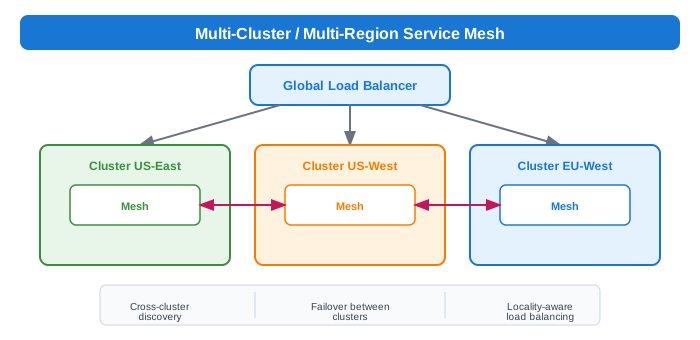
3. Multi-Cluster / Multi-Region
4. A/B Testing
# Route based on headers
apiVersion: networking.istio.io/v1beta1
kind: VirtualService
metadata:
  name: recommendation-service
spec:
  hosts:
    - recommendation-service
  http:
    - match:
        - headers:
            x-user-group:
              exact: "beta"
      route:
        - destination:
            host: recommendation-service
            subset: ml-v2
    - route:
        - destination:
            host: recommendation-service
            subset: ml-v1
5. Rate Limiting
# Istio EnvoyFilter for rate limiting
apiVersion: networking.istio.io/v1alpha3
kind: EnvoyFilter
metadata:
  name: rate-limit
  namespace: istio-system
spec:
  workloadSelector:
    labels:
      app: api-gateway
  configPatches:
    - applyTo: HTTP_FILTER
      match:
        context: SIDECAR_INBOUND
      patch:
        operation: INSERT_BEFORE
        value:
          name: envoy.filters.http.local_ratelimit
          typed_config:
            "@type": type.googleapis.com/envoy.extensions.filters.http.local_ratelimit.v3.LocalRateLimit
            stat_prefix: http_local_rate_limiter
            token_bucket:
              max_tokens: 100
              tokens_per_fill: 100
              fill_interval: 1s
Trade-offs
| Pros | Cons |
|---|---|
| Decouples infra concerns from app code | Added latency (extra network hop) |
| Consistent security across all services | Increased resource consumption |
| Rich observability out of the box | Operational complexity |
| Enables advanced deployment patterns | Learning curve |
| Language/framework agnostic | Debugging can be harder |
| Centralized policy management | Another system to maintain |
| mTLS without code changes | May be overkill for simple apps |
Performance Considerations
Latency Impact
Typical added latency per hop:
- Istio/Envoy: 1-3ms
- Linkerd: 0.5-1ms

For a request traversing 5 services:
- Without mesh: 0ms overhead
- With Istio: 5-15ms overhead
- With Linkerd: 2.5-5ms overhead
Resource Usage (per pod)
| Mesh | CPU | Memory |
|---|---|---|
| Istio/Envoy | 100-500m | 50-150MB |
| Linkerd | 10-100m | 10-50MB |
Optimization Tips
# Limit Envoy memory
resources:
  limits:
    memory: "128Mi"
  requests:
    memory: "64Mi"

# Use protocol detection wisely
# Explicit protocol declaration is faster
apiVersion: v1
kind: Service
metadata:
  name: my-service
spec:
  ports:
    - name: http  # or grpc, http2, tcp
      port: 8080
When to Use Service Mesh
Good For: - Large microservices deployments (50+ services) - Need for mTLS without app changes - Complex traffic management requirements - Multi-team environments needing consistent policies - Compliance requirements (audit trails, encryption) - Canary/blue-green deployment strategies - Cross-cluster/multi-region deployments
Not Good For: - Small number of services (< 10) - Simple architectures - Latency-critical applications (every ms matters) - Resource-constrained environments - Teams without Kubernetes expertise - Monoliths or simple service architectures
Service Mesh vs Alternatives
| Approach | Complexity | Flexibility | Performance |
|---|---|---|---|
| Service Mesh | High | High | Medium |
| Library (e.g., Hystrix) | Medium | Medium | High |
| API Gateway only | Low | Low | High |
| Manual implementation | Low | Low | High |
Best Practices
- Start small - Enable on non-critical services first
- Use permissive mTLS initially - Then move to strict
- Monitor resource usage - Sidecars consume resources
- Define clear policies - Document authorization rules
- Automate sidecar injection - Use namespace labels
- Set resource limits - Prevent runaway sidecars
- Use explicit protocol names - Improves performance
- Plan for upgrades - Mesh upgrades can be complex
- Train your team - Debugging requires new skills
- Have a rollback plan - Things can go wrong
Quick Reference Commands
# Istio
istioctl install --set profile=demo
kubectl label namespace default istio-injection=enabled
istioctl analyze  # Check configuration
istioctl proxy-status  # Check sidecar sync
istioctl dashboard kiali  # Open Kiali UI

# Linkerd
linkerd install | kubectl apply -f -
linkerd check  # Verify installation
linkerd viz dashboard  # Open dashboard
linkerd inject deployment.yaml | kubectl apply -f -

# Debug
kubectl logs <pod> -c istio-proxy  # Sidecar logs
istioctl proxy-config routes <pod>  # Check routes
istioctl proxy-config clusters <pod>  # Check clusters