Amazon EC2 (Elastic Compute Cloud)
Introduction
Amazon EC2 provides resizable compute capacity in the cloud as virtual servers called instances. It's the backbone of AWS compute services and offers complete control over computing resources.
Key Features
- Elasticity - Scale up/down in minutes
- Multiple instance types - Optimized for different workloads
- Various pricing models - On-demand, Reserved, Spot, Dedicated
- Integration - Works seamlessly with other AWS services
- Global availability - Available in all AWS regions
When to Use
Ideal Use Cases
- Web applications - Host websites and web servers
- Application servers - Backend processing, APIs
- Development/Test environments - Flexible, disposable environments
- High-performance computing - Scientific modeling, simulations
- Big data processing - Hadoop, Spark clusters
- Gaming servers - Low-latency game backends
- Machine learning training - GPU-powered instances
Signs EC2 is Right for You
- Need full control over the operating system
- Require specific software installations
- Need persistent, long-running workloads
- Have variable or unpredictable workloads
- Need to lift-and-shift existing applications
Instance Types
| Family | Optimized For | Use Cases |
|---|---|---|
| T (T3, T3a, T4g) | Burstable | Dev/test, small DBs, web servers |
| M (M5, M6i, M7g) | General purpose | Web servers, app servers, small DBs |
| C (C5, C6i, C7g) | Compute | Batch processing, gaming, scientific modeling |
| R (R5, R6i, R7g) | Memory | In-memory DBs, real-time analytics |
| X (X1, X2) | Memory intensive | SAP HANA, large in-memory DBs |
| I (I3, I4i) | Storage | NoSQL DBs, data warehousing |
| D (D2, D3) | Dense storage | Hadoop, distributed file systems |
| G (G4, G5) | Graphics | ML inference, video encoding |
| P (P3, P4, P5) | GPU compute | ML training, HPC |
| Inf (Inf1, Inf2) | Inference | ML inference at scale |
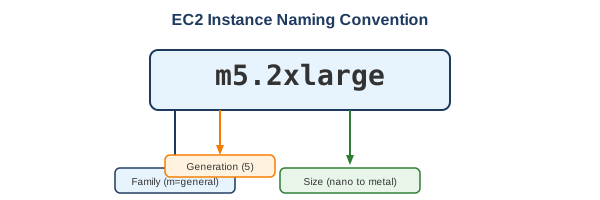
Instance Naming Convention
What to Be Careful About
Cost Management
- Idle instances - Instances running but not being used still incur charges
- Over-provisioning - Using larger instances than needed
- EBS volumes - Storage persists and costs money even when instances stop
- Data transfer - Outbound data transfer costs can add up
- Elastic IPs - Charged when not associated with a running instance
Security
- Security Groups - Default denies all inbound; ensure proper rules
- Key pairs - Losing the private key means losing SSH access
- Public IPs - Don't expose instances unnecessarily
- IMDSv2 - Use Instance Metadata Service v2 to prevent SSRF attacks
- Patch management - You're responsible for OS security updates
Architecture
- Single AZ risk - Instances in one AZ are vulnerable to AZ failures
- Instance store - Data is lost when instance stops/terminates
- Placement groups - Understand cluster vs spread vs partition
- ENI limits - Each instance type has a max number of network interfaces
Operational
- Instance limits - Default limits vary by instance type
- Spot interruptions - Spot instances can be terminated with 2-min warning
- Scheduled maintenance - AWS may require reboots for maintenance
- AMI management - Keep AMIs updated and clean up old ones
Pricing Models
| Model | Discount | Commitment | Best For |
|---|---|---|---|
| On-Demand | None | None | Unpredictable workloads, testing |
| Reserved (Standard) | Up to 72% | 1-3 years | Steady-state workloads |
| Reserved (Convertible) | Up to 66% | 1-3 years | Steady workloads with flexibility |
| Spot | Up to 90% | None | Fault-tolerant, flexible workloads |
| Savings Plans | Up to 72% | 1-3 years | Flexible commitment across services |
| Dedicated Hosts | Varies | Hourly or Reserved | Compliance, licensing requirements |
Key Components
AMI (Amazon Machine Image)
- Template for instance OS and software
- Can be public, private, or marketplace
- Region-specific (can be copied across regions)
EBS (Elastic Block Store)
- Persistent block storage
- Types: gp3, gp2, io2, io1, st1, sc1
- Snapshots for backup (stored in S3)
Security Groups
- Virtual firewall at instance level
- Stateful (return traffic automatically allowed)
- Can reference other security groups
Elastic IPs
- Static public IPv4 addresses
- Can be remapped between instances
- Charged when not in use
Common Interview Questions
- What's the difference between stopping and terminating an instance?
- Stop: Instance halts, EBS data persists, no compute charges
-
Terminate: Instance deleted, EBS root volume deleted (by default)
-
How do you make an EC2 instance highly available?
- Deploy across multiple AZs
- Use Auto Scaling groups
-
Place behind a load balancer
-
What's the difference between instance store and EBS?
- Instance store: Ephemeral, highest performance, data lost on stop
-
EBS: Persistent, can be detached/attached, supports snapshots
-
How do Spot instances work?
- Bid on unused EC2 capacity
- Can be interrupted with 2-minute warning
-
Use Spot Fleet for availability across pools
-
What is a placement group?
- Cluster: Low latency, single AZ
- Spread: Distinct hardware, multi-AZ
- Partition: Groups of instances on separate racks
Alternatives
AWS Alternatives
| Service | When to Use Instead |
|---|---|
| Lambda | Short-running, event-driven code |
| Fargate | Containerized workloads without managing servers |
| Lightsail | Simple applications with predictable pricing |
| App Runner | Containerized web apps with minimal configuration |
| Elastic Beanstalk | Quick deployment without infrastructure management |
External Alternatives
| Provider | Service |
|---|---|
| Google Cloud | Compute Engine |
| Azure | Virtual Machines |
| DigitalOcean | Droplets |
| Linode | Linodes |
Best Practices
- Use the latest generation - Better performance per dollar
- Right-size instances - Use CloudWatch metrics to optimize
- Use Auto Scaling - Match capacity to demand
- Spread across AZs - Improve availability
- Use IMDSv2 - Enhanced security for metadata
- Tag everything - For cost allocation and organization
- Use launch templates - Consistent, versioned configurations
- Enable detailed monitoring - 1-minute CloudWatch metrics