Amazon S3 (Simple Storage Service)
Introduction
Amazon S3 is an object storage service offering industry-leading scalability, data availability, security, and performance. It's designed for 99.999999999% (11 9's) durability.
Key Features
- Unlimited storage - No capacity planning needed
- Object-based - Store files up to 5TB each
- Highly durable - Data replicated across 3+ AZs
- Flexible access - REST API, SDKs, CLI, Console
- Lifecycle management - Automate data movement between storage classes
- Versioning - Keep multiple versions of objects
When to Use
Ideal Use Cases
- Static website hosting - HTML, CSS, JS, images
- Data lakes - Central repository for structured/unstructured data
- Backup and restore - Reliable backup destination
- Archive - Long-term retention with Glacier classes
- Big data analytics - Query with Athena, process with EMR
- Content distribution - Origin for CloudFront CDN
- Application data - User uploads, logs, media files
- Disaster recovery - Cross-region replication
Signs S3 is Right for You
- Need to store and retrieve any amount of data
- Want pay-per-use pricing without capacity planning
- Need high durability and availability
- Want to integrate with other AWS services
- Need to serve static content
Storage Classes
| Class | Durability | Availability | Use Case | Min Duration |
|---|---|---|---|---|
| S3 Standard | 11 9's | 99.99% | Frequently accessed data | None |
| S3 Intelligent-Tiering | 11 9's | 99.9% | Unknown/changing access patterns | 30 days |
| S3 Standard-IA | 11 9's | 99.9% | Infrequent access, rapid retrieval | 30 days |
| S3 One Zone-IA | 11 9's | 99.5% | Infrequent, non-critical, recreatable | 30 days |
| S3 Glacier Instant | 11 9's | 99.9% | Archive with millisecond retrieval | 90 days |
| S3 Glacier Flexible | 11 9's | 99.99% | Archive, minutes-hours retrieval | 90 days |
| S3 Glacier Deep Archive | 11 9's | 99.99% | Long-term archive, 12-48 hr retrieval | 180 days |
What to Be Careful About
Cost Management
- Storage class selection - Wrong class can cost more
- Lifecycle policies - Not using them leads to unnecessary storage costs
- Request costs - PUT, GET, LIST operations have per-request charges
- Data transfer - Outbound transfer costs (inbound is free)
- Incomplete multipart uploads - Abort policy needed to clean up
- Versioning costs - Old versions consume storage
Security
- Public access - Buckets are private by default; be careful with public access
- Bucket policies - Overly permissive policies are a common vulnerability
- ACLs - Prefer bucket policies over ACLs (ACLs are legacy)
- Encryption - Enable server-side encryption by default
- Block Public Access - Enable at account level as safety net
- Access logs - Enable for audit trail
Data Integrity
- Eventual consistency - Strong read-after-write consistency (as of Dec 2020)
- Object lock - Use for compliance (WORM)
- Cross-region replication - Consider for DR, but adds cost
- Versioning - Enable to protect against accidental deletion
Performance
- Request rate - 3,500 PUT/POST/DELETE and 5,500 GET per prefix per second
- Large files - Use multipart upload for files > 100MB
- Prefix design - Distribute requests across prefixes for high throughput
- Transfer acceleration - Enable for faster uploads from distant locations
Key Concepts
Bucket Naming
- Globally unique across all AWS accounts
- 3-63 characters, lowercase, numbers, hyphens
- Cannot be changed after creation
Object Structure
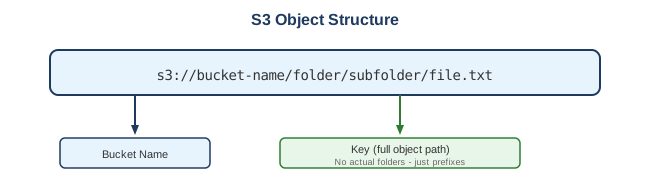
Access Control Layers
- IAM Policies - User/role permissions
- Bucket Policies - Bucket-level JSON policies
- ACLs - Object-level permissions (legacy)
- Block Public Access - Account/bucket-level safety
Encryption Options
| Type | Key Management | Use Case |
|---|---|---|
| SSE-S3 | AWS managed | Default, simplest |
| SSE-KMS | AWS KMS | Audit trail, key rotation |
| SSE-C | Customer provided | Customer controls keys |
| Client-side | Customer managed | Encrypt before upload |
Common Interview Questions
- How does S3 achieve 11 9's durability?
- Data automatically replicated across minimum 3 AZs
- Checksums verify data integrity
-
Automatic healing of any bit-rot or failures
-
What's the difference between S3 and EBS?
- S3: Object storage, unlimited, accessed via API
-
EBS: Block storage, limited size, attached to EC2
-
How do you secure an S3 bucket?
- Enable Block Public Access
- Use bucket policies with least privilege
- Enable encryption (SSE-S3 or SSE-KMS)
- Enable versioning and MFA delete
-
Enable access logging
-
What is S3 Select?
- Query subset of object data using SQL
- Reduces data transfer and processing time
-
Works with CSV, JSON, Parquet
-
Explain S3 replication options
- Same-Region Replication (SRR): Compliance, log aggregation
- Cross-Region Replication (CRR): DR, lower latency access
Alternatives
AWS Alternatives
| Service | When to Use Instead |
|---|---|
| EBS | Block storage for EC2 instances |
| EFS | Shared file system for multiple EC2 instances |
| FSx | Managed Windows/Lustre/NetApp file systems |
| Storage Gateway | Hybrid cloud storage |
External Alternatives
| Provider | Service |
|---|---|
| Google Cloud | Cloud Storage |
| Azure | Blob Storage |
| DigitalOcean | Spaces |
| Backblaze | B2 Cloud Storage |
| MinIO | S3-compatible self-hosted |
Best Practices
- Enable versioning - Protect against accidental deletion
- Use lifecycle policies - Automate transitions to cheaper storage
- Enable server-side encryption - SSE-S3 at minimum
- Block public access - Enable at account level
- Use S3 Inventory - Audit bucket contents
- Enable access logging - Audit who accessed what
- Use multipart upload - For files > 100MB
- Consider S3 Transfer Acceleration - For distant uploads
- Use appropriate storage class - Match to access patterns
- Set up S3 Event Notifications - Trigger Lambda, SQS, SNS on events
S3 Event Notifications
Trigger actions on S3 events:
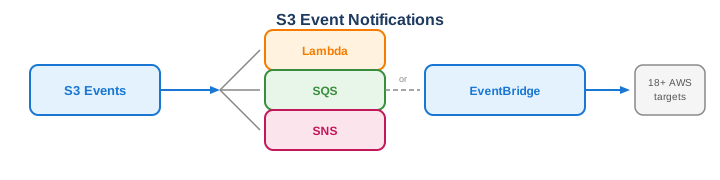
Supported Events: - Object created (PUT, POST, COPY, multipart upload) - Object removed (DELETE, lifecycle expiration) - Object restore (from Glacier) - Replication events