Amazon RDS (Relational Database Service)
Introduction
Amazon RDS is a managed relational database service that makes it easy to set up, operate, and scale databases in the cloud. It handles routine database tasks such as provisioning, patching, backup, recovery, and scaling.
Supported Engines
- Amazon Aurora (MySQL & PostgreSQL compatible)
- MySQL
- PostgreSQL
- MariaDB
- Oracle
- SQL Server
Key Features
- Managed service - AWS handles maintenance, patching, backups
- High availability - Multi-AZ deployments
- Read replicas - Scale read workloads
- Automated backups - Point-in-time recovery
- Security - Encryption at rest and in transit, VPC isolation
When to Use
Ideal Use Cases
- Web applications - Backend databases for CRUD operations
- E-commerce - Transactional workloads
- Enterprise applications - ERP, CRM systems
- SaaS applications - Multi-tenant databases
- Mobile backends - User data storage
- Traditional applications - Lift and shift from on-premises
Signs RDS is Right for You
- Need a relational database with SQL
- Want managed infrastructure (no OS access needed)
- Need ACID compliance
- Have predictable workloads
- Require high availability with minimal effort
Deployment Options
Single-AZ
- One DB instance in one AZ
- Cost-effective for dev/test
- No automatic failover
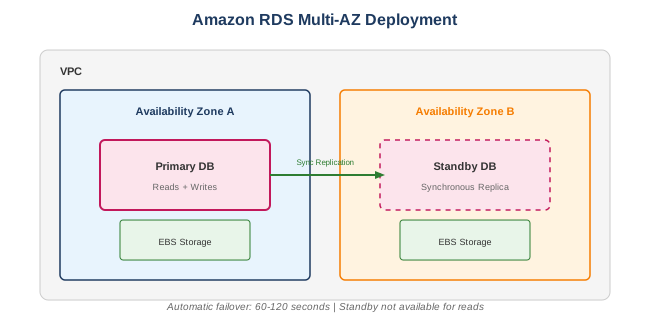
Multi-AZ
- Primary + standby replica in different AZ
- Synchronous replication
- Automatic failover (60-120 seconds)
- Standby not available for reads
Multi-AZ Cluster (MySQL/PostgreSQL)
- One writer + two reader instances
- Readable standby instances
- Faster failover (~35 seconds)
- Better write performance
What to Be Careful About
Cost Management
- Instance sizing - Over-provisioned instances waste money
- Storage type - Provisioned IOPS is expensive; use gp3 when possible
- Multi-AZ - Doubles the cost
- Read replicas - Each replica costs extra
- Snapshots - Stored in S3, charged per GB
- Data transfer - Cross-AZ and internet transfer costs
Performance
- Storage type selection - gp2/gp3 vs io1/io2 based on IOPS needs
- Instance class - Memory-optimized vs general purpose
- Parameter groups - Tune database parameters
- Read replicas - Distribute read traffic
- Connection pooling - Use RDS Proxy to manage connections
Security
- VPC placement - Always deploy in private subnets
- Security groups - Restrict database access
- Encryption - Enable encryption at rest (can't enable later)
- SSL/TLS - Enforce encrypted connections
- IAM authentication - Use for MySQL/PostgreSQL when possible
- Secrets Manager - Rotate credentials automatically
Operational
- Maintenance windows - Plan for required updates
- Storage autoscaling - Enable to prevent running out of space
- Enhanced monitoring - 50+ metrics at OS level
- Performance Insights - Identify bottlenecks
- Backup retention - Configure appropriate retention (max 35 days)
Limitations
- No OS access - Can't SSH into the instance
- Engine limitations - Some features not supported
- Storage limits - Max 64 TB (varies by engine)
- Cross-region replicas - Higher latency, async only
Key Concepts
Backup and Recovery
| Feature | Description |
|---|---|
| Automated backups | Daily snapshots + transaction logs |
| Retention | 0-35 days (0 disables) |
| Manual snapshots | User-initiated, persist until deleted |
| Point-in-time recovery | Restore to any second in retention period |
| Cross-region snapshots | Copy snapshots to another region |
Read Replicas
- Asynchronous replication
- Up to 5 replicas per source (15 for Aurora)
- Can be in different regions
- Can be promoted to standalone
- Use for read scaling and DR
Parameter Groups
- DB Parameter Group - Engine configuration
- DB Cluster Parameter Group - Aurora cluster settings
- Modify and apply to instances
- Some changes require reboot
Storage Types
| Type | Use Case | IOPS |
|---|---|---|
| gp2 | General purpose | 3 IOPS/GB, burst to 3,000 |
| gp3 | General purpose | 3,000 baseline, up to 16,000 |
| io1 | I/O intensive | Up to 64,000 |
| io2 | High durability I/O | Up to 64,000, 99.999% durability |
RDS vs Aurora
| Feature | RDS | Aurora |
|---|---|---|
| Performance | Standard | 5x MySQL, 3x PostgreSQL |
| Storage | Manual scaling | Auto-scales to 128 TB |
| Replicas | Up to 5 | Up to 15 |
| Failover | 60-120 seconds | ~30 seconds |
| Replication | Async | Sync (within cluster) |
| Cost | Lower | ~20% more |
| Serverless option | No | Yes (Aurora Serverless) |
Common Interview Questions
- What's the difference between Multi-AZ and Read Replicas?
- Multi-AZ: High availability, sync replication, automatic failover, standby not readable
-
Read Replicas: Read scaling, async replication, manual promotion, readable
-
How does RDS handle failover in Multi-AZ?
- Detects primary failure
- Flips DNS record to standby (60-120 seconds)
- Standby becomes new primary
-
Old primary replaced
-
When would you choose Aurora over standard RDS?
- Need higher performance (5x MySQL)
- Need more than 5 read replicas
- Want automatic storage scaling
- Need faster failover
-
Want serverless option
-
How do you encrypt an unencrypted RDS instance?
- Create snapshot of unencrypted instance
- Copy snapshot with encryption enabled
- Restore from encrypted snapshot
-
Update application connection string
-
What is RDS Proxy and when would you use it?
- Fully managed connection pooler
- Use with Lambda (handles connection surges)
- Reduces failover time by 66%
- Supports IAM authentication
Alternatives
AWS Alternatives
| Service | When to Use Instead |
|---|---|
| Aurora | Better performance, more features |
| DynamoDB | NoSQL, serverless, high scale |
| Redshift | Data warehousing, analytics |
| DocumentDB | MongoDB-compatible document DB |
| EC2 + self-managed | Full control, specific versions |
External Alternatives
| Provider | Service |
|---|---|
| Google Cloud | Cloud SQL, Cloud Spanner |
| Azure | Azure SQL, Azure Database |
| PlanetScale | Serverless MySQL |
| CockroachDB | Distributed SQL |
| Supabase | PostgreSQL with extras |
Best Practices
- Enable Multi-AZ - For production workloads
- Use encryption - Enable at creation (can't add later)
- Deploy in private subnets - No public accessibility
- Enable automated backups - With appropriate retention
- Use parameter groups - Tune for your workload
- Monitor with Performance Insights - Identify bottlenecks
- Enable Enhanced Monitoring - OS-level metrics
- Use RDS Proxy - For serverless and connection pooling
- Set up CloudWatch alarms - CPU, connections, storage
- Test failover - Regularly test Multi-AZ failover
Monitoring Metrics
| Metric | What to Watch |
|---|---|
| CPUUtilization | High sustained CPU |
| DatabaseConnections | Near max connections |
| FreeStorageSpace | Running low on disk |
| ReadIOPS/WriteIOPS | I/O bottlenecks |
| ReadLatency/WriteLatency | Slow queries |
| ReplicaLag | Replication delay |
| FreeableMemory | Memory pressure |