Amazon DynamoDB
Introduction
Amazon DynamoDB is a fully managed NoSQL database service that provides fast and predictable performance with seamless scalability. It's a key-value and document database delivering single-digit millisecond latency at any scale.
Key Features
- Fully managed - No servers, patching, or maintenance
- Serverless - Scales automatically, pay per use
- Single-digit millisecond - Consistent low latency
- Unlimited throughput - Scales to handle any traffic
- Built-in security - Encryption, IAM, VPC endpoints
- Global tables - Multi-region, multi-active replication
When to Use
Ideal Use Cases
- Session management - User sessions, shopping carts
- Gaming - Leaderboards, player data, game state
- IoT - Time-series data, device status
- Mobile backends - User profiles, app data
- Ad tech - Real-time bidding, user tracking
- E-commerce - Product catalog, order processing
- Caching - With DAX for microsecond latency
Signs DynamoDB is Right for You
- Need consistent single-digit millisecond latency
- Have simple access patterns (known queries)
- Need to scale massively
- Want zero operational overhead
- Have high read/write ratios
- Don't need complex joins or transactions
Data Model
Core Concepts
| Concept | Description |
|---|---|
| Table | Collection of items |
| Item | Single record (like a row) |
| Attribute | Data element (like a column) |
| Primary Key | Unique identifier for items |
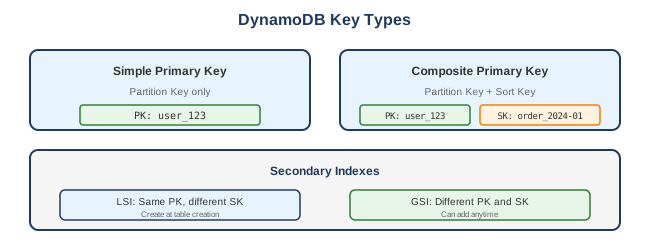
| Partition Key (PK) | Hash key, determines data distribution |
| Sort Key (SK) | Optional range key, enables queries |
Key Types
Secondary Indexes
| Type | Description | Use Case |
|---|---|---|
| Local Secondary Index (LSI) | Same PK, different SK | Alternative sort orders |
| Global Secondary Index (GSI) | Different PK and SK | Different access patterns |
What to Be Careful About
Data Modeling
- Access patterns first - Design tables around queries, not entities
- Hot partitions - Uneven key distribution causes throttling
- GSI limits - Max 20 GSIs per table
- LSI limits - Max 5 LSIs, must be created at table creation
- Item size - Max 400 KB per item
- No joins - Denormalize or use application-level joins
Cost Management
- Provisioned vs On-Demand - Choose based on traffic predictability
- Over-provisioning - Paying for unused capacity
- GSI costs - Each GSI has its own capacity
- Storage costs - $0.25/GB/month
- Scans - Expensive; use queries instead
- Data transfer - Cross-region replication costs
Performance
- Hot keys - Distribute traffic across partitions
- Burst capacity - Limited, don't rely on it
- Consistent reads - 2x cost of eventually consistent
- Large items - Split across multiple items
- Scans - Consume lots of capacity, use sparingly
Consistency
- Eventually consistent - Default, might return stale data
- Strongly consistent - Guaranteed latest, 2x RCU cost
- Transactions - 2x cost, but ACID guarantees
- Global tables - Eventually consistent across regions
Capacity Modes
On-Demand
- Pay per request
- No capacity planning
- Instantly scales
- Best for: Unpredictable traffic, new applications
Provisioned
- Specify Read/Write Capacity Units (RCU/WCU)
- Auto-scaling available
- Reserved capacity for discounts
- Best for: Predictable traffic, cost optimization
Capacity Units
| Operation | Capacity |
|---|---|
| 1 RCU | 1 strongly consistent read/sec (up to 4 KB) |
| 1 RCU | 2 eventually consistent reads/sec (up to 4 KB) |
| 1 WCU | 1 write/sec (up to 1 KB) |
| Transactional | 2x RCU/WCU |
Key Features
DynamoDB Streams
- Capture item-level changes
- Time-ordered sequence
- 24-hour retention
- Trigger Lambda functions
- Use for: Replication, analytics, notifications
Global Tables
- Multi-region, multi-active
- Automatic replication
- < 1 second replication latency
- Conflict resolution: Last writer wins
DAX (DynamoDB Accelerator)
- In-memory cache
- Microsecond latency
- Compatible with DynamoDB API
- Use for: Read-heavy workloads
TTL (Time to Live)
- Automatic item deletion
- No additional cost
- Use for: Session data, logs, temporary data
Common Interview Questions
- When would you choose DynamoDB over RDS?
- Need unlimited scale
- Have simple access patterns
- Need single-digit millisecond latency
- Don't need complex joins/transactions
-
Want serverless/zero maintenance
-
How do you avoid hot partitions?
- Use high-cardinality partition keys
- Add random suffix to distribute writes
- Use write sharding patterns
-
Use on-demand capacity mode
-
What's the difference between GSI and LSI?
- LSI: Same PK, different SK, created at table creation, shares capacity
-
GSI: Different PK/SK, can be added later, separate capacity
-
How do you handle large items?
- Compress data
- Store large attributes in S3, reference in DynamoDB
- Split across multiple items
-
Use document compression
-
Explain DynamoDB Streams use cases
- Trigger Lambda on data changes
- Replicate data to other systems
- Build materialized views
- Audit logging
- Cross-region replication (Global Tables use Streams)
Single Table Design
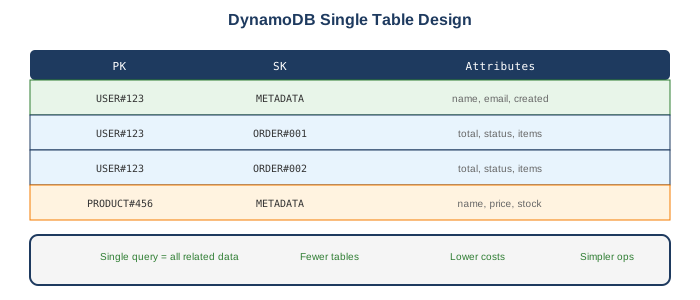
Pattern: Entity per Item
Store multiple entity types in one table:
Benefits
- Single query fetches related data
- Reduces costs (fewer tables)
- Simplifies operations
Alternatives
AWS Alternatives
| Service | When to Use Instead |
|---|---|
| RDS/Aurora | Complex queries, joins, transactions |
| ElastiCache | Pure caching, sub-millisecond latency |
| Neptune | Graph relationships |
| DocumentDB | MongoDB compatibility needed |
| Keyspaces | Cassandra compatibility needed |
| Timestream | Time-series data |
External Alternatives
| Provider | Service |
|---|---|
| Google Cloud | Firestore, Bigtable |
| Azure | Cosmos DB |
| MongoDB | MongoDB Atlas |
| ScyllaDB | DynamoDB-compatible |
| Apache Cassandra | Self-managed |
Best Practices
- Design for access patterns - Know your queries before designing
- Use composite keys - Enable flexible queries
- Avoid scans - Use queries with partition key
- Distribute partition keys - Prevent hot partitions
- Use sparse indexes - GSIs only contain items with index attributes
- Enable Point-in-Time Recovery - For backup/restore
- Use TTL - Automatically expire old data
- Consider single-table design - For related entities
- Use DAX for caching - Read-heavy workloads
- Monitor with CloudWatch - Throttling, latency, errors
Pricing Summary
| Component | Cost (US East) |
|---|---|
| Write Request Unit | $1.25 per million |
| Read Request Unit | $0.25 per million |
| Storage | $0.25 per GB/month |
| Global Tables | 1.5x write cost |
| Streams | $0.02 per 100K reads |
| DAX | Instance hours |