Amazon VPC (Virtual Private Cloud)
Introduction
Amazon VPC lets you provision a logically isolated section of the AWS Cloud where you can launch resources in a virtual network that you define. You have complete control over your virtual networking environment.
Key Features
- Network isolation - Your own private network in AWS
- Subnets - Segment your VPC into public and private sections
- Route tables - Control traffic routing
- Security groups & NACLs - Multiple layers of security
- VPN & Direct Connect - Connect to on-premises networks
- VPC Peering - Connect VPCs together
When to Use
VPC is Required For
- EC2 instances - All instances run in a VPC
- RDS databases - Database isolation
- Lambda in VPC - Access private resources
- ECS/EKS - Container networking
- ElastiCache - Cache cluster isolation
Design Considerations
- Multi-AZ deployments for high availability
- Public vs private subnet separation
- Network segmentation for security
- Connectivity to on-premises networks
Core Components
CIDR Blocks
- Define IP address range
- Primary CIDR: /16 to /28
- Can add secondary CIDRs
- Cannot overlap with connected networks
Subnets
| Type | Description | Resources |
|---|---|---|
| Public | Route to Internet Gateway | Load balancers, NAT Gateway, bastion |
| Private | No direct internet route | Application servers, databases |
Gateways
| Gateway | Purpose |
|---|---|
| Internet Gateway (IGW) | Connect VPC to internet |
| NAT Gateway | Outbound internet for private subnets |
| Virtual Private Gateway | VPN connection endpoint |
| Transit Gateway | Hub for connecting VPCs/on-premises |
Route Tables
Destination     Target          Description
10.0.0.0/16     local           Traffic within VPC
0.0.0.0/0       igw-xxx         Internet (public subnet)
0.0.0.0/0       nat-xxx         Internet (private subnet)
192.168.0.0/16  vgw-xxx         On-premises via VPN
Security Layers
Security Groups (Stateful)
- Instance-level firewall
- Allow rules only (implicit deny)
- Stateful: return traffic automatically allowed
- Can reference other security groups
Network ACLs (Stateless)
- Subnet-level firewall
- Allow and deny rules
- Stateless: must allow return traffic explicitly
- Rules evaluated by number (lowest first)
Inbound:
100  Allow TCP 443 from 0.0.0.0/0
200  Allow TCP 1024-65535 from 0.0.0.0/0 (ephemeral)
*    Deny all
Security Groups vs NACLs
| Feature | Security Groups | NACLs |
|---|---|---|
| Level | Instance | Subnet |
| Rules | Allow only | Allow and Deny |
| State | Stateful | Stateless |
| Evaluation | All rules | Numbered order |
| Default | Deny all inbound | Allow all |
What to Be Careful About
IP Address Planning
- CIDR sizing - Too small limits growth, too large wastes IPs
- Reserved IPs - AWS reserves 5 IPs per subnet
- Overlapping CIDRs - Prevent VPC peering and VPN connections
- IPv6 - Consider dual-stack if needed
Cost Management
- NAT Gateway - $0.045/hour + $0.045/GB processed
- VPC endpoints - $0.01/hour + data transfer
- Data transfer - Cross-AZ: $0.01/GB each way
- VPN connections - $0.05/hour per connection
Security
- Default VPC - Consider deleting or securing
- Public subnets - Minimize resources with public IPs
- Security group rules - Don't use 0.0.0.0/0 unnecessarily
- VPC Flow Logs - Enable for security analysis
Connectivity
- Single NAT Gateway - Single point of failure
- VPC endpoints - Use for AWS services to avoid NAT
- DNS resolution - Enable DNS hostnames and resolution
- Peering limits - No transitive peering
Common Mistakes
- Placing databases in public subnets
- Using overly permissive security groups
- Not using multiple AZs
- Forgetting ephemeral ports in NACLs
- Not planning for growth
Connectivity Options
VPC Peering
- Connect two VPCs
- No transitive routing
- Can be cross-region
- Must not have overlapping CIDRs
Transit Gateway
- Hub-and-spoke connectivity
- Connect multiple VPCs and on-premises
- Supports transitive routing
- Centralized management
VPN
- Site-to-Site VPN - Connect on-premises to AWS
- Client VPN - Remote user access
- Up to 1.25 Gbps per tunnel
- Encrypted over internet
Direct Connect
- Dedicated network connection
- 1 Gbps or 10 Gbps ports
- Consistent latency
- More expensive than VPN
VPC Endpoints
| Type | Description | Use For |
|---|---|---|
| Gateway | S3 and DynamoDB | Free, route table entry |
| Interface | Other AWS services | ENI with private IP |
| PrivateLink | Third-party services | Private connectivity |
Common Interview Questions
- What's the difference between Security Groups and NACLs?
- Security Groups: Instance-level, stateful, allow only
-
NACLs: Subnet-level, stateless, allow/deny, numbered rules
-
How do you enable internet access for private subnets?
- Deploy NAT Gateway in public subnet
- Add route in private subnet route table: 0.0.0.0/0 → NAT Gateway
-
NAT Gateway needs Elastic IP
-
What is a VPC endpoint and why use it?
- Private connection to AWS services
- Traffic stays within AWS network
- No NAT Gateway needed for AWS services
-
More secure, potentially cheaper
-
How do you connect multiple VPCs?
- VPC Peering: Direct connection, no transitive routing
- Transit Gateway: Hub-and-spoke, transitive routing supported
-
PrivateLink: Service-based connectivity
-
What IPs does AWS reserve in each subnet?
- .0: Network address
- .1: VPC router
- .2: DNS server
- .3: Reserved for future use
- .255: Broadcast (not used but reserved)
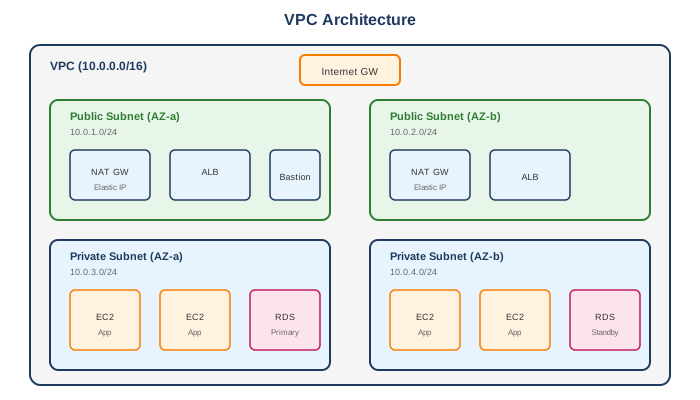
Typical VPC Architecture
Alternatives
AWS Alternatives
- Default VPC - Pre-configured VPC (not recommended for production)
External Alternatives
| Provider | Service |
|---|---|
| Google Cloud | Virtual Private Cloud (VPC) |
| Azure | Virtual Network (VNet) |
| DigitalOcean | VPC |
Best Practices
- Use multiple AZs - Minimum 2 for high availability
- Separate public/private subnets - Security isolation
- Size CIDR appropriately - Plan for growth
- Use VPC endpoints - For AWS services
- Enable Flow Logs - Security and troubleshooting
- Use NAT Gateway per AZ - High availability
- Implement least privilege - Security group rules
- Tag everything - For cost allocation and organization
- Use Transit Gateway - For complex multi-VPC architectures
- Document your architecture - IP ranges, connectivity