AWS IAM (Identity and Access Management)
Introduction
AWS IAM enables you to manage access to AWS services and resources securely. You can create and manage AWS users, groups, and roles, and use permissions to allow and deny their access to AWS resources.
Key Features
- Free service - No additional charges
- Centralized control - Manage all access from one place
- Granular permissions - Fine-grained access control
- Identity federation - Connect to external identity providers
- Multi-factor authentication - Enhanced security
- Temporary credentials - Via roles and STS
When to Use
IAM is Essential For
- User management - Create accounts for team members
- Service access - Grant EC2 instances access to S3
- Cross-account access - Allow access from other AWS accounts
- Federation - SAML/OIDC integration with corporate identity
- API access - Programmatic access with access keys
- Compliance - Audit and control access
Core Components
Users
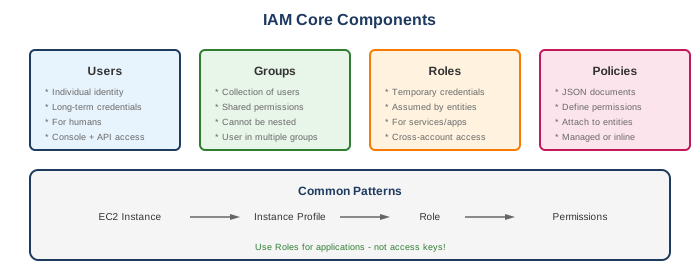
- Individual identity with long-term credentials
- Access keys for programmatic access
- Password for console access
- Should be used for humans (not applications)
Groups
- Collection of users
- Apply policies to multiple users at once
- Users can belong to multiple groups
- Cannot be nested (no groups within groups)
Roles
- Identity with temporary credentials
- Assumed by users, services, or accounts
- No long-term credentials
- Preferred for applications and services
Policies
- JSON documents defining permissions
- Attached to users, groups, or roles
- Types: AWS managed, customer managed, inline
Policy Structure
{
  "Version": "2012-10-17",
  "Statement": [
    {
      "Sid": "AllowS3Read",
      "Effect": "Allow",
      "Action": [
        "s3:GetObject",
        "s3:ListBucket"
      ],
      "Resource": [
        "arn:aws:s3:::my-bucket",
        "arn:aws:s3:::my-bucket/*"
      ],
      "Condition": {
        "IpAddress": {
          "aws:SourceIp": "192.0.2.0/24"
        }
      }
    }
  ]
}
Policy Elements
| Element | Description |
|---|---|
| Version | Policy language version (use "2012-10-17") |
| Statement | Array of permission statements |
| Sid | Optional statement identifier |
| Effect | Allow or Deny |
| Action | API actions (s3:GetObject) |
| Resource | ARN of affected resources |
| Condition | Optional conditions for when policy applies |
What to Be Careful About
Security
- Root account - Never use for daily tasks; secure with MFA
- Access keys - Rotate regularly; don't embed in code
- Overly permissive policies - Avoid
*in actions/resources - Inline policies - Prefer managed policies for reusability
- Password policy - Enforce strong passwords
- MFA - Enable for all human users
Common Mistakes
- Using root account credentials
- Sharing access keys
- Not rotating credentials
- Granting
*:*permissions - Not using roles for applications
- Forgetting to remove access for departing employees
Policy Evaluation
- Explicit Deny wins
- SCPs (Organizations) evaluated
- Resource-based policies evaluated
- Permission boundaries evaluated
- Session policies evaluated
- Identity-based policies evaluated
- Default implicit deny
Limits
- 5,000 users per account
- 300 groups per account
- 10 groups per user
- 1,000 roles per account
- 10 managed policies per user/group/role
Key Concepts
Trust Policies vs Permission Policies
| Type | Purpose | Example |
|---|---|---|
| Trust Policy | Who can assume the role | EC2 can assume this role |
| Permission Policy | What actions are allowed | Can read from S3 |
Temporary Credentials (STS)
- AssumeRole - Get credentials for a role
- AssumeRoleWithSAML - Federate with SAML provider
- AssumeRoleWithWebIdentity - Federate with OIDC provider
- GetSessionToken - Temporary creds for MFA users
Permission Boundaries
- Set maximum permissions for a user/role
- Even if policy allows, boundary must also allow
- Useful for delegating admin responsibilities
Service-Linked Roles
- Pre-defined by AWS services
- Cannot modify permissions
- Auto-created when you use certain services
IAM Best Practices
AWS Recommended
- Lock away root user - Use MFA, don't use for daily tasks
- Create individual users - Don't share credentials
- Use groups - Manage permissions for multiple users
- Grant least privilege - Minimum permissions needed
- Use roles for applications - Not access keys
- Enable MFA - For privileged users
- Rotate credentials - Regularly change passwords and keys
- Use policy conditions - Restrict by IP, time, MFA, etc.
- Monitor activity - Use CloudTrail and Access Analyzer
Common Interview Questions
- What's the difference between a user and a role?
- User: Identity with long-term credentials (access keys, password)
-
Role: Identity with temporary credentials, assumed by users/services
-
How does policy evaluation work?
- Explicit Deny always wins
- Then check for explicit Allow
- Default is implicit Deny
-
All applicable policies evaluated together
-
What are permission boundaries?
- Maximum permissions an entity can have
- Effective permissions = identity policy ∩ permission boundary
-
Used to delegate IAM administration safely
-
How do you grant cross-account access?
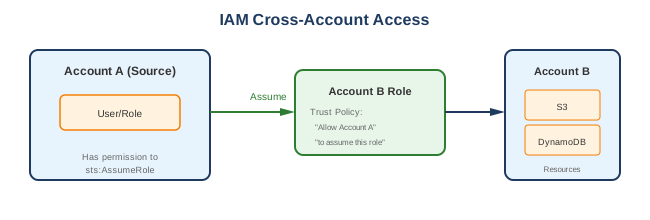
- Create role in target account with trust policy
- Trust policy allows source account to assume role
- Source account user assumes the role
-
Alternative: Resource-based policy (S3, KMS, etc.)
-
What's the difference between AWS managed and customer managed policies?
- AWS managed: Created by AWS, auto-updated, read-only
- Customer managed: You create, full control, reusable
IAM Access Analyzer
- Identifies resources shared externally
- Analyzes resource-based policies
- Generates findings for review
- Validates policies before deployment
- Generates policies from CloudTrail activity
Common Patterns
IAM Components Overview
Cross-Account Access
Alternatives
AWS Services
| Service | Use Case |
|---|---|
| IAM Identity Center | SSO for workforce (multiple accounts) |
| Cognito | User pools for applications |
| STS | Temporary credentials |
| Secrets Manager | Store and rotate secrets |
External Alternatives
| Provider | Service |
|---|---|
| Google Cloud | Cloud IAM |
| Azure | Azure Active Directory |
| Okta | Identity management |
| Auth0 | Authentication platform |
Policy Examples
S3 Read-Only
{
  "Version": "2012-10-17",
  "Statement": [
    {
      "Effect": "Allow",
      "Action": ["s3:GetObject", "s3:ListBucket"],
      "Resource": ["arn:aws:s3:::bucket-name", "arn:aws:s3:::bucket-name/*"]
    }
  ]
}
EC2 Start/Stop Own Instances
{
  "Version": "2012-10-17",
  "Statement": [
    {
      "Effect": "Allow",
      "Action": ["ec2:StartInstances", "ec2:StopInstances"],
      "Resource": "*",
      "Condition": {
        "StringEquals": {"ec2:ResourceTag/Owner": "${aws:username}"}
      }
    }
  ]
}