Amazon CloudFront
Introduction
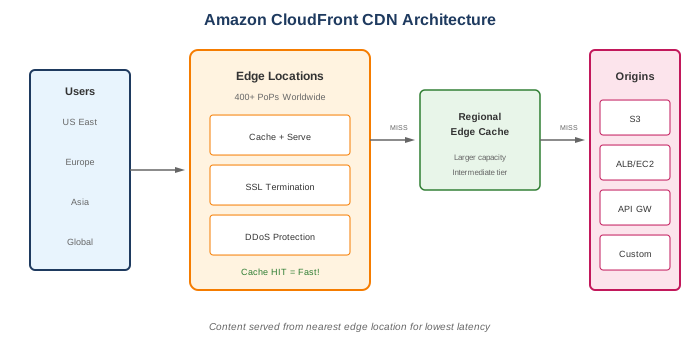
Amazon CloudFront is a fast content delivery network (CDN) service that securely delivers data, videos, applications, and APIs to customers globally with low latency and high transfer speeds.
Key Features
- Global edge network - 400+ Points of Presence worldwide
- Low latency - Content served from nearest edge location
- Security - DDoS protection, HTTPS, signed URLs
- Integration - Works seamlessly with S3, EC2, ALB, Lambda@Edge
- Real-time metrics - Detailed analytics and logging
- Cost-effective - Pay for what you use, no minimum commitments
When to Use
Ideal Use Cases
- Static websites - HTML, CSS, JS, images
- Dynamic content - API acceleration
- Video streaming - Live and on-demand
- Software distribution - Large file downloads
- WebSocket support - Real-time applications
- API acceleration - Reduce API latency globally
Signs CloudFront is Right for You
- Users distributed globally
- Need to reduce origin load
- Want DDoS protection
- Need to serve HTTPS easily
- Want to reduce latency
- Need to customize content at the edge
Core Concepts
Distributions
- Web distributions for HTTP/HTTPS
- Configure origins, behaviors, and settings
- Unique domain name (d123.cloudfront.net)
- Can use custom domain with SSL certificate
Origins
| Origin Type | Description |
|---|---|
| S3 Bucket | Static content |
| S3 Static Website | Website hosting |
| ALB/ELB | Dynamic applications |
| EC2 | Custom web servers |
| API Gateway | APIs |
| Custom Origin | Any HTTP server |
Behaviors
- Path pattern matching (/images/, /api/)
- Origin selection per path
- Cache settings per behavior
- Protocol and HTTP method settings
Edge Locations vs Regional Edge Caches
- Edge Locations - Serve content to users
- Regional Edge Caches - Intermediate layer, larger capacity
What to Be Careful About
Caching
- Cache invalidation - Takes time, costs $0.005 per path
- TTL settings - Balance freshness vs cache efficiency
- Query strings - May bypass cache if not configured
- Cookies - Can reduce cache hit ratio
- Versioned URLs - Better than invalidation (e.g., /file.v2.js)
Cost Management
- Data transfer - Main cost driver
- Invalidation requests - First 1,000/month free
- Price class - Use regional price classes to reduce costs
- Origin shield - Additional layer, additional cost
Security
- S3 bucket access - Use Origin Access Control (OAC)
- HTTPS - Enable and configure properly
- Geo-restriction - Block countries if needed
- Signed URLs/Cookies - For private content
- WAF integration - Protect against common attacks
Content
- Maximum file size - 30 GB per file
- Cache key - Understand what makes content unique
- Compression - Enable for text-based content
- CORS - Forward Origin header if needed
Cache Optimization
Cache Key
Determined by: - URL path - Query strings (if configured) - Headers (if configured) - Cookies (if configured)
Cache Policies
| Policy | Use Case |
|---|---|
| CachingOptimized | Static content, maximum caching |
| CachingDisabled | Dynamic, personalized content |
| CachingOptimizedForUncompressedObjects | Already compressed content |
Origin Request Policies
- Control what's forwarded to origin
- Separate from cache policy
- Forward headers, cookies, query strings
Edge Computing
Lambda@Edge
- Run code at edge locations
- Triggered by CloudFront events
- Use cases: URL rewriting, authentication, A/B testing
- Runtime: Node.js, Python
- Limits: 5 seconds (viewer events), 30 seconds (origin events)
CloudFront Functions
- Lightweight JavaScript functions
- Sub-millisecond startup
- Use cases: Header manipulation, URL redirects, request/response manipulation
- Limits: 1 ms execution, 10 KB code size
Lambda@Edge vs CloudFront Functions
| Feature | CloudFront Functions | Lambda@Edge |
|---|---|---|
| Language | JavaScript | Node.js, Python |
| Execution time | < 1 ms | 5-30 seconds |
| Memory | 2 MB | Up to 10 GB |
| Network access | No | Yes |
| File system | No | Yes |
| Request body access | No | Yes |
| Price | 1/6 of Lambda@Edge | Higher |
Common Interview Questions
- How does CloudFront improve performance?
- Caches content at edge locations near users
- Reduces distance data travels
- Keeps persistent connections to origin
-
Optimizes TCP/TLS handshakes
-
What's the difference between Origin Access Identity (OAI) and Origin Access Control (OAC)?
- OAI: Legacy method for S3 access
- OAC: Newer, recommended, supports SSE-KMS
-
Both restrict direct S3 access
-
How do you handle cache invalidation?
- Create invalidation request (costs after 1,000/month)
- Use versioned URLs (better approach)
- Set appropriate TTL
-
Use Cache-Control headers
-
When would you use Lambda@Edge vs CloudFront Functions?
- CloudFront Functions: Simple, fast manipulations
-
Lambda@Edge: Complex logic, external calls, longer execution
-
How do you serve private content?
- Signed URLs: Single file access
- Signed Cookies: Multiple file access
- Origin Access Control: Restrict S3 access
- WAF: Additional protection
Security Features
HTTPS/SSL
- Free SSL certificate with ACM
- SNI (Server Name Indication) - Free
- Dedicated IP - $600/month per distribution
- TLS versions configurable
Access Control
| Method | Use Case |
|---|---|
| Signed URLs | Restrict individual file access |
| Signed Cookies | Restrict access to multiple files |
| Geo-restriction | Block/allow by country |
| WAF | Protect against web attacks |
| Field-level encryption | Encrypt sensitive fields |
DDoS Protection
- AWS Shield Standard included (free)
- Shield Advanced available ($3,000/month)
- Rate limiting with WAF
Alternatives
AWS Alternatives
| Service | When to Use Instead |
|---|---|
| S3 Transfer Acceleration | Upload acceleration only |
| Global Accelerator | Non-HTTP/HTTPS protocols |
| API Gateway | API management features |
External Alternatives
| Provider | Service |
|---|---|
| Cloudflare | CDN with security features |
| Akamai | Enterprise CDN |
| Fastly | Edge computing focus |
| Azure | Azure CDN |
| Google Cloud | Cloud CDN |
Best Practices
- Use Origin Shield - Reduce origin load
- Enable compression - Reduce transfer size
- Use versioned URLs - Avoid invalidation costs
- Set appropriate TTLs - Balance freshness and caching
- Use cache policies - Instead of legacy settings
- Enable access logging - For analysis and debugging
- Use OAC for S3 - Not public bucket policies
- Configure custom error pages - Better user experience
- Use appropriate price class - Reduce costs if global reach isn't needed
- Monitor with CloudWatch - Cache hit ratio, errors, latency
Price Classes
| Price Class | Regions Included |
|---|---|
| All | All edge locations globally |
| 200 | US, Canada, Europe, Asia, Middle East, Africa |
| 100 | US, Canada, Europe |
Lower price class = fewer edge locations = lower cost but potentially higher latency for excluded regions