Amazon SQS (Simple Queue Service)
Introduction
Amazon SQS is a fully managed message queuing service that enables you to decouple and scale microservices, distributed systems, and serverless applications. It eliminates the complexity of managing message-oriented middleware.
Key Features
- Fully managed - No infrastructure to maintain
- Unlimited throughput - Send any number of messages
- At-least-once delivery - Messages delivered at least once
- Scales automatically - Handles any volume
- Server-side encryption - Using KMS
- Dead-letter queues - Handle failed messages
When to Use
Ideal Use Cases
- Decoupling services - Producer-consumer pattern
- Work queues - Distribute tasks to workers
- Buffering - Handle traffic spikes
- Event-driven architecture - Trigger Lambda functions
- Order processing - Queue orders for processing
- Batch processing - Accumulate work before processing
Signs SQS is Right for You
- Need asynchronous communication
- Want to decouple services
- Need to handle variable traffic
- Require message persistence
- Want simple producer-consumer pattern
Queue Types
Standard Queue
- Unlimited throughput - Nearly unlimited TPS
- At-least-once delivery - Messages may be delivered more than once
- Best-effort ordering - Order not guaranteed
- Use for: High throughput, ordering not critical
FIFO Queue
- Exactly-once processing - No duplicates
- Guaranteed ordering - Messages in order
- Limited throughput - 300 TPS (3,000 with batching)
- Use for: Order matters, no duplicates allowed
- Naming: Must end with
.fifo
Comparison
| Feature | Standard | FIFO |
|---|---|---|
| Throughput | Unlimited | 300/3,000 TPS |
| Ordering | Best-effort | Guaranteed |
| Delivery | At-least-once | Exactly-once |
| Deduplication | None | 5-minute window |
| Use case | High volume | Strict order |
What to Be Careful About
Message Handling
- Visibility timeout - Message invisible while processing; set appropriately
- Message retention - Default 4 days, max 14 days
- Message size - Max 256 KB (use S3 for larger)
- Duplicate handling - Standard queues may duplicate; handle idempotently
- At-least-once delivery - Design for possible duplicates
Performance
- Polling - Use long polling to reduce costs and latency
- Batch operations - Process up to 10 messages at a time
- FIFO throughput - Limited; use message groups for parallelism
- Lambda concurrency - Control batch size and concurrency
Cost Management
- Request costs - Each API call costs money
- Long polling - Reduces empty responses
- Batch operations - Reduce API calls
- Message size - Charged per 64 KB chunk
Dead-Letter Queues
- Configure properly - Set max receive count
- Monitor - Alert on DLQ messages
- Process DLQ - Don't let messages accumulate
- Retention - Set long enough for investigation
Key Concepts
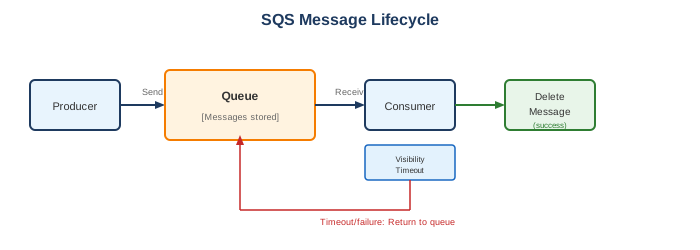
Message Lifecycle
Visibility Timeout
- Message invisible while being processed
- Default: 30 seconds
- Max: 12 hours
- If processing takes longer, extend with ChangeMessageVisibility
Long Polling vs Short Polling
| Type | Description | Best For |
|---|---|---|
| Short | Returns immediately | Low latency requirements |
| Long | Waits up to 20 seconds | Cost optimization |
Message Groups (FIFO)
- Messages with same group ID processed in order
- Different groups processed in parallel
- Enables horizontal scaling of FIFO queues
Integrations
Lambda Integration
- Event source mapping
- Automatic polling
- Batch processing
- Error handling with DLQ
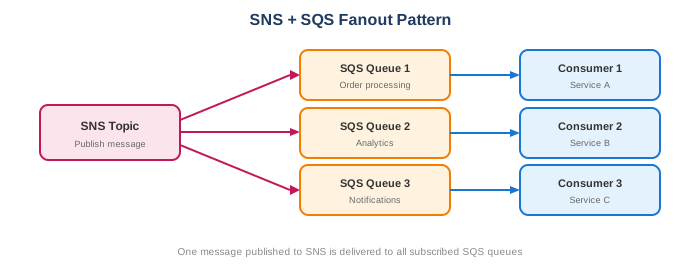
SNS + SQS (Fanout)
EventBridge Integration
- Route events to SQS
- Filter and transform
- Multiple targets
Common Interview Questions
- What's the difference between Standard and FIFO queues?
- Standard: Unlimited throughput, at-least-once, best-effort ordering
-
FIFO: Limited throughput, exactly-once, guaranteed ordering
-
How do you handle message duplicates?
- FIFO queues: Exactly-once delivery, deduplication ID
- Standard queues: Design idempotent consumers
- Use deduplication ID in FIFO
-
Track processed messages in database
-
What is visibility timeout?
- Time a message is invisible after being received
- Prevents other consumers from processing same message
- If processing fails, message returns to queue
-
Should be longer than processing time
-
When would you use SQS vs SNS?
- SQS: Queue, persistent, one consumer processes message
- SNS: Pub/sub, push-based, multiple subscribers
-
Often used together: SNS → multiple SQS queues
-
What is a dead-letter queue?
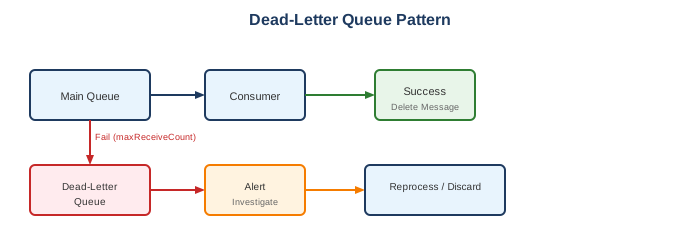
- Queue for failed messages
- Messages move after maxReceiveCount attempts
- Allows investigation of processing failures
- Prevents infinite retry loops
Dead-Letter Queue Pattern
Redrive Policy
Alternatives
AWS Alternatives
| Service | When to Use Instead |
|---|---|
| SNS | Pub/sub, push to multiple subscribers |
| EventBridge | Event routing, filtering, transformation |
| Kinesis | Real-time streaming, ordering, replay |
| MQ | Need JMS, AMQP, MQTT protocols |
| Step Functions | Complex workflows |
External Alternatives
| Provider | Service |
|---|---|
| Google Cloud | Cloud Pub/Sub, Cloud Tasks |
| Azure | Service Bus, Queue Storage |
| RabbitMQ | Self-managed message broker |
| Apache Kafka | High-throughput streaming |
| Redis | Simple queue with lists |
Best Practices
- Use long polling - Reduce empty responses and cost
- Set appropriate visibility timeout - Longer than processing time
- Use batch operations - Reduce API calls
- Configure dead-letter queues - Handle failures
- Design idempotent consumers - Handle duplicates
- Use FIFO for strict ordering - When order matters
- Monitor queue depth - CloudWatch alarm on ApproximateNumberOfMessages
- Delete messages after processing - Don't rely on visibility timeout expiration
- Use message groups - Scale FIFO queue processing
- Enable encryption - Server-side encryption with KMS
Pricing
| Component | Cost |
|---|---|
| Standard requests | $0.40 per million |
| FIFO requests | $0.50 per million |
| Data transfer | Standard AWS rates |
| Free tier | 1 million requests/month |
Each 64 KB of message payload counts as one request