Amazon ECS (Elastic Container Service)
Introduction
Amazon ECS is a fully managed container orchestration service that makes it easy to deploy, manage, and scale containerized applications using Docker containers.
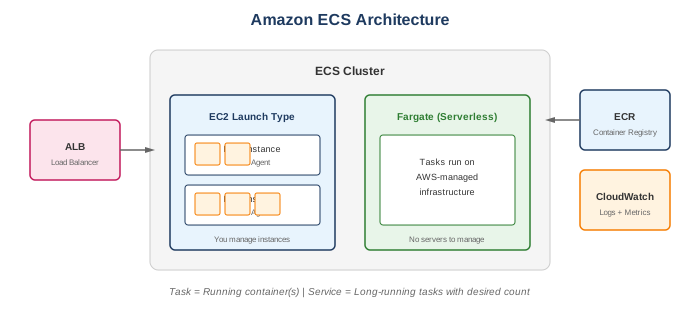
Key Features
- Fully managed - No control plane to manage
- Deep AWS integration - IAM, VPC, CloudWatch, ALB
- Two launch types - EC2 and Fargate
- Task definitions - Blueprint for containers
- Service discovery - Built-in DNS-based discovery
- Scheduling - Place containers intelligently
When to Use
Ideal Use Cases
- Microservices - Run containerized microservices
- Batch processing - Run batch jobs in containers
- Web applications - Deploy web services
- CI/CD - Build and deploy pipelines
- Hybrid deployment - ECS Anywhere for on-premises
- Machine learning - Training and inference workloads
Signs ECS is Right for You
- Already using Docker
- Want AWS-native solution
- Need deep AWS integration
- Don't need Kubernetes-specific features
- Want simpler orchestration
ECS vs EKS Decision
| Choose ECS | Choose EKS |
|---|---|
| Simpler requirements | Kubernetes expertise |
| AWS-native integration | Multi-cloud portability |
| Smaller teams | Large-scale operations |
| New to containers | Kubernetes ecosystem needed |
Core Concepts
Cluster
- Logical grouping of tasks/services
- Contains infrastructure (EC2 or Fargate)
- Can span multiple AZs
Task Definition
- Blueprint for application
- Defines containers, resources, networking
- Versioned (revisions)
- JSON configuration
{
  "family": "my-app",
  "containerDefinitions": [
    {
      "name": "web",
      "image": "nginx:latest",
      "cpu": 256,
      "memory": 512,
      "portMappings": [
        {"containerPort": 80, "protocol": "tcp"}
      ]
    }
  ],
  "requiresCompatibilities": ["FARGATE"],
  "networkMode": "awsvpc",
  "cpu": "256",
  "memory": "512"
}
Task
- Running instance of task definition
- One or more containers
- Ephemeral (can be standalone or part of service)
Service
- Maintains desired count of tasks
- Integrates with load balancers
- Handles deployment strategies
- Auto-recovery of failed tasks
Launch Types
EC2 Launch Type
- You manage EC2 instances
- More control over infrastructure
- Can use Spot instances
- Charged for EC2 instances
Fargate Launch Type
- Serverless - no instances to manage
- Pay per task (vCPU + memory)
- AWS manages infrastructure
- Simplified operations
Comparison
| Feature | EC2 | Fargate |
|---|---|---|
| Infrastructure | You manage | AWS manages |
| Pricing | EC2 instances | Per task |
| GPU support | Yes | Limited |
| Spot support | Yes | Yes (Fargate Spot) |
| Customization | Full | Limited |
| Persistent storage | EBS | EFS only |
What to Be Careful About
Resource Management
- Task sizing - Right-size CPU and memory
- Container limits - Set appropriate limits to prevent noisy neighbors
- EC2 capacity - Ensure cluster has enough capacity
- Fargate limits - Max 4 vCPU, 30 GB memory per task
Networking
- awsvpc mode - Each task gets ENI (ENI limits per instance)
- Security groups - Apply at task level in awsvpc mode
- Service discovery - Plan namespace structure
- Load balancer health checks - Configure properly
Cost Management
- Fargate pricing - Can be expensive at scale
- Spot instances - Use for fault-tolerant workloads
- Right-sizing - Don't over-provision
- Reserved capacity - Compute Savings Plans for EC2
Operational
- Container image updates - Plan deployment strategy
- Secrets management - Use Secrets Manager or Parameter Store
- Logging - Configure CloudWatch Logs
- Task IAM roles - Follow least privilege
Deployment Strategies
Rolling Update (Default)
- Gradually replace old tasks with new
- Configurable minimum healthy percent
- Zero-downtime deployments
Blue/Green (with CodeDeploy)
- Deploy new version alongside old
- Shift traffic gradually or all-at-once
- Easy rollback
External Deployment
- Use third-party tools
- Custom deployment logic
Common Interview Questions
- What's the difference between ECS and EKS?
- ECS: AWS-native, simpler, tight AWS integration
- EKS: Managed Kubernetes, portable, larger ecosystem
-
Both support EC2 and Fargate launch types
-
What's the difference between a Task and a Service?
- Task: Single running instance (ephemeral)
-
Service: Maintains desired count, integrates with LB, handles failures
-
When would you use Fargate vs EC2?
- Fargate: Simpler ops, variable workloads, no infrastructure management
-
EC2: Cost optimization, GPU needs, specific instance requirements
-
How do you handle secrets in ECS?
- AWS Secrets Manager - Rotate secrets automatically
- Systems Manager Parameter Store - Simpler, cheaper
- Reference secrets in task definition
-
Never bake secrets into images
-
How does service discovery work in ECS?
- AWS Cloud Map integration
- DNS-based service discovery
- SRV and A records
- Health check integration
Networking Modes
| Mode | Description | Use Case |
|---|---|---|
| awsvpc | Task gets own ENI | Fargate, security groups per task |
| bridge | Docker bridge network | EC2, port mapping |
| host | Host network | EC2, high performance |
| none | No networking | Batch jobs |
Auto Scaling
Service Auto Scaling
- Target tracking (CPU, memory)
- Step scaling
- Scheduled scaling
- Scale based on custom metrics
Cluster Auto Scaling (EC2)
- Capacity providers
- Auto Scaling groups
- Managed scaling
- Managed termination protection
Alternatives
AWS Alternatives
| Service | When to Use Instead |
|---|---|
| EKS | Need Kubernetes, multi-cloud |
| App Runner | Simple container apps |
| Lambda | Short-running, event-driven |
| Elastic Beanstalk | PaaS with containers |
| Batch | Batch processing jobs |
External Alternatives
| Provider | Service |
|---|---|
| Google Cloud | Cloud Run, GKE |
| Azure | Container Apps, AKS |
| Docker | Docker Swarm |
| HashiCorp | Nomad |
Best Practices
- Use Fargate for simplicity - Unless you need EC2-specific features
- One container per task - For microservices (multiple for sidecars)
- Use task IAM roles - Not instance roles
- Enable container insights - Detailed monitoring
- Use capacity providers - Better scaling management
- Store images in ECR - Private, integrated registry
- Use blue/green deployments - Safer releases
- Configure health checks - Both container and ALB
- Use service discovery - For inter-service communication
- Implement proper logging - CloudWatch Logs with awslogs driver
Task Definition Tips
Environment Variables
- Use
secretsfor sensitive values - Use
environmentfor non-sensitive config - Reference SSM parameters and Secrets Manager