Amazon Route 53
Introduction
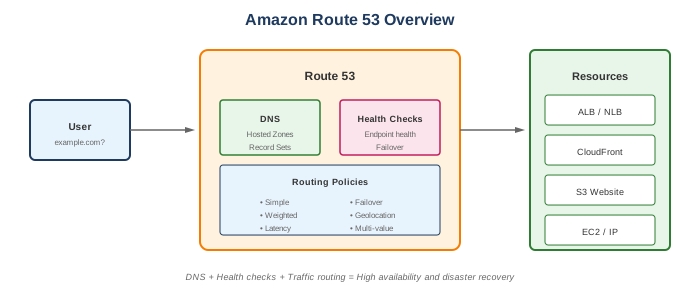
Amazon Route 53 is a highly available and scalable Domain Name System (DNS) web service. It provides domain registration, DNS routing, and health checking capabilities.
Key Features
- 100% SLA - Highly available DNS service
- Domain registration - Register and manage domains
- DNS routing - Multiple routing policies
- Health checks - Monitor endpoint health
- Traffic flow - Visual policy editor
- DNSSEC - DNS security extensions
When to Use
Ideal Use Cases
- Domain management - Register and manage domains
- DNS hosting - Host DNS for your domains
- Load balancing - DNS-based load distribution
- Failover - Route traffic away from unhealthy endpoints
- Geolocation routing - Route based on user location
- Multi-region deployments - Global traffic management
DNS Record Types
| Type | Purpose | Example |
|---|---|---|
| A | IPv4 address | example.com → 192.0.2.1 |
| AAAA | IPv6 address | example.com → 2001:db8::1 |
| CNAME | Alias to another domain | www.example.com → example.com |
| MX | Mail server | mail.example.com |
| TXT | Text records | SPF, DKIM, verification |
| NS | Name servers | ns-1.awsdns-01.com |
| SOA | Start of authority | Zone metadata |
| SRV | Service locator | _sip._tcp.example.com |
| CAA | Certificate authority | Authorized CAs |
| Alias | AWS-specific, points to AWS resources | ELB, CloudFront, S3 |
Alias vs CNAME
| Feature | Alias | CNAME |
|---|---|---|
| Zone apex (root) | Yes | No |
| AWS resources | Direct integration | Need hostname |
| Query charges | Free for AWS resources | Standard charges |
| TTL | Inherited | Configurable |
Routing Policies
Simple Routing
- Single resource
- Returns all values in random order
- No health checks
- Use for: Single server
Weighted Routing
- Distribute traffic by percentage
- Values 0-255 (relative weights)
- Health check supported
- Use for: A/B testing, gradual deployments
Latency-Based Routing
- Route to lowest latency region
- Based on AWS region latency measurements
- Health check supported
- Use for: Multi-region deployments
Failover Routing
- Active-passive setup
- Primary and secondary records
- Requires health checks
- Use for: Disaster recovery
Geolocation Routing
- Route based on user location
- Continent, country, or US state
- Requires default record
- Use for: Content localization, compliance
Geoproximity Routing
- Route based on geographic location
- Bias to shift traffic between locations
- Requires Traffic Flow
- Use for: Fine-grained geographic control
Multi-Value Answer Routing
- Return multiple healthy records
- Up to 8 healthy records per query
- Simple load balancing
- Use for: Client-side load balancing
What to Be Careful About
DNS Configuration
- TTL values - Low TTL = more queries = more cost
- Propagation time - DNS changes take time to propagate
- Zone apex - Use Alias records (CNAME doesn't work)
- Record conflicts - Can't have CNAME at zone apex
Health Checks
- Endpoint health checks - Check HTTP, HTTPS, TCP
- Calculated health checks - Combine multiple checks
- CloudWatch alarm checks - Based on CloudWatch metrics
- Health check costs - $0.50/month per health check
Cost Management
- Hosted zone - $0.50/month per zone
- Queries - $0.40 per million (standard)
- Health checks - $0.50-$2.00/month each
- Traffic Flow - $50/month per policy record
- Domain registration - Varies by TLD
Security
- DNSSEC - Sign zones for security
- Private hosted zones - VPC-only DNS
- IAM permissions - Restrict who can modify records
- Domain locking - Prevent unauthorized transfers
Health Checks
Types
| Type | Monitors | Use Case |
|---|---|---|
| Endpoint | URL, IP, or domain | Web server health |
| Calculated | Other health checks | Combined status |
| CloudWatch Alarm | CloudWatch metrics | Custom metrics |
Configuration
- Protocol: HTTP, HTTPS, TCP
- Interval: 30 or 10 seconds
- Threshold: Number of failures before unhealthy
- Regions: Choose health checker locations
- String matching: Optional response validation
Common Interview Questions
- What's the difference between Alias and CNAME records?
- Alias: AWS-specific, works at zone apex, free for AWS resources
-
CNAME: Standard DNS, can't be at zone apex, charged per query
-
How do you implement DNS failover?
- Create primary and secondary records
- Configure health check for primary
- Set routing policy to failover
-
Route 53 automatically fails over when primary unhealthy
-
What routing policy would you use for A/B testing?
- Weighted routing policy
- Assign weights to each variant
-
Example: Version A (90%), Version B (10%)
-
How does latency-based routing work?
- Route 53 measures latency from user to AWS regions
- Routes to region with lowest latency
-
Based on AWS network, not internet latency
-
Can you use Route 53 without registering domain there?
- Yes, just create hosted zone
- Update NS records at current registrar
- Point to Route 53 name servers
Private Hosted Zones
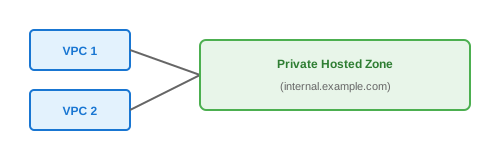
- DNS resolution within VPCs only
- Associate with one or more VPCs
- Same domain name as public zone (split-view DNS)
- Use for internal service discovery
Configuration
Traffic Flow
- Visual policy editor
- Complex routing logic
- Geoproximity routing
- Versioning support
- $50/month per policy record
Use Cases
- Multi-region failover with weights
- Complex geographic routing
- Cascaded routing policies
Alternatives
AWS Alternatives
| Service | When to Use Instead |
|---|---|
| CloudFront | CDN with geographic distribution |
| Global Accelerator | Anycast IP, non-DNS load balancing |
| App Mesh | Service mesh for microservices |
| Cloud Map | Service discovery |
External Alternatives
| Provider | Service |
|---|---|
| Cloudflare | DNS with DDoS protection |
| Google Cloud | Cloud DNS |
| Azure | Azure DNS |
| Dyn | Enterprise DNS |
| NS1 | Traffic management |
Best Practices
- Use Alias records - For AWS resources (free, zone apex support)
- Set appropriate TTL - Balance freshness vs query cost
- Enable health checks - For failover scenarios
- Use private hosted zones - For internal resources
- Enable DNSSEC - For security-sensitive domains
- Monitor with CloudWatch - DNS query metrics
- Use multiple routing policies - Combine for complex scenarios
- Test failover - Verify failover works as expected
- Document DNS architecture - Complex setups need documentation
- Lock domains - Prevent unauthorized transfers
Pricing
| Component | Cost |
|---|---|
| Hosted Zone | $0.50/month |
| Standard Queries | $0.40/million |
| Latency-based Queries | $0.60/million |
| Geo Queries | $0.70/million |
| Health Checks (basic) | $0.50/month |
| Health Checks (advanced) | $1.00-$2.00/month |
| Traffic Flow | $50/month per policy record |
| Domain Registration | Varies ($12-$2,000+/year) |