Amazon CloudWatch
Introduction
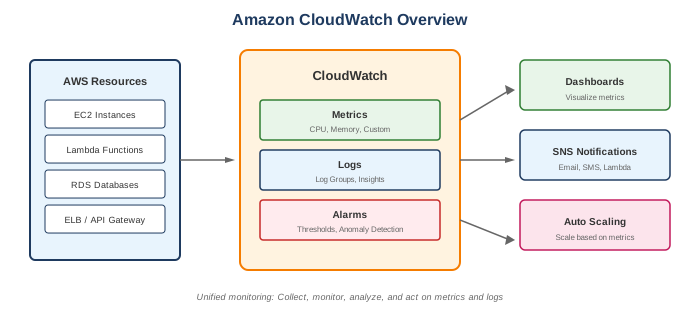
Amazon CloudWatch is a monitoring and observability service that provides data and actionable insights for AWS resources and applications. It collects monitoring data in the form of logs, metrics, and events.
Key Features
- Metrics - Collect and track AWS and custom metrics
- Logs - Centralize logs from all systems
- Alarms - React to metric thresholds
- Dashboards - Visualize metrics and logs
- Events/EventBridge - Respond to system events
- Insights - Query and analyze logs
- Anomaly Detection - ML-powered metric anomalies
When to Use
Ideal Use Cases
- Infrastructure monitoring - EC2, RDS, Lambda metrics
- Application monitoring - Custom metrics, logs
- Operational visibility - Dashboards, alerts
- Log aggregation - Centralize all logs
- Troubleshooting - Query logs, trace issues
- Auto scaling triggers - Scale based on metrics
Core Components
Metrics
- Time-ordered data points
- Organized by namespaces (AWS/EC2, Custom)
- Dimensions for filtering (InstanceId, etc.)
- Standard (5-min) or detailed (1-min) resolution
Common AWS Metrics
| Service | Key Metrics |
|---|---|
| EC2 | CPUUtilization, NetworkIn/Out, DiskReadOps |
| RDS | DatabaseConnections, FreeStorageSpace, ReadLatency |
| Lambda | Invocations, Duration, Errors, Throttles |
| ELB | RequestCount, TargetResponseTime, HTTPCode |
| S3 | BucketSizeBytes, NumberOfObjects |
Logs
- Log groups - containers for log streams
- Log streams - sequence of events from same source
- Log events - individual log entries
- Retention configurable (1 day to never expire)
Alarms
- Watch single metric
- Three states: OK, ALARM, INSUFFICIENT_DATA
- Actions: SNS, Auto Scaling, EC2 actions
- Can be composite (multiple conditions)
What to Be Careful About
Cost Management
- Custom metrics - $0.30/metric/month (first 10,000)
- Log ingestion - $0.50/GB
- Log storage - $0.03/GB/month
- Dashboard cost - $3/dashboard/month
- Alarms - $0.10/alarm/month (standard)
- API calls - GetMetricData, GetMetricStatistics charged
Log Management
- Retention settings - Set appropriate retention (don't keep forever)
- Log volume - High volume = high cost
- Log format - Structured logs easier to query
- Metric filters - Create metrics from log patterns
Metrics
- Resolution - Standard (5-min) vs high-resolution (1-sec)
- Aggregation - Understand statistics (Average, Sum, Max, etc.)
- Dimensions - Can't add dimensions after publishing
- Missing data - Configure alarm behavior for missing data
Alarms
- Evaluation periods - Too short may cause flapping
- Data points to alarm - M out of N evaluation
- Actions - Ensure SNS topics, IAM roles configured
- Composite alarms - Reduce alarm noise
CloudWatch Logs Insights
Query language for log analysis:
Common Queries
# Count errors per hour
fields @timestamp
| filter @message like /ERROR/
| stats count(*) by bin(1h)

# Find slow Lambda executions
fields @requestId, @duration
| filter @duration > 1000
| sort @duration desc

# Parse JSON logs
fields @timestamp
| parse @message '{"level":"*","message":"*"}' as level, msg
| filter level = "ERROR"
Custom Metrics
Publishing Custom Metrics
import boto3

cloudwatch = boto3.client('cloudwatch')
cloudwatch.put_metric_data(
    Namespace='MyApp',
    MetricData=[{
        'MetricName': 'PageViews',
        'Value': 1,
        'Unit': 'Count',
        'Dimensions': [
            {'Name': 'Page', 'Value': '/home'}
        ]
    }]
)
High-Resolution Metrics
- 1-second resolution
- Higher cost
- Use for time-sensitive monitoring
- Short retention at full resolution
Common Interview Questions
- What's the difference between CloudWatch Metrics and Logs?
- Metrics: Numeric time-series data, aggregated
- Logs: Text-based event records, searchable
-
Metrics for monitoring, Logs for debugging
-
How do you create an alarm for a custom metric?
- Publish custom metric using PutMetricData API
- Create alarm on the metric
- Configure threshold, period, evaluation
-
Set alarm actions (SNS, Auto Scaling, etc.)
-
What is a CloudWatch Agent?
- Software agent for EC2/on-premises
- Collects system metrics (memory, disk)
- Collects logs
-
Sends to CloudWatch
-
How do you reduce CloudWatch costs?
- Set appropriate log retention
- Use metric filters instead of custom metrics where possible
- Reduce high-resolution metrics
- Use Logs Insights instead of continuous queries
-
Archive old logs to S3
-
What is Container Insights?
- Collect metrics from ECS, EKS, Kubernetes
- Pre-built dashboards
- Performance monitoring for containers
- Additional cost per container
CloudWatch Agent
Capabilities
- Collect additional EC2 metrics (memory, disk)
- Collect custom application logs
- Works on-premises too
- StatsD and collectd support
Configuration
{
  "metrics": {
    "metrics_collected": {
      "mem": {"measurement": ["mem_used_percent"]},
      "disk": {"measurement": ["used_percent"]}
    }
  },
  "logs": {
    "logs_collected": {
      "files": {
        "collect_list": [{
          "file_path": "/var/log/app.log",
          "log_group_name": "app-logs"
        }]
      }
    }
  }
}
Dashboards
Features
- Custom visualizations
- Multiple metric sources
- Auto-refresh
- Cross-account, cross-region
- Shareable links
Widget Types
- Line graphs
- Stacked area
- Number (single value)
- Gauge
- Text (markdown)
- Query results (Logs Insights)
- Alarm status
Alternatives
AWS Alternatives
| Service | When to Use Instead |
|---|---|
| X-Ray | Distributed tracing |
| CloudTrail | API audit logging |
| EventBridge | Event routing (evolved from CW Events) |
| Managed Grafana | Advanced visualization |
| Managed Prometheus | Prometheus-compatible metrics |
External Alternatives
| Provider | Service |
|---|---|
| Datadog | Full-stack monitoring |
| New Relic | APM and monitoring |
| Splunk | Log analytics |
| Grafana | Visualization |
| Prometheus | Metrics collection |
Best Practices
- Enable detailed monitoring - 1-minute metrics for critical resources
- Set log retention - Don't store logs forever
- Use structured logging - JSON format for easier querying
- Create dashboards - Operational visibility
- Use composite alarms - Reduce alert fatigue
- Configure alarm actions - Automate responses
- Use metric math - Combine metrics for insights
- Enable anomaly detection - Catch unusual patterns
- Use Contributor Insights - Top-N analysis
- Archive to S3 - Long-term log retention
Pricing Summary
| Component | Cost |
|---|---|
| Basic metrics | Free (5-min, default AWS metrics) |
| Custom metrics | $0.30/metric/month (first 10K) |
| High-resolution | $0.30/metric/month |
| Dashboards | $3/dashboard/month |
| Alarms | $0.10/alarm/month (standard) |
| Log ingestion | $0.50/GB |
| Log storage | $0.03/GB/month |
| Logs Insights | $0.005/GB scanned |
| Container Insights | Per container pricing |