Elastic Load Balancing (ELB)
Introduction
Elastic Load Balancing automatically distributes incoming application traffic across multiple targets, such as EC2 instances, containers, and IP addresses, in one or more Availability Zones.
Load Balancer Types
- Application Load Balancer (ALB) - Layer 7, HTTP/HTTPS
- Network Load Balancer (NLB) - Layer 4, TCP/UDP/TLS
- Gateway Load Balancer (GWLB) - Layer 3, network appliances
- Classic Load Balancer (CLB) - Legacy, Layer 4/7
When to Use Each Type
Application Load Balancer (ALB)
- Web applications (HTTP/HTTPS)
- Microservices and containers
- Path-based and host-based routing
- WebSocket support needed
- Lambda function targets
Network Load Balancer (NLB)
- Ultra-low latency requirements
- TCP/UDP traffic
- Static IP addresses needed
- Millions of requests per second
- Non-HTTP protocols
Gateway Load Balancer (GWLB)
- Third-party virtual appliances
- Firewalls, IDS/IPS
- Deep packet inspection
- Transparent network gateway
Classic Load Balancer (CLB)
- Avoid for new applications
- Legacy applications only
- Being deprecated
Application Load Balancer (ALB)
Key Features
- Layer 7 (HTTP/HTTPS)
- Content-based routing
- Host-based routing (*.example.com)
- Path-based routing (/api, /images)
- WebSocket and HTTP/2
- Native HTTP/HTTPS termination
- Lambda targets
Routing Rules
| Condition | Example |
|---|---|
| Host header | api.example.com |
| Path | /api/* |
| HTTP header | X-Custom-Header |
| HTTP method | POST |
| Query string | ?action=delete |
| Source IP | 192.0.2.0/24 |
Target Types
- Instance (EC2)
- IP address (ECS, on-premises)
- Lambda function
Network Load Balancer (NLB)
Key Features
- Layer 4 (TCP/UDP/TLS)
- Ultra-low latency (~100μs)
- Millions of RPS capability
- Static IP per AZ
- Elastic IP support
- Preserves source IP
- PrivateLink support
Use Cases
- Gaming servers
- IoT applications
- Financial trading
- TCP-based services
- Any non-HTTP protocol
What to Be Careful About
ALB Considerations
- Timeout - 60 second idle timeout default
- Security groups - Must allow health check traffic
- Sticky sessions - May cause uneven distribution
- Target registration - Takes time for health checks
- Cross-zone - Enabled by default (charges apply)
NLB Considerations
- Source IP preservation - May need proxy protocol
- Health checks - TCP or HTTP
- Security groups - Not required (optional)
- Cross-zone - Disabled by default
- Connection draining - Configure deregistration delay
Cost Management
- Hourly charges - Per ALB/NLB hour
- LCU/NLCU - Capacity unit charges
- Data processing - Per GB processed
- Cross-zone traffic - Data transfer charges
- SSL certificates - Free with ACM
Security
- HTTPS listeners - Terminate SSL at LB
- Security policies - Choose TLS versions/ciphers
- WAF integration - ALB only
- Access logs - Enable for auditing
- Authenticate users - ALB supports Cognito/OIDC
Target Groups
Configuration
- Protocol and port
- Health check settings
- Target type (instance, IP, Lambda)
- Deregistration delay
- Slow start duration
Health Checks
| Setting | Description |
|---|---|
| Protocol | HTTP, HTTPS, TCP |
| Path | /health |
| Interval | 5-300 seconds |
| Timeout | 2-120 seconds |
| Healthy threshold | 2-10 |
| Unhealthy threshold | 2-10 |
Common Interview Questions
- What's the difference between ALB and NLB?
- ALB: Layer 7, HTTP/HTTPS, content-based routing
- NLB: Layer 4, TCP/UDP, ultra-low latency, static IP
-
Choose based on protocol and routing needs
-
How does ALB path-based routing work?
- Define rules with path conditions
- /api/* → API target group
- /images/* → Static content target group
-
Default rule as fallback
-
How do you achieve high availability with ELB?
- Deploy targets across multiple AZs
- Enable cross-zone load balancing
- Configure health checks
-
ELB automatically routes to healthy targets
-
What is connection draining (deregistration delay)?
- Allows in-flight requests to complete
- Default 300 seconds
- New requests don't go to deregistering targets
-
Set based on request duration
-
How do you handle SSL/TLS with load balancers?
- Terminate at load balancer (recommended)
- Use ACM for free certificates
- Choose appropriate security policy
- Can also do end-to-end encryption (re-encrypt to targets)
Sticky Sessions
ALB Sticky Sessions
- Duration-based cookies (AWSALB)
- Application-based cookies
- Configurable duration
When to Use
- Stateful applications
- Session stored on server
- Avoid if possible (limits scaling)
Alternative
- Store sessions externally (ElastiCache, DynamoDB)
- Enables better load distribution
Cross-Zone Load Balancing
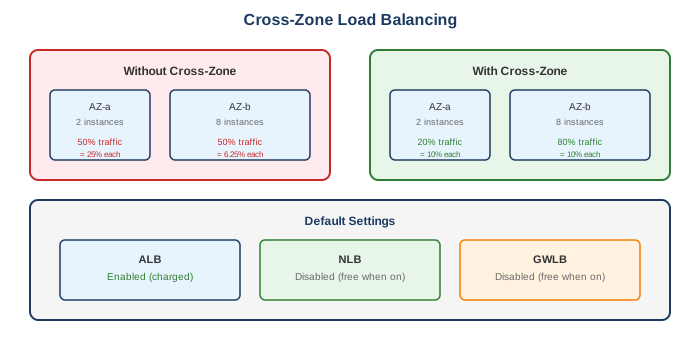
| LB Type | Default | Cost |
|---|---|---|
| ALB | Enabled | Charged |
| NLB | Disabled | Free when enabled |
| GWLB | Disabled | Free when enabled |
Alternatives
AWS Alternatives
| Service | When to Use Instead |
|---|---|
| API Gateway | API management, throttling |
| CloudFront | Global distribution, caching |
| Global Accelerator | Global anycast IPs |
| Route 53 | DNS-based load balancing |
External Alternatives
| Provider | Service |
|---|---|
| NGINX | Self-managed load balancer |
| HAProxy | High-performance proxy |
| F5 | Enterprise load balancing |
| Google Cloud | Cloud Load Balancing |
| Azure | Azure Load Balancer |
Best Practices
- Use ALB for HTTP/HTTPS - Content-based routing
- Use NLB for non-HTTP - Low latency, static IP
- Enable access logs - Troubleshooting and audit
- Configure health checks properly - Right path, intervals
- Use multiple AZs - High availability
- Enable deletion protection - Prevent accidental deletion
- Use ACM certificates - Free, auto-renewed
- Consider connection draining - Graceful shutdown
- Monitor with CloudWatch - HealthyHostCount, latency
- Externalize session state - Better scalability
Pricing
| Component | ALB | NLB |
|---|---|---|
| Hourly | $0.0225/hour | $0.0225/hour |
| Capacity | $0.008/LCU-hour | $0.006/NLCU-hour |
LCU Components (ALB)
- New connections per second
- Active connections per minute
- Processed bytes
- Rule evaluations per second