Amazon ElastiCache
Introduction
Amazon ElastiCache is a fully managed in-memory data store service compatible with Redis and Memcached. It provides sub-millisecond latency for caching and real-time use cases.
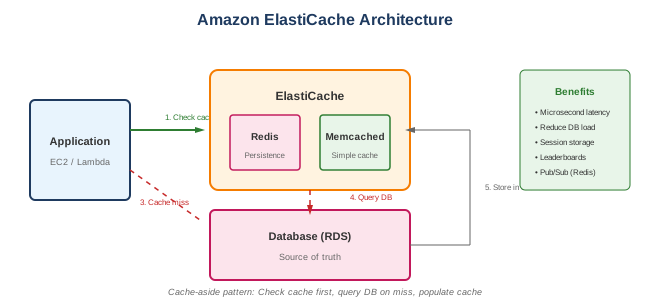
Supported Engines
- Redis - Rich data structures, persistence, replication
- Memcached - Simple, multi-threaded, volatile cache
Key Features
- Sub-millisecond latency - In-memory performance
- Fully managed - Patching, backup, failover
- Scalability - Cluster mode, read replicas
- High availability - Multi-AZ, automatic failover
- Security - VPC, encryption, IAM auth
When to Use
Ideal Use Cases
- Session store - User session management
- Database caching - Reduce database load
- Real-time leaderboards - Gaming, competitions
- Rate limiting - API throttling
- Message queues - Pub/sub messaging
- Geospatial data - Location-based services
- Real-time analytics - Counting, aggregation
Signs ElastiCache is Right for You
- Need sub-millisecond response times
- Database is the bottleneck
- Have read-heavy workloads
- Need distributed caching
- Require session management
Redis vs Memcached
| Feature | Redis | Memcached |
|---|---|---|
| Data structures | Strings, lists, sets, hashes, sorted sets | Simple key-value |
| Persistence | Yes (snapshots, AOF) | No |
| Replication | Yes (read replicas) | No |
| Cluster mode | Yes (sharding) | Yes (multiple nodes) |
| Multi-threaded | No (single-threaded) | Yes |
| Pub/Sub | Yes | No |
| Lua scripting | Yes | No |
| Transactions | Yes | No |
| Backup/Restore | Yes | No |
| Auto failover | Yes (Multi-AZ) | No |
Choose Redis When
- Need data persistence
- Need rich data structures
- Need replication/HA
- Need pub/sub messaging
- Need atomic operations
Choose Memcached When
- Simple caching only
- Need multi-threaded performance
- Can tolerate data loss
- Simpler operational model
What to Be Careful About
Performance
- Memory sizing - Insufficient memory causes evictions
- Network - Use same AZ for lowest latency
- Connection limits - Monitor max connections
- Key design - Avoid hot keys
- Serialization - Affects performance
Cost Management
- Node sizing - Right-size for memory and network
- Reserved nodes - Up to 55% savings
- Data tiering - Redis on SSD for larger datasets
- Replicas - Each replica costs
Operational
- Eviction policies - Understand behavior when full
- TTL strategy - Set appropriate expiration
- Cluster mode - Plan sharding strategy
- Backup window - Schedule during low traffic
- Parameter groups - Tune for workload
Security
- VPC deployment - Always use private subnets
- Security groups - Restrict access
- Encryption - At-rest and in-transit
- IAM authentication - Redis 6.0+ (ElastiCache 6.x+)
- AUTH token - Password protection
Data Management
- Cache invalidation - Hardest problem in computing
- Consistency - Cache vs database consistency
- Serialization format - JSON, MessagePack, etc.
- Key naming - Namespaced, predictable keys
Caching Patterns
Cache-Aside (Lazy Loading)
def get_user(user_id):
    # Check cache first
    user = cache.get(f"user:{user_id}")
    if user:
        return user

    # Cache miss - get from database
    user = db.get_user(user_id)
    cache.set(f"user:{user_id}", user, ttl=3600)
    return user
Pros: Only caches what's needed Cons: Cache miss penalty, stale data possible
Write-Through
def update_user(user_id, data):
    # Update database
    db.update_user(user_id, data)
    # Update cache
    cache.set(f"user:{user_id}", data)
Pros: Cache always current Cons: Write latency, unused data cached
Write-Behind (Write-Back)
def update_user(user_id, data):
    # Update cache immediately
    cache.set(f"user:{user_id}", data)
    # Async update to database
    queue.send({"user_id": user_id, "data": data})
Pros: Fast writes Cons: Data loss risk, complexity
Common Interview Questions
- When would you choose Redis over Memcached?
- Need data structures beyond simple strings
- Need data persistence
- Need replication/high availability
- Need pub/sub messaging
-
Need atomic operations (transactions)
-
How do you handle cache invalidation?
- TTL-based expiration
- Event-driven invalidation (update on write)
- Cache-aside pattern (lazy loading)
-
Use message queue for distributed invalidation
-
What is Redis Cluster mode?
- Data sharded across multiple nodes
- Each shard has primary + replicas
- Automatic data distribution
- Higher throughput and capacity
-
Some commands have limitations
-
How do you handle a cache stampede?
- Locking (only one process refreshes)
- Probabilistic early expiration
- Background refresh before expiration
-
Circuit breaker pattern
-
What happens when ElastiCache runs out of memory?
- Eviction based on policy (LRU, LFU, etc.)
- Writes may fail if maxmemory-policy is noeviction
- Monitor for evictions, scale up if needed
Cluster Configurations
Redis Non-Cluster Mode
- Single shard
- 1 primary + up to 5 replicas
- All data on single node
- Automatic failover with Multi-AZ
Redis Cluster Mode
- Multiple shards (up to 500)
- Each shard: 1 primary + up to 5 replicas
- Data distributed by key hash
- Horizontal scaling
Scaling Options
| Scaling Type | Cluster Mode Disabled | Cluster Mode Enabled |
|---|---|---|
| Vertical | Change node type | Change node type |
| Add replicas | Yes (up to 5) | Yes (up to 5 per shard) |
| Add shards | No | Yes (online) |
Alternatives
AWS Alternatives
| Service | When to Use Instead |
|---|---|
| DynamoDB DAX | DynamoDB-specific caching |
| MemoryDB | Redis-compatible with durability |
| CloudFront | Edge caching for HTTP content |
External Alternatives
| Provider | Service |
|---|---|
| Redis Cloud | Managed Redis |
| Upstash | Serverless Redis |
| Momento | Serverless cache |
| Google Cloud | Memorystore |
| Azure | Azure Cache for Redis |
Best Practices
- Use Redis for most cases - Rich features, HA
- Size for memory + overhead - 25-30% buffer
- Enable encryption - At-rest and in-transit
- Deploy in VPC - Private subnets only
- Use Multi-AZ - For production workloads
- Set appropriate TTLs - Prevent stale data
- Monitor evictions - Scale before evicting
- Use connection pooling - Reduce connection overhead
- Implement cache-aside - Standard pattern
- Plan key naming - Namespace keys (user:123)
Pricing
| Component | Cost Factors |
|---|---|
| Node hours | Instance type, size |
| Reserved nodes | 1 or 3 year, partial/all upfront |
| Backup storage | Per GB over free tier |
| Data transfer | Cross-AZ, internet egress |
Example Node Types
| Type | vCPU | Memory | Network |
|---|---|---|---|
| cache.t3.micro | 2 | 0.5 GB | Low |
| cache.r6g.large | 2 | 13.07 GB | Up to 10 Gbps |
| cache.r6g.4xlarge | 16 | 105 GB | Up to 10 Gbps |