Amazon Kinesis
Introduction
Amazon Kinesis is a platform for streaming data on AWS, making it easy to collect, process, and analyze real-time streaming data. It consists of multiple services for different streaming needs.
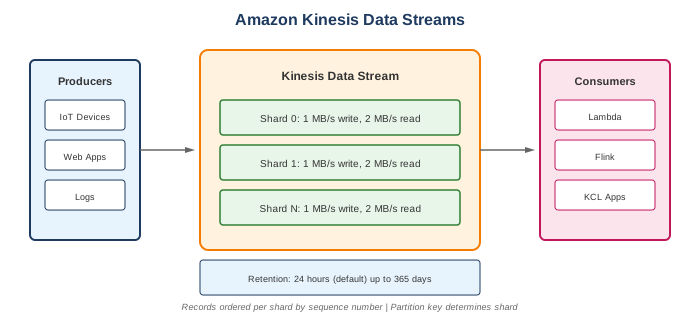
Kinesis Services
- Kinesis Data Streams (KDS) - Collect and process data streams
- Kinesis Data Firehose - Load streaming data to destinations
- Kinesis Data Analytics - Analyze streams with SQL/Flink
- Kinesis Video Streams - Capture and process video streams
When to Use
Ideal Use Cases
- Real-time analytics - Dashboards, metrics
- Log and event processing - Aggregate and process logs
- IoT data ingestion - Sensor data collection
- Clickstream analysis - User behavior tracking
- Real-time ML - Fraud detection, recommendations
- Data integration - ETL pipelines
Signs Kinesis is Right for You
- Need real-time data processing
- Have high-volume, continuous data
- Need ordered data within partitions
- Want to replay data (7-365 days)
- Multiple consumers need same data
Kinesis Data Streams (KDS)
Core Concepts
| Concept | Description |
|---|---|
| Stream | Collection of shards |
| Shard | Unit of capacity |
| Record | Data unit (up to 1 MB) |
| Partition Key | Determines shard assignment |
| Sequence Number | Unique ID within shard |
Capacity
- Write: 1 MB/sec or 1,000 records/sec per shard
- Read: 2 MB/sec per shard (shared among consumers)
- Enhanced fan-out: 2 MB/sec per consumer per shard
Retention
- Default: 24 hours
- Extended: Up to 365 days
- Longer retention = higher cost
Kinesis Data Firehose
Key Features
- Fully managed delivery service
- Near real-time (60 second buffer minimum)
- Auto-scaling
- Data transformation with Lambda
- No data retention (delivery only)
Destinations
- Amazon S3
- Amazon Redshift
- Amazon OpenSearch
- Splunk
- HTTP endpoints
- Third-party partners
Use Cases
- Load data to data lake (S3)
- Stream to data warehouse (Redshift)
- Index in search engine (OpenSearch)
What to Be Careful About
Kinesis Data Streams
- Shard management - Over/under provisioning
- Hot shards - Uneven partition key distribution
- Throttling - ProvisionedThroughputExceeded
- Consumer lag - Monitor IteratorAge
- Ordering - Only guaranteed within a shard
Cost Management
- Shard hours - $0.015/shard-hour
- PUT payload units - $0.014/million (25 KB units)
- Extended retention - Additional per shard-hour
- Enhanced fan-out - Per consumer-shard-hour
- Firehose - Per GB ingested
Data Processing
- Exactly-once - Not guaranteed (at-least-once)
- Checkpoint - Track processed records (use Kinesis Client Library)
- Retry logic - Handle failures gracefully
- Ordering - Design partition keys carefully
Performance
- Batch writes - PutRecords more efficient than PutRecord
- Aggregation - Kinesis Producer Library (KPL) aggregates
- Shard splitting/merging - Plan for growth
- Enhanced fan-out - For multiple high-throughput consumers
Data Streams vs Firehose vs SQS
| Feature | Data Streams | Firehose | SQS |
|---|---|---|---|
| Real-time | Yes (sub-second) | Near (60+ sec) | Depends |
| Data retention | Yes (24h-365d) | No | Yes (4-14 days) |
| Replay | Yes | No | No |
| Multiple consumers | Yes | No (single destination) | No (single consumer) |
| Ordering | Within shard | N/A | FIFO only |
| Scaling | Manual/on-demand | Automatic | Automatic |
| Use case | Stream processing | Data delivery | Decoupling |
Common Interview Questions
- When would you use Kinesis Data Streams vs Firehose?
- KDS: Need real-time processing, multiple consumers, data replay
- Firehose: Just need to deliver data to S3/Redshift/OpenSearch
-
Can use both: KDS → Lambda → Firehose → S3
-
How do you handle hot shards?
- Use random or distributed partition keys
- Add salt to partition keys
- Split hot shards
-
Use more granular partition keys
-
What's the difference between Kinesis and SQS?
- Kinesis: Stream processing, ordering, replay, multiple consumers
- SQS: Message queue, single consumer per message, simpler
-
Kinesis for streaming, SQS for decoupling
-
How do you scale Kinesis Data Streams?
- On-demand mode: Automatic scaling (up to 200 MB/s)
- Provisioned mode: Split/merge shards manually
-
Monitor metrics: IncomingRecords, IncomingBytes
-
What is enhanced fan-out?
- Dedicated throughput per consumer
- 2 MB/sec per shard per consumer
- Push-based (SubscribeToShard API)
- Higher cost, lower latency
Capacity Modes
On-Demand Mode
- Automatic scaling
- No capacity planning
- Pay per use
- Up to 200 MB/s write, 400 MB/s read
Provisioned Mode
- You manage shards
- Manual scaling (split/merge)
- Lower cost if steady traffic
- Full control
Consumers
Shared Throughput (Standard)
- GetRecords API
- 2 MB/s per shard (shared)
- Polling-based
- Lower cost
Enhanced Fan-Out (EFO)
- SubscribeToShard API
- 2 MB/s per consumer per shard
- Push-based
- Higher cost
- Lower latency
Kinesis Client Library (KCL)
- Java library for consumers
- Handles checkpointing
- Manages shard allocation
- Handles resharding
Lambda Integration
- Event source mapping
- Automatic polling
- Batch processing
- Error handling with bisect
Alternatives
AWS Alternatives
| Service | When to Use Instead |
|---|---|
| SQS | Simple queuing, decoupling |
| MSK | Kafka workloads, ecosystem |
| EventBridge | Event routing, filtering |
| IoT Core | IoT device ingestion |
External Alternatives
| Provider | Service |
|---|---|
| Apache Kafka | Self-managed streaming |
| Confluent | Managed Kafka |
| Google Cloud | Pub/Sub, Dataflow |
| Azure | Event Hubs |
Best Practices
- Use on-demand mode - Unless you need cost optimization
- Distribute partition keys - Avoid hot shards
- Use Kinesis Producer Library - Batching and aggregation
- Use Kinesis Client Library - For consumers
- Monitor IteratorAge - Detect consumer lag
- Use enhanced fan-out - For multiple consumers
- Set appropriate retention - Balance cost and need
- Implement checkpointing - Track progress
- Handle throttling - Exponential backoff
- Use Firehose for delivery - When processing not needed
Pricing Summary
Kinesis Data Streams (Provisioned)
| Component | Cost |
|---|---|
| Shard hour | $0.015/hour |
| PUT payload unit (25 KB) | $0.014/million |
| Extended retention (7 days) | $0.020/shard-hour |
| Long-term retention (365 days) | $0.023/GB-month |
| Enhanced fan-out | $0.015/shard-hour + $0.013/GB |
Kinesis Data Firehose
| Component | Cost |
|---|---|
| Data ingested | $0.029/GB (first 500 TB) |
| Format conversion | $0.018/GB |
| VPC delivery | $0.01/GB + $0.01/hour |