AWS CloudFormation
Introduction
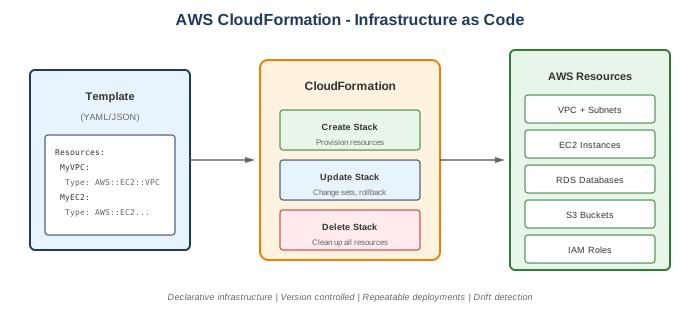
AWS CloudFormation is an Infrastructure as Code (IaC) service that allows you to model, provision, and manage AWS resources using templates. You describe your desired infrastructure in JSON or YAML, and CloudFormation handles the rest.
Key Features
- Infrastructure as Code - Version control your infrastructure
- Declarative - Describe what you want, not how
- Dependency management - Automatic resource ordering
- Rollback - Automatic rollback on failures
- Drift detection - Detect configuration changes
- Stack sets - Deploy across accounts/regions
When to Use
Ideal Use Cases
- Repeatable deployments - Same infrastructure in multiple environments
- Version control - Track infrastructure changes
- Compliance - Auditable infrastructure definitions
- Multi-account - StackSets for organization-wide deployment
- Complex architectures - Many interdependent resources
- DR/Recovery - Quickly recreate infrastructure
Signs CloudFormation is Right for You
- Need reproducible infrastructure
- Want infrastructure versioning
- Require change tracking and audit
- Have AWS-only environment
- Need rollback capabilities
Core Concepts
Templates
- JSON or YAML files
- Define resources and configuration
- Reusable across environments
- Version controlled
Stacks
- Collection of resources from a template
- Single unit of management
- Create, update, delete together
- Named and tracked
Change Sets
- Preview changes before applying
- See what will be added/modified/deleted
- Safe way to update stacks
Stack Sets
- Deploy stacks across accounts/regions
- Organizational deployment
- Centralized management
Template Structure
AWSTemplateFormatVersion: "2010-09-09"
Description: My infrastructure template

Parameters:
  Environment:
    Type: String
    AllowedValues: [dev, staging, prod]

Mappings:
  RegionMap:
    us-east-1:
      AMI: ami-12345678

Conditions:
  IsProd: !Equals [!Ref Environment, prod]

Resources:
  MyEC2Instance:
    Type: AWS::EC2::Instance
    Properties:
      ImageId: !FindInMap [RegionMap, !Ref "AWS::Region", AMI]
      InstanceType: !If [IsProd, t3.large, t3.micro]
      Tags:
        - Key: Name
          Value: !Sub "${Environment}-server"

Outputs:
  InstanceId:
    Value: !Ref MyEC2Instance
    Export:
      Name: !Sub "${Environment}-instance-id"
Template Sections
| Section | Purpose |
|---|---|
| Parameters | Input values for customization |
| Mappings | Static key-value lookups |
| Conditions | Conditional resource creation |
| Resources | AWS resources to create (required) |
| Outputs | Values to export or display |
| Transform | Macros (e.g., AWS::Serverless) |
What to Be Careful About
Template Design
- Resource limits - 500 resources per stack
- Circular dependencies - Avoid mutual references
- Hard-coded values - Use parameters instead
- Large templates - Consider nested stacks
- Drift - Resources modified outside CloudFormation
Updates and Changes
- Replacement vs Update - Some changes require replacement
- Stack policy - Protect critical resources
- Rollback triggers - Configure CloudWatch alarms
- Change sets - Always preview changes
Operations
- Stack failures - Debug with events, logs
- Deletion issues - Resources with dependencies
- IAM permissions - CloudFormation needs permissions
- S3 storage - Large templates need S3
Cost
- No direct cost - CloudFormation is free
- Resources cost - You pay for created resources
- Failed stacks - May leave billable resources
Intrinsic Functions
| Function | Purpose | Example |
|---|---|---|
!Ref |
Reference parameter/resource | !Ref MyParameter |
!Sub |
String substitution | !Sub "${AWS::StackName}-bucket" |
!GetAtt |
Get resource attribute | !GetAtt MyEC2.PublicIp |
!Join |
Join strings | !Join [",", [a, b, c]] |
!If |
Conditional value | !If [IsProd, large, small] |
!Equals |
Compare values | !Equals [!Ref Env, prod] |
!FindInMap |
Lookup from mappings | !FindInMap [Map, Key1, Key2] |
!ImportValue |
Import from another stack | !ImportValue ExportedValue |
!Split |
Split string | !Split [",", "a,b,c"] |
Common Interview Questions
- What is a Change Set?
- Preview of changes before execution
- Shows adds, modifies, deletes
- Safe way to validate updates
-
Must be executed to apply changes
-
How do you handle secrets in CloudFormation?
- Use
AWS::SecretsManager::Secret - Reference with dynamic references:
{{resolve:secretsmanager:...}} - Use SSM Parameter Store SecureString
-
Never hardcode secrets in templates
-
What happens when a stack update fails?
- Automatic rollback to previous state
- Failed resources shown in events
- Stack status: UPDATE_ROLLBACK_COMPLETE
-
Can configure rollback triggers (CloudWatch)
-
What is drift detection?
- Detects resources modified outside CloudFormation
- Shows actual vs expected configuration
- Helps maintain infrastructure consistency
-
Doesn't auto-fix (just detection)
-
How do you share resources between stacks?
- Outputs/Exports: Export from one stack, import in another
- Nested stacks: Child stacks within parent
- Cross-stack references:
!ImportValue - SSM Parameters: Store values in Parameter Store
Nested Stacks vs Stack Sets
Nested Stacks
- Stacks within stacks
- Reusable components
- Parent manages lifecycle
- Same account/region
Resources:
  NetworkStack:
    Type: AWS::CloudFormation::Stack
    Properties:
      TemplateURL: https://s3.../network.yaml
      Parameters:
        VpcCidr: 10.0.0.0/16
Stack Sets
- Deploy across accounts/regions
- Organizational deployment
- Centralized management
- StackSet instances in each target
Helper Scripts
For EC2 instances:
| Script | Purpose |
|---|---|
cfn-init |
Apply metadata (install packages, create files) |
cfn-signal |
Signal success/failure to CloudFormation |
cfn-get-metadata |
Retrieve metadata |
cfn-hup |
Daemon to detect metadata changes |
Example
Resources:
  Instance:
    Type: AWS::EC2::Instance
    Metadata:
      AWS::CloudFormation::Init:
        config:
          packages:
            yum:
              httpd: []
          services:
            sysvinit:
              httpd:
                enabled: true
    CreationPolicy:
      ResourceSignal:
        Timeout: PT5M
    Properties:
      UserData:
        Fn::Base64: !Sub |
          #!/bin/bash
          cfn-init -v --stack ${AWS::StackName} --resource Instance
          cfn-signal -e $? --stack ${AWS::StackName} --resource Instance
Alternatives
AWS Alternatives
| Service | When to Use Instead |
|---|---|
| CDK | Prefer programming languages |
| SAM | Serverless applications |
| Proton | Platform teams, templates |
External Alternatives
| Tool | Description |
|---|---|
| Terraform | Multi-cloud IaC |
| Pulumi | Multi-cloud, programming languages |
| Ansible | Configuration management |
| Crossplane | Kubernetes-native IaC |
Best Practices
- Use parameters - Don't hardcode values
- Use conditions - Single template for multiple environments
- Use nested stacks - Break up large templates
- Enable termination protection - Prevent accidental deletion
- Use change sets - Preview before updating
- Version templates - Git version control
- Use stack policies - Protect critical resources
- Enable drift detection - Regularly check for drift
- Use !Sub over !Join - Cleaner string formatting
- Export outputs - Share resources between stacks
Pricing
CloudFormation is free. You only pay for: - Resources created by templates - Handler operations for third-party resources ($0.0009/operation) - Hook operations ($0.00008/operation)