Amazon EKS (Elastic Kubernetes Service)
Introduction
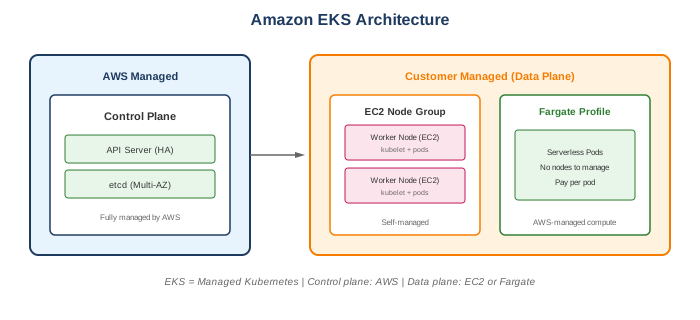
Amazon EKS is a managed Kubernetes service that makes it easy to run Kubernetes on AWS without needing to install, operate, and maintain your own Kubernetes control plane.
Key Features
- Managed control plane - AWS manages Kubernetes masters
- High availability - Multi-AZ control plane
- Kubernetes compatibility - Standard upstream Kubernetes
- Integration - IAM, VPC, ELB, ECR
- Add-ons - Managed versions of common components
- Multiple compute options - EC2, Fargate, hybrid
When to Use
Ideal Use Cases
- Container orchestration - Complex containerized applications
- Microservices - Service mesh, scaling
- Multi-cloud/hybrid - Kubernetes portability
- CI/CD pipelines - GitOps, automated deployments
- Batch processing - Kubernetes Jobs
- Machine learning - Kubeflow, ML pipelines
Signs EKS is Right for You
- Team has Kubernetes expertise
- Need Kubernetes ecosystem tools
- Require multi-cloud portability
- Have complex orchestration needs
- Need fine-grained control
EKS vs ECS
| Feature | EKS | ECS |
|---|---|---|
| Orchestrator | Kubernetes | AWS proprietary |
| Complexity | Higher | Lower |
| Portability | Multi-cloud | AWS only |
| Ecosystem | Large (CNCF) | AWS ecosystem |
| Learning curve | Steeper | Gentler |
| Control plane cost | $0.10/hour | Free |
| Community | Very large | AWS-focused |
Choose EKS When
- Kubernetes expertise exists
- Need ecosystem tools (Helm, Istio, Argo)
- Multi-cloud is a requirement
- Need advanced features
Choose ECS When
- AWS-only environment
- Simpler requirements
- Smaller team
- Want faster setup
Core Components
Control Plane (AWS Managed)
- API Server
- etcd (data store)
- Controller Manager
- Scheduler
- Multi-AZ by default
Data Plane (You Manage)
- Worker nodes (EC2 or Fargate)
- kubelet
- Container runtime
- kube-proxy
Node Types
| Type | Description |
|---|---|
| Managed Node Groups | AWS manages EC2 instances |
| Self-managed Nodes | You manage EC2 instances |
| Fargate | Serverless, per-pod compute |
| Outposts | On-premises Kubernetes |
| Local Zones | Low-latency edge locations |
What to Be Careful About
Cluster Management
- Kubernetes version - Upgrade regularly (support window)
- Node updates - Plan for node group updates
- Add-on management - Keep add-ons updated
- RBAC - Configure properly for security
Networking
- VPC CNI - Understand IP address consumption
- Pod networking - Each pod gets VPC IP
- Security groups - For pods and nodes
- Load balancers - AWS Load Balancer Controller
Cost Management
- Control plane - $0.10/hour per cluster
- EC2 nodes - Instance costs
- Fargate - Per-pod pricing (higher)
- Data transfer - Cross-AZ costs
- NAT Gateway - For private subnets
Security
- IAM Roles for Service Accounts (IRSA) - Pod-level IAM
- Pod Security Standards - Enforce security policies
- Network policies - Control pod communication
- Secrets management - Use Secrets Manager or external-secrets
Operations
- Logging - Enable control plane logging
- Monitoring - Container Insights, Prometheus
- Backups - etcd backup (automatic), persistent volumes
- Disaster recovery - Multi-region considerations
Compute Options
Managed Node Groups
nodeGroups:
  - name: standard-workers
    instanceType: m5.large
    desiredCapacity: 3
    minSize: 1
    maxSize: 10
Fargate
- Serverless pods - No node management - Per-pod pricing - Some limitations (daemonsets, etc.)Common Interview Questions
- What's the difference between EKS and self-managed Kubernetes?
- EKS: AWS manages control plane, automatic updates, integrated
- Self-managed: Full control, more operational burden
-
EKS handles HA, patching, etcd for control plane
-
How do you manage IAM permissions for pods?
- IAM Roles for Service Accounts (IRSA)
- Associate IAM role with Kubernetes service account
- Pods assume role via OIDC provider
-
Fine-grained, per-pod permissions
-
How does networking work in EKS?
- VPC CNI plugin assigns VPC IPs to pods
- Each pod gets real VPC IP address
- Security groups can apply to pods
-
Consider IP exhaustion in small subnets
-
How do you expose services in EKS?
- LoadBalancer service → AWS ELB
- AWS Load Balancer Controller for ALB/NLB
- Ingress for HTTP routing
-
NodePort for simple exposure
-
How do you handle cluster upgrades?
- Update control plane first (EKS console/CLI)
- Update node groups after
- Rolling update for managed node groups
- Test in non-prod first
Networking
VPC CNI
- Each pod gets VPC IP
- Direct pod-to-pod communication
- Security group for pods
- Watch for IP exhaustion
AWS Load Balancer Controller
- Manages ALB/NLB for Kubernetes
- Ingress → ALB
- Service type LoadBalancer → NLB
- IP mode for Fargate
Network Policies
- Control pod-to-pod traffic
- Use Calico or VPC CNI network policies
- Default: all traffic allowed
Add-ons
| Add-on | Purpose |
|---|---|
| VPC CNI | Pod networking |
| CoreDNS | Cluster DNS |
| kube-proxy | Network proxy |
| EBS CSI Driver | EBS persistent volumes |
| EFS CSI Driver | EFS file system |
Managed add-ons automatically updated by AWS.
Alternatives
AWS Alternatives
| Service | When to Use Instead |
|---|---|
| ECS | Simpler requirements, AWS-only |
| App Runner | Simple containerized apps |
| Fargate | Serverless containers |
| Batch | Batch processing |
External Alternatives
| Provider | Service |
|---|---|
| Google Cloud | GKE |
| Azure | AKS |
| Red Hat | OpenShift |
| Rancher | Multi-cluster management |
Best Practices
- Use managed node groups - Less operational overhead
- Enable IRSA - Pod-level IAM, not node roles
- Use Fargate for specific workloads - Burstable, isolated
- Plan IP addressing - VPC CNI consumes IPs quickly
- Enable control plane logging - To CloudWatch
- Use namespaces - Organize and isolate workloads
- Implement network policies - Least-privilege networking
- Regular upgrades - Stay within support window
- Use Container Insights - Monitoring and logging
- GitOps for deployments - ArgoCD, Flux
Pricing
| Component | Cost |
|---|---|
| EKS control plane | $0.10/hour (~$73/month) |
| Managed node groups | EC2 pricing |
| Fargate | vCPU/memory per second |
| Data transfer | Standard AWS rates |
Fargate Pricing (per pod)
- vCPU: $0.04048/hour
- Memory: $0.004445/GB/hour
Example Monthly Cost
- 1 cluster: $73
- 3 m5.large nodes: ~$200
- Data transfer: Variable
- Minimum: ~$273/month + data transfer