AWS Secrets Manager
Introduction
AWS Secrets Manager helps you protect secrets needed to access your applications, services, and IT resources. It enables you to easily rotate, manage, and retrieve database credentials, API keys, and other secrets throughout their lifecycle.
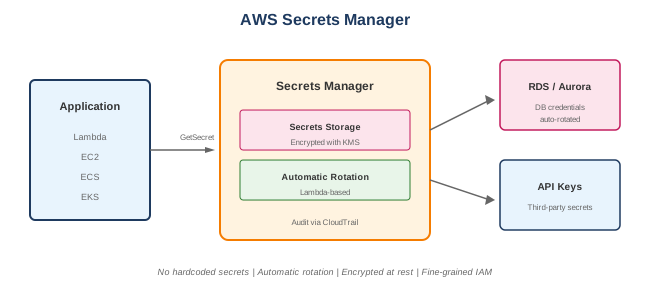
Key Features
- Automatic rotation - Rotate secrets automatically
- Fine-grained access - IAM policies for secret access
- Encryption - KMS encryption at rest
- Audit - CloudTrail integration
- Cross-region replication - Disaster recovery
- Versioning - Multiple secret versions
When to Use
Ideal Use Cases
- Database credentials - RDS, Redshift, DocumentDB
- API keys - Third-party service keys
- SSH keys - Server access credentials
- OAuth tokens - Application tokens
- Application secrets - Configuration secrets
- License keys - Software licenses
Signs Secrets Manager is Right for You
- Need automatic credential rotation
- Have database credentials to manage
- Require audit trail for secret access
- Need cross-region secret replication
- Want centralized secret management
Secrets Manager vs Parameter Store
| Feature | Secrets Manager | Parameter Store |
|---|---|---|
| Automatic rotation | Yes | No (manual only) |
| Cross-region replication | Yes | No |
| Database integration | Native | No |
| Cost | $0.40/secret/month | Free tier available |
| Max secret size | 64 KB | 8 KB (standard) |
| KMS encryption | Always | Optional (SecureString) |
| Versioning | Built-in | Limited |
When to Use Each
- Secrets Manager: Database creds, rotation needed, compliance
- Parameter Store: Simple config, cost-sensitive, no rotation needed
Core Concepts
Secret
- Name and value pair
- Encrypted with KMS
- Contains versions
- Has metadata and tags
Secret Value
- String or binary
- Often JSON for structured data
- Up to 64 KB
Rotation
- Automatic credential rotation
- Lambda function performs rotation
- Supports major databases
- Custom rotation for other secrets
Versions
| Label | Description |
|---|---|
| AWSCURRENT | Current active version |
| AWSPENDING | Version being rotated to |
| AWSPREVIOUS | Previous version |
| Custom labels | User-defined versions |
What to Be Careful About
Security
- IAM permissions - Least privilege access
- KMS key access - Both secret and KMS permissions needed
- Resource policies - Control cross-account access
- VPC endpoints - Keep traffic private
Rotation
- Lambda function - Needs network access to database
- Multi-user rotation - For high availability
- Rotation schedule - Don't rotate too frequently
- Testing - Test rotation in non-prod first
Cost Management
- Per secret charge - $0.40/secret/month
- API calls - $0.05 per 10,000 calls
- Caching - Cache secrets to reduce API calls
- Consolidate secrets - JSON for related values
Integration
- Application updates - Handle secret changes
- Caching - Balance freshness vs API costs
- Error handling - Handle rotation failures
- Database connections - Reconnect after rotation
Automatic Rotation
Supported Databases
- Amazon RDS (MySQL, PostgreSQL, Oracle, SQL Server, MariaDB)
- Amazon Redshift
- Amazon DocumentDB
- Custom (via Lambda function)
Rotation Strategies
| Strategy | Description |
|---|---|
| Single user | Rotate credentials for one user |
| Alternating users | Switch between two users |
| Multi-user | Use multiple users for high availability |
Rotation Process
- Create new credentials (AWSPENDING)
- Set credentials in database
- Test new credentials
- Mark as current (AWSCURRENT)
- Previous version labeled AWSPREVIOUS
Retrieving Secrets
AWS SDK (Python)
import boto3
import json

def get_secret():
    client = boto3.client('secretsmanager')
    response = client.get_secret_value(SecretId='my-secret')
    secret = json.loads(response['SecretString'])
    return secret

# Returns: {"username": "admin", "password": "secret123"}
AWS CLI
Environment Variables (ECS/Lambda)
# ECS Task Definition
secrets:
  - name: DB_PASSWORD
    valueFrom: arn:aws:secretsmanager:region:account:secret:my-secret
Common Interview Questions
- How does automatic rotation work?
- Secrets Manager invokes Lambda function
- Lambda creates new credentials in database
- Lambda updates secret with new value
- Secret staged as AWSPENDING, then AWSCURRENT
-
Configurable rotation schedule (e.g., 30 days)
-
What's the difference between Secrets Manager and Parameter Store?
- Secrets Manager: Automatic rotation, higher cost, database integration
- Parameter Store: Manual rotation, free tier, simpler use cases
-
Both can store encrypted values with KMS
-
How do you handle secrets in containers (ECS)?
- Reference secret ARN in task definition
- Secrets injected as environment variables
- Use IAM task role for permissions
-
Secrets Manager resolved at container start
-
How do you reduce Secrets Manager costs?
- Cache secrets in application
- Use AWS-provided caching libraries
- Consolidate related secrets into one JSON
-
Use Parameter Store for simpler needs
-
How do you ensure high availability during rotation?
- Use alternating users strategy
- Application can use either user
- No downtime during rotation
- Both users always have valid credentials
Caching Secrets
AWS Caching Libraries
- Reduce API calls
- Configurable cache TTL
- Automatic refresh
- Available for multiple languages
from aws_secretsmanager_caching import SecretCache

cache = SecretCache()
secret = cache.get_secret_string('my-secret')
Caching Considerations
- TTL shorter than rotation period
- Handle cache invalidation
- Consider Lambda cold starts
- Balance freshness vs cost
Cross-Region Replication
- Replicate secrets to other regions
- Disaster recovery
- Regional access with lower latency
- Automatic sync
client.replicate_secret_to_regions(
    SecretId='my-secret',
    AddReplicaRegions=[
        {'Region': 'eu-west-1', 'KmsKeyId': 'alias/my-key'}
    ]
)
Alternatives
AWS Alternatives
| Service | When to Use Instead |
|---|---|
| Parameter Store | Simple config, no rotation needed |
| KMS | Encryption keys only |
| IAM | AWS API credentials |
External Alternatives
| Tool | Description |
|---|---|
| HashiCorp Vault | Multi-cloud secrets management |
| CyberArk | Enterprise secrets management |
| Azure Key Vault | Azure secrets service |
| Google Secret Manager | GCP secrets service |
Best Practices
- Use automatic rotation - Enable for all database credentials
- Use JSON format - Store related values together
- Implement caching - Reduce API calls and costs
- Use resource policies - Control cross-account access
- Enable CloudTrail - Audit secret access
- Use VPC endpoints - Keep traffic private
- Test rotation - Verify in non-prod environments
- Use alternating users - For database HA during rotation
- Set up alarms - Monitor rotation failures
- Tag secrets - Organize and manage access
Pricing
| Component | Cost |
|---|---|
| Per secret/month | $0.40 |
| Per 10,000 API calls | $0.05 |
Example
- 50 secrets, 1 million API calls/month
- Secrets: 50 × $0.40 = $20
- API calls: 100 × $0.05 = $5
- Total: $25/month