Docker & Containers
Container Fundamentals
Dockerfile
Basic Structure
# Build stage
FROM maven:3.9-eclipse-temurin-21 AS builder
WORKDIR /app

# Cache dependencies
COPY pom.xml .
RUN mvn dependency:go-offline

# Build application
COPY src ./src
RUN mvn package -DskipTests

# Runtime stage
FROM eclipse-temurin:21-jre-alpine

# Security: Don't run as root
RUN addgroup -S appgroup && adduser -S appuser -G appgroup
USER appuser

WORKDIR /app

# Copy artifact from builder
COPY --from=builder /app/target/app.jar ./app.jar

# Health check
HEALTHCHECK --interval=30s --timeout=3s --start-period=10s --retries=3 \
  CMD wget --quiet --tries=1 --spider http://localhost:8080/health || exit 1

# Expose port
EXPOSE 8080

# Runtime configuration
ENV JAVA_OPTS="-XX:+UseContainerSupport -XX:MaxRAMPercentage=75.0"

# Start application
ENTRYPOINT ["sh", "-c", "java $JAVA_OPTS -jar app.jar"]
Multi-Stage Builds
# Stage 1: Dependencies
FROM node:20-alpine AS deps
WORKDIR /app
COPY package*.json ./
RUN npm ci --only=production

# Stage 2: Build
FROM node:20-alpine AS builder
WORKDIR /app
COPY package*.json ./
RUN npm ci
COPY . .
RUN npm run build

# Stage 3: Production
FROM node:20-alpine AS runner
WORKDIR /app

ENV NODE_ENV=production

# Security
RUN addgroup -S nodejs && adduser -S nextjs -G nodejs
USER nextjs

# Copy only necessary files
COPY --from=deps --chown=nextjs:nodejs /app/node_modules ./node_modules
COPY --from=builder --chown=nextjs:nodejs /app/dist ./dist

EXPOSE 3000

CMD ["node", "dist/server.js"]
Docker Commands
# Build
docker build -t myapp:1.0 .
docker build -t myapp:1.0 -f Dockerfile.prod .
docker build --no-cache -t myapp:1.0 .

# Run
docker run myapp:1.0
docker run -d myapp:1.0                    # Detached
docker run -p 8080:80 myapp:1.0           # Port mapping
docker run -e ENV_VAR=value myapp:1.0     # Environment
docker run -v /host/path:/container/path myapp:1.0  # Volume
docker run --name mycontainer myapp:1.0   # Named container
docker run --rm myapp:1.0                 # Remove after exit
docker run -it myapp:1.0 /bin/sh          # Interactive

# Container management
docker ps                    # Running containers
docker ps -a                 # All containers
docker logs container_id     # View logs
docker logs -f container_id  # Follow logs
docker exec -it container_id /bin/sh  # Execute command
docker stop container_id
docker start container_id
docker rm container_id
docker rm $(docker ps -aq)   # Remove all containers

# Images
docker images
docker pull image:tag
docker push image:tag
docker tag source:tag target:tag
docker rmi image_id
docker image prune           # Remove unused images
docker system prune -a       # Clean everything

# Debugging
docker inspect container_id
docker stats                 # Resource usage
docker top container_id      # Running processes
docker diff container_id     # Filesystem changes
Docker Compose
# docker-compose.yml
version: '3.8'

services:
  app:
    build:
      context: .
      dockerfile: Dockerfile
    ports:
      - "8080:8080"
    environment:
      - DATABASE_URL=postgres://db:5432/mydb
      - REDIS_URL=redis://redis:6379
    depends_on:
      db:
        condition: service_healthy
      redis:
        condition: service_started
    healthcheck:
      test: ["CMD", "curl", "-f", "http://localhost:8080/health"]
      interval: 30s
      timeout: 10s
      retries: 3
      start_period: 40s
    deploy:
      resources:
        limits:
          cpus: '0.5'
          memory: 512M
        reservations:
          cpus: '0.25'
          memory: 256M

  db:
    image: postgres:15-alpine
    environment:
      POSTGRES_DB: mydb
      POSTGRES_USER: user
      POSTGRES_PASSWORD: password
    volumes:
      - postgres_data:/var/lib/postgresql/data
    healthcheck:
      test: ["CMD-SHELL", "pg_isready -U user -d mydb"]
      interval: 10s
      timeout: 5s
      retries: 5

  redis:
    image: redis:7-alpine
    volumes:
      - redis_data:/data

volumes:
  postgres_data:
  redis_data:

networks:
  default:
    driver: bridge
# Docker Compose commands
docker-compose up              # Start services
docker-compose up -d           # Detached mode
docker-compose up --build      # Rebuild images
docker-compose down            # Stop and remove
docker-compose down -v         # Also remove volumes
docker-compose logs -f app     # Follow logs
docker-compose exec app sh     # Execute in running container
docker-compose ps              # List containers
docker-compose pull            # Pull latest images
Image Optimization
.dockerignore
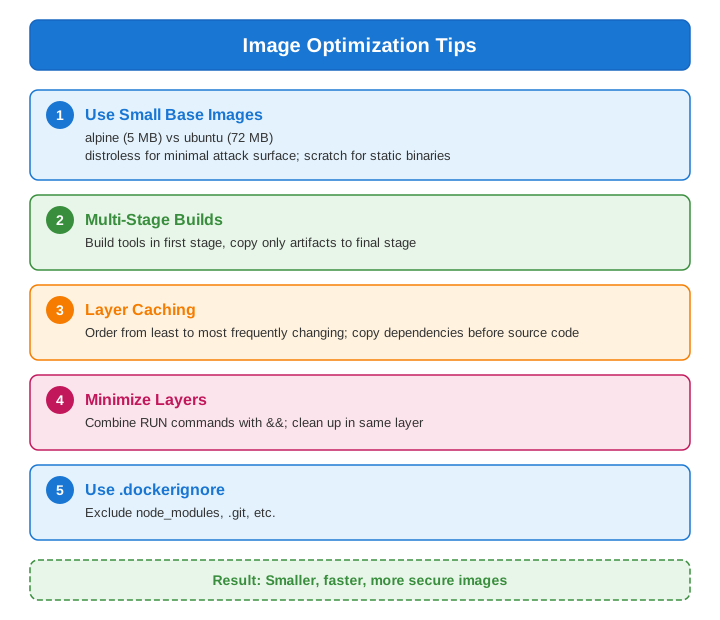
# .dockerignore
.git
.gitignore
node_modules
npm-debug.log
Dockerfile*
docker-compose*
.dockerignore
.env
*.md
.idea
.vscode
coverage
dist
*.log
Layer Optimization Example
# Bad: Separate RUN commands create multiple layers
RUN apt-get update
RUN apt-get install -y curl
RUN apt-get clean

# Good: Combined and cleaned in single layer
RUN apt-get update && \
    apt-get install -y --no-install-recommends curl && \
    apt-get clean && \
    rm -rf /var/lib/apt/lists/*
Security Best Practices
# 1. Don't run as root
FROM node:20-alpine
RUN addgroup -S app && adduser -S app -G app
USER app

# 2. Use specific image versions
FROM node:20.10.0-alpine3.19  # Not :latest

# 3. Use read-only filesystem
# docker run --read-only myapp

# 4. Drop capabilities
# docker run --cap-drop=ALL --cap-add=NET_BIND_SERVICE myapp

# 5. Scan for vulnerabilities
# docker scan myapp:1.0
# trivy image myapp:1.0

# 6. Don't store secrets in images
# Use runtime secrets, environment variables, or secret managers

# 7. Use COPY instead of ADD
COPY . .  # Not ADD . .

# 8. Set resource limits
# docker run --memory=512m --cpus=0.5 myapp
Security Scanning
# Docker Scout (built-in)
docker scout cve myimage:tag

# Trivy
trivy image myimage:tag

# Snyk
snyk container test myimage:tag
Networking
Volumes
Registry
Push to Registry
# Tag image
docker tag myapp:1.0 myregistry.com/myapp:1.0

# Login
docker login myregistry.com

# Push
docker push myregistry.com/myapp:1.0

# Pull
docker pull myregistry.com/myapp:1.0
Private Registry
# Run local registry
docker run -d -p 5000:5000 --name registry registry:2

# Push to local
docker tag myapp:1.0 localhost:5000/myapp:1.0
docker push localhost:5000/myapp:1.0
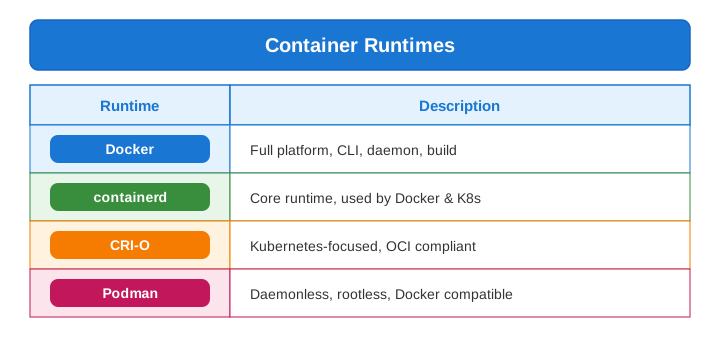
Container Runtime Comparison
Common Interview Questions
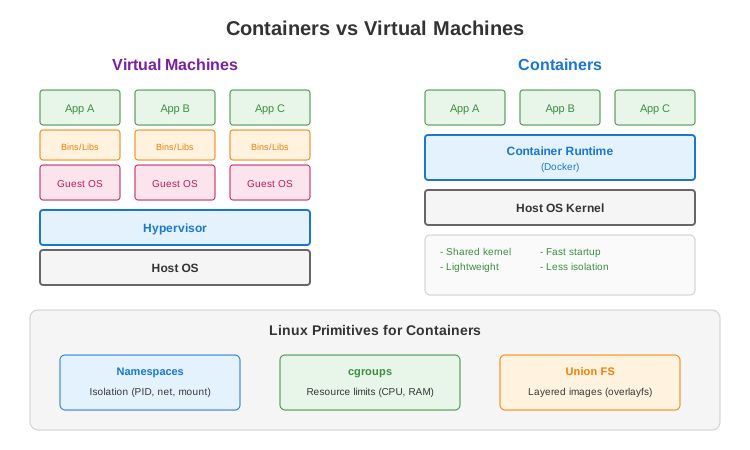
- Container vs VM?
- Container: Shares kernel, lightweight, fast
-
VM: Full OS, more isolation, heavier
-
What are namespaces?
- Kernel feature for isolation
-
PID, network, mount, user, UTS, IPC
-
What are cgroups?
- Control groups for resource limits
-
CPU, memory, I/O, network
-
Multi-stage build benefits?
- Smaller final image
- Build tools not in production
-
Separate build and runtime dependencies
-
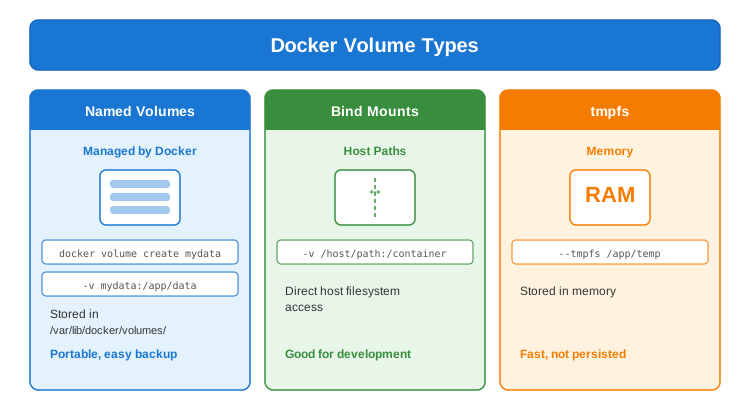
How to persist data?
- Volumes (Docker-managed)
- Bind mounts (host filesystem)
- tmpfs (memory, not persisted)
- *