Kubernetes
Architecture
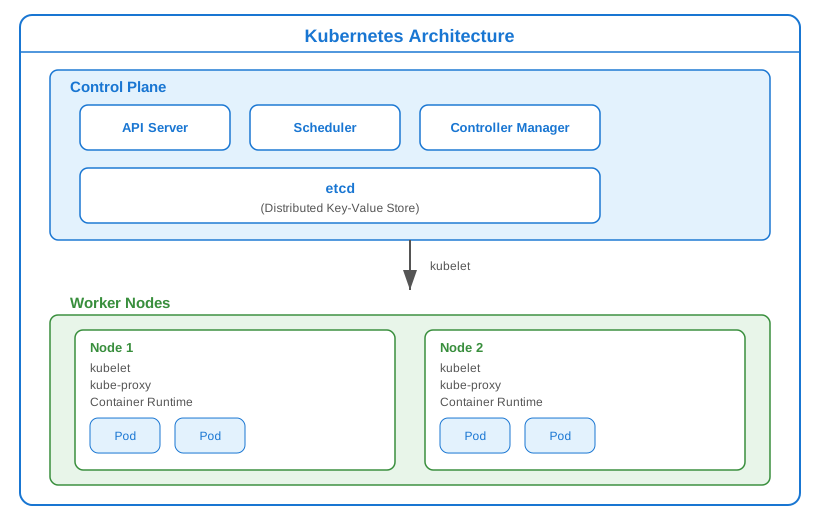
Components
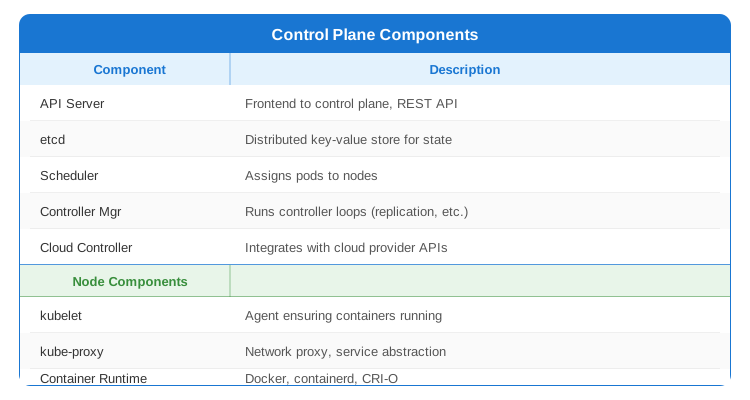
Core Objects
Pod
Smallest deployable unit. One or more containers.
apiVersion: v1
kind: Pod
metadata:
  name: my-app
  labels:
    app: my-app
spec:
  containers:
  - name: app
    image: my-app:1.0
    ports:
    - containerPort: 8080
    resources:
      requests:
        memory: "256Mi"
        cpu: "250m"
      limits:
        memory: "512Mi"
        cpu: "500m"
    livenessProbe:
      httpGet:
        path: /health
        port: 8080
      initialDelaySeconds: 30
      periodSeconds: 10
    readinessProbe:
      httpGet:
        path: /ready
        port: 8080
      initialDelaySeconds: 5
      periodSeconds: 5
    env:
    - name: DB_HOST
      valueFrom:
        configMapKeyRef:
          name: app-config
          key: database_host
    - name: DB_PASSWORD
      valueFrom:
        secretKeyRef:
          name: app-secrets
          key: database_password
    volumeMounts:
    - name: data
      mountPath: /data
  volumes:
  - name: data
    persistentVolumeClaim:
      claimName: my-pvc
Deployment
Declarative updates for Pods and ReplicaSets.
apiVersion: apps/v1
kind: Deployment
metadata:
  name: my-app
  labels:
    app: my-app
spec:
  replicas: 3
  selector:
    matchLabels:
      app: my-app
  strategy:
    type: RollingUpdate
    rollingUpdate:
      maxSurge: 1
      maxUnavailable: 0
  template:
    metadata:
      labels:
        app: my-app
    spec:
      containers:
      - name: app
        image: my-app:1.0
        ports:
        - containerPort: 8080
        resources:
          requests:
            memory: "256Mi"
            cpu: "250m"
          limits:
            memory: "512Mi"
            cpu: "500m"
      affinity:
        podAntiAffinity:
          preferredDuringSchedulingIgnoredDuringExecution:
          - weight: 100
            podAffinityTerm:
              labelSelector:
                matchLabels:
                  app: my-app
              topologyKey: kubernetes.io/hostname
Service
Expose pods as a network service.
# ClusterIP (internal only)
apiVersion: v1
kind: Service
metadata:
  name: my-app
spec:
  type: ClusterIP
  selector:
    app: my-app
  ports:
  - port: 80
    targetPort: 8080

---
# NodePort (external via node IP)
apiVersion: v1
kind: Service
metadata:
  name: my-app-nodeport
spec:
  type: NodePort
  selector:
    app: my-app
  ports:
  - port: 80
    targetPort: 8080
    nodePort: 30080

---
# LoadBalancer (cloud LB)
apiVersion: v1
kind: Service
metadata:
  name: my-app-lb
spec:
  type: LoadBalancer
  selector:
    app: my-app
  ports:
  - port: 80
    targetPort: 8080
Ingress
HTTP routing and load balancing.
apiVersion: networking.k8s.io/v1
kind: Ingress
metadata:
  name: my-ingress
  annotations:
    nginx.ingress.kubernetes.io/rewrite-target: /
    cert-manager.io/cluster-issuer: letsencrypt-prod
spec:
  ingressClassName: nginx
  tls:
  - hosts:
    - api.example.com
    secretName: api-tls
  rules:
  - host: api.example.com
    http:
      paths:
      - path: /users
        pathType: Prefix
        backend:
          service:
            name: user-service
            port:
              number: 80
      - path: /orders
        pathType: Prefix
        backend:
          service:
            name: order-service
            port:
              number: 80
Configuration
ConfigMap
apiVersion: v1
kind: ConfigMap
metadata:
  name: app-config
data:
  database_host: "postgres.default.svc.cluster.local"
  log_level: "INFO"
  config.json: |
    {
      "feature_flags": {
        "new_checkout": true
      }
    }
Secret
apiVersion: v1
kind: Secret
metadata:
  name: app-secrets
type: Opaque
data:
  database_password: cGFzc3dvcmQxMjM=  # base64 encoded
  api_key: YXBpLWtleS1zZWNyZXQ=
# Create secret from command line
kubectl create secret generic app-secrets \
  --from-literal=database_password=password123 \
  --from-file=tls.crt=/path/to/tls.crt
Storage
PersistentVolume & PersistentVolumeClaim
# PersistentVolume (admin creates)
apiVersion: v1
kind: PersistentVolume
metadata:
  name: my-pv
spec:
  capacity:
    storage: 10Gi
  accessModes:
    - ReadWriteOnce
  persistentVolumeReclaimPolicy: Retain
  storageClassName: standard
  hostPath:
    path: /data/pv001

---
# PersistentVolumeClaim (developer requests)
apiVersion: v1
kind: PersistentVolumeClaim
metadata:
  name: my-pvc
spec:
  accessModes:
    - ReadWriteOnce
  resources:
    requests:
      storage: 5Gi
  storageClassName: standard
StorageClass (Dynamic Provisioning)
apiVersion: storage.k8s.io/v1
kind: StorageClass
metadata:
  name: fast-ssd
provisioner: kubernetes.io/aws-ebs
parameters:
  type: gp3
  iopsPerGB: "50"
reclaimPolicy: Delete
volumeBindingMode: WaitForFirstConsumer
Scaling
Horizontal Pod Autoscaler
apiVersion: autoscaling/v2
kind: HorizontalPodAutoscaler
metadata:
  name: my-app-hpa
spec:
  scaleTargetRef:
    apiVersion: apps/v1
    kind: Deployment
    name: my-app
  minReplicas: 2
  maxReplicas: 10
  metrics:
  - type: Resource
    resource:
      name: cpu
      target:
        type: Utilization
        averageUtilization: 70
  - type: Resource
    resource:
      name: memory
      target:
        type: Utilization
        averageUtilization: 80
  behavior:
    scaleDown:
      stabilizationWindowSeconds: 300
      policies:
      - type: Percent
        value: 10
        periodSeconds: 60
Vertical Pod Autoscaler
apiVersion: autoscaling.k8s.io/v1
kind: VerticalPodAutoscaler
metadata:
  name: my-app-vpa
spec:
  targetRef:
    apiVersion: apps/v1
    kind: Deployment
    name: my-app
  updatePolicy:
    updateMode: "Auto"
  resourcePolicy:
    containerPolicies:
    - containerName: app
      minAllowed:
        cpu: 100m
        memory: 128Mi
      maxAllowed:
        cpu: 2
        memory: 4Gi
Networking
Network Policies
apiVersion: networking.k8s.io/v1
kind: NetworkPolicy
metadata:
  name: backend-policy
spec:
  podSelector:
    matchLabels:
      app: backend
  policyTypes:
  - Ingress
  - Egress
  ingress:
  - from:
    - podSelector:
        matchLabels:
          app: frontend
    ports:
    - protocol: TCP
      port: 8080
  egress:
  - to:
    - podSelector:
        matchLabels:
          app: database
    ports:
    - protocol: TCP
      port: 5432
Health Checks
spec:
  containers:
  - name: app
    # Liveness: Is container healthy? Restart if fails
    livenessProbe:
      httpGet:
        path: /health
        port: 8080
      initialDelaySeconds: 30
      periodSeconds: 10
      timeoutSeconds: 5
      failureThreshold: 3

    # Readiness: Is container ready for traffic?
    readinessProbe:
      httpGet:
        path: /ready
        port: 8080
      initialDelaySeconds: 5
      periodSeconds: 5
      failureThreshold: 3

    # Startup: Give slow containers time to start
    startupProbe:
      httpGet:
        path: /health
        port: 8080
      initialDelaySeconds: 10
      periodSeconds: 10
      failureThreshold: 30  # 30 * 10 = 300s max
Common Commands
# Get resources
kubectl get pods -n namespace
kubectl get pods -o wide  # More details
kubectl get all
kubectl get events --sort-by='.lastTimestamp'

# Describe (detailed info)
kubectl describe pod my-pod
kubectl describe node my-node

# Logs
kubectl logs my-pod
kubectl logs my-pod -c container-name  # Multi-container
kubectl logs -f my-pod  # Follow
kubectl logs my-pod --previous  # Previous container

# Execute commands
kubectl exec -it my-pod -- /bin/sh
kubectl exec my-pod -- env

# Apply/Delete
kubectl apply -f manifest.yaml
kubectl delete -f manifest.yaml
kubectl delete pod my-pod

# Scaling
kubectl scale deployment my-app --replicas=5

# Rollout
kubectl rollout status deployment/my-app
kubectl rollout history deployment/my-app
kubectl rollout undo deployment/my-app
kubectl rollout restart deployment/my-app

# Port forwarding
kubectl port-forward pod/my-pod 8080:80
kubectl port-forward svc/my-service 8080:80

# Debug
kubectl run debug --image=busybox -it --rm -- /bin/sh
kubectl debug my-pod -it --image=busybox
Best Practices
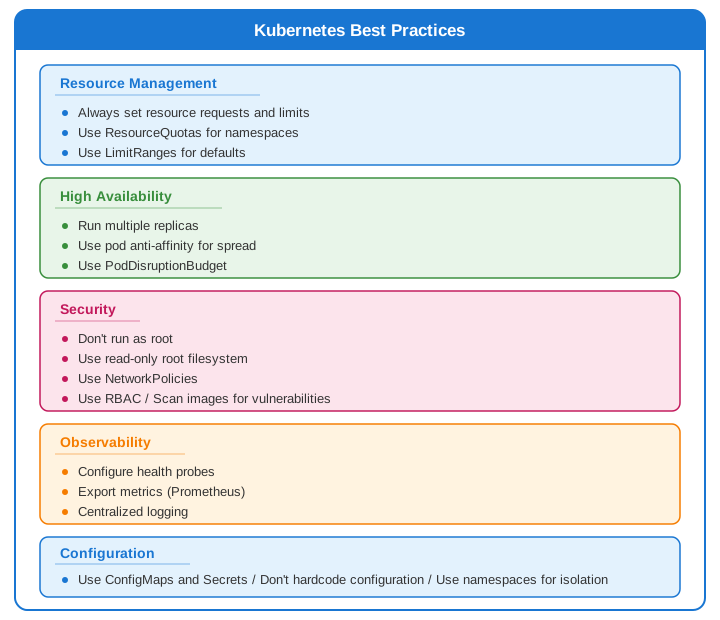
Common Interview Questions
- Pod vs Container?
- Pod: Smallest K8s unit, can have multiple containers
-
Containers share network namespace, storage
-
Service types?
- ClusterIP: Internal only
- NodePort: External via node ports
-
LoadBalancer: Cloud load balancer
-
How does rolling update work?
- Creates new pods, waits for ready
- Terminates old pods gradually
-
Controlled by maxSurge, maxUnavailable
-
Liveness vs Readiness probes?
- Liveness: Restart container if fails
-
Readiness: Remove from service if fails
-
How to handle secrets?
- Kubernetes Secrets (base64, not encrypted)
- Use external secret managers (Vault, AWS SM)
- Enable encryption at rest
- *