OAuth 2.0
OAuth 2.0 Overview
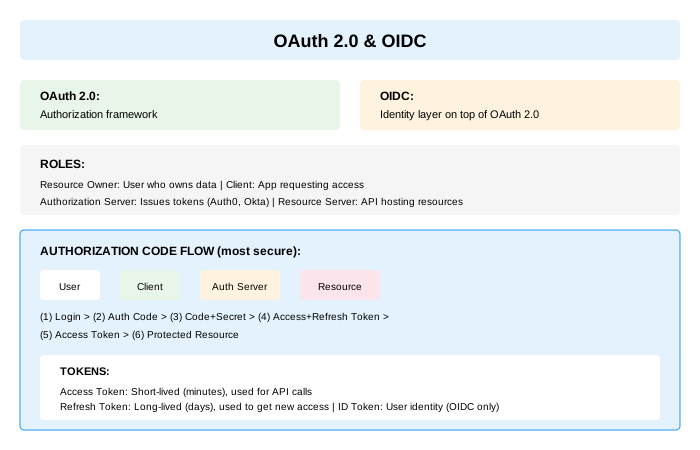
What is OAuth 2.0? - Authorization framework (NOT authentication) - Allows third-party limited access to resources - Without sharing credentials
Key Concepts: - Delegated authorization - Access tokens (not identity) - Scopes define permissions
Example Use Case: "Allow Trello to access my Google Calendar" - Trello doesn't need my Google password - Trello only gets calendar access (scoped) - I can revoke Trello's access anytime
OAuth 2.0 Roles
Resource Owner - The user who owns the data - Grants permission to access resources - Example: You (granting Trello access to calendar)
Client - Application requesting access - Has client_id and client_secret - Example: Trello application
Authorization Server - Issues tokens after authentication - Validates credentials and consent - Example: Google OAuth server
Resource Server - Hosts protected resources - Accepts and validates access tokens - Example: Google Calendar API
OAuth 2.0 Grant Types
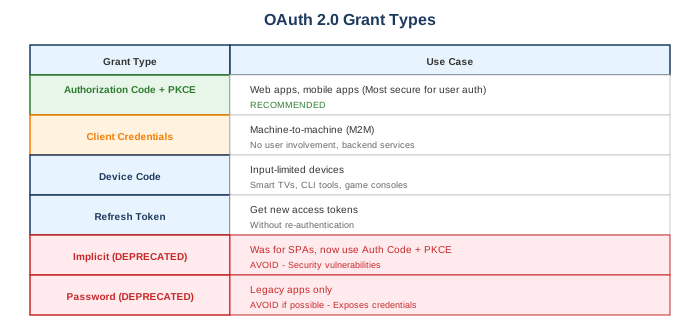
Authorization Code Flow (with PKCE)
Flow Steps: 1. User clicks Login 2. Client generates code_verifier and code_challenge (PKCE) 3. Redirect to Auth Server 4. Auth request (client_id, redirect_uri, scope, state, code_challenge) 5. Auth Server shows Login page 6. User logs in and grants consent 7. Auth Server redirects with authorization_code 8. Callback to Client 9. Client exchanges code for tokens (+ code_verifier) 10. Auth Server returns Access token and Refresh token 11. User is authenticated
PKCE Implementation
// Client-side: Generate PKCE values
function generatePKCE() {
    // Generate random code_verifier (43-128 characters)
    const array = new Uint8Array(32);
    crypto.getRandomValues(array);
    const codeVerifier = base64URLEncode(array);

    // Generate code_challenge = SHA256(code_verifier)
    const encoder = new TextEncoder();
    const data = encoder.encode(codeVerifier);
    const digest = await crypto.subtle.digest('SHA-256', data);
    const codeChallenge = base64URLEncode(new Uint8Array(digest));

    return { codeVerifier, codeChallenge };
}

// Step 1: Authorization request
const { codeVerifier, codeChallenge } = await generatePKCE();
const state = generateRandomString();

// Store for later
sessionStorage.setItem('code_verifier', codeVerifier);
sessionStorage.setItem('oauth_state', state);

const authUrl = `https://auth.example.com/authorize?` +
    `client_id=${CLIENT_ID}&` +
    `redirect_uri=${REDIRECT_URI}&` +
    `response_type=code&` +
    `scope=openid profile email&` +
    `state=${state}&` +
    `code_challenge=${codeChallenge}&` +
    `code_challenge_method=S256`;

window.location.href = authUrl;
// Server-side: Token exchange
@PostMapping("/oauth/callback")
public TokenResponse handleCallback(@RequestParam String code,
                                    @RequestParam String state,
                                    HttpSession session) {
    // Verify state
    String savedState = (String) session.getAttribute("oauth_state");
    if (!state.equals(savedState)) {
        throw new SecurityException("Invalid state parameter");
    }

    String codeVerifier = (String) session.getAttribute("code_verifier");

    // Exchange code for tokens
    MultiValueMap<String, String> params = new LinkedMultiValueMap<>();
    params.add("grant_type", "authorization_code");
    params.add("code", code);
    params.add("redirect_uri", redirectUri);
    params.add("client_id", clientId);
    params.add("client_secret", clientSecret);
    params.add("code_verifier", codeVerifier);

    ResponseEntity<TokenResponse> response = restTemplate.postForEntity(
        "https://auth.example.com/token",
        new HttpEntity<>(params, headers),
        TokenResponse.class
    );

    return response.getBody();
}
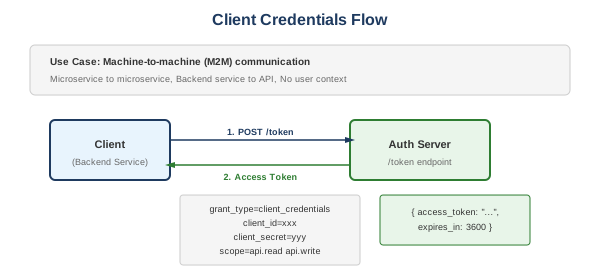
Client Credentials Flow
@Service
public class OAuth2ClientService {

    private final WebClient webClient;
    private final String tokenEndpoint;
    private final String clientId;
    private final String clientSecret;

    private String accessToken;
    private Instant tokenExpiry;

    public String getAccessToken() {
        if (accessToken == null || Instant.now().isAfter(tokenExpiry)) {
            refreshToken();
        }
        return accessToken;
    }

    private synchronized void refreshToken() {
        TokenResponse response = webClient.post()
            .uri(tokenEndpoint)
            .contentType(MediaType.APPLICATION_FORM_URLENCODED)
            .body(BodyInserters.fromFormData("grant_type", "client_credentials")
                .with("client_id", clientId)
                .with("client_secret", clientSecret)
                .with("scope", "api.read api.write"))
            .retrieve()
            .bodyToMono(TokenResponse.class)
            .block();

        this.accessToken = response.getAccessToken();
        // Refresh slightly before actual expiry
        this.tokenExpiry = Instant.now()
            .plusSeconds(response.getExpiresIn() - 60);
    }
}
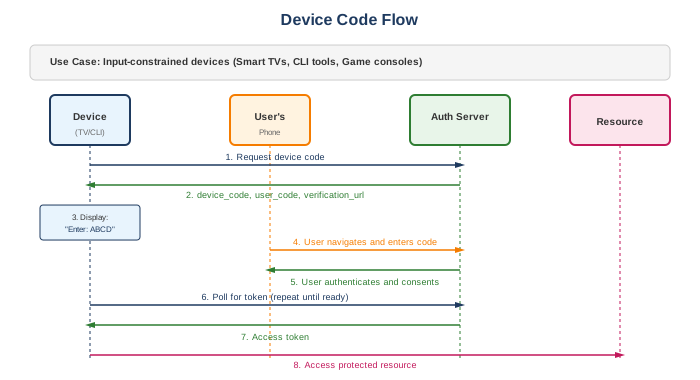
Device Code Flow
OpenID Connect (OIDC)
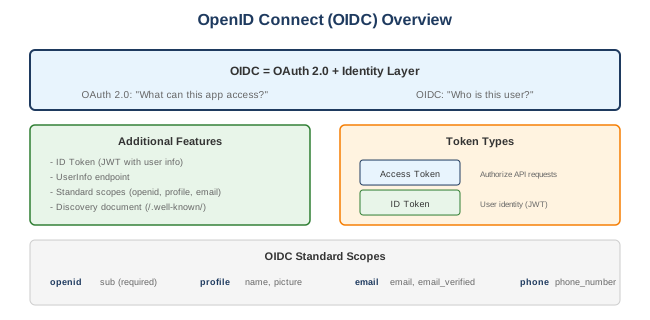
ID Token Claims
{
  "iss": "https://auth.example.com",     // Issuer
  "sub": "user123",                       // Subject (user ID)
  "aud": "my-client-id",                  // Audience
  "exp": 1704067200,                      // Expiration
  "iat": 1704063600,                      // Issued at
  "auth_time": 1704063500,                // When user authenticated
  "nonce": "abc123",                      // Replay protection
  "name": "John Doe",                     // User's full name
  "email": "[email protected]",            // User's email
  "email_verified": true,                 // Email verification status
  "picture": "https://example.com/john.jpg"
}
OIDC Scopes
| Scope | Claims |
|---|---|
| openid | sub (required for OIDC) |
| profile | name, family_name, given_name, nickname, preferred_username, picture, updated_at |
| email, email_verified | |
| address | address (JSON object) |
| phone | phone_number, phone_number_verified |
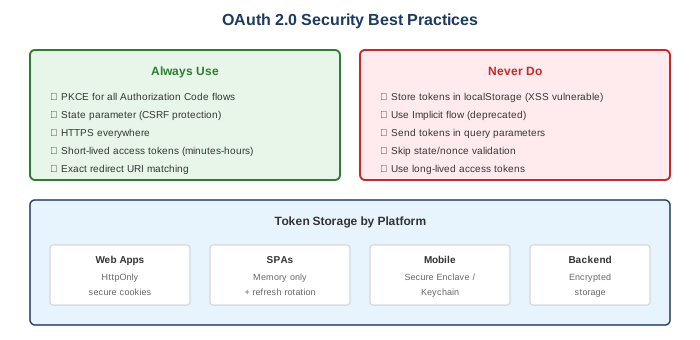
OAuth 2.0 Security Best Practices
Spring Security OAuth 2.0
OAuth 2.0 Client (Login with OAuth)
@Configuration
@EnableWebSecurity
public class SecurityConfig {

    @Bean
    public SecurityFilterChain filterChain(HttpSecurity http) throws Exception {
        http
            .authorizeHttpRequests(auth -> auth
                .requestMatchers("/", "/login/**").permitAll()
                .anyRequest().authenticated()
            )
            .oauth2Login(oauth2 -> oauth2
                .loginPage("/login")
                .defaultSuccessUrl("/dashboard")
                .userInfoEndpoint(userInfo -> userInfo
                    .userService(customOAuth2UserService())
                )
            );
        return http.build();
    }

    @Bean
    public OAuth2UserService<OAuth2UserRequest, OAuth2User> customOAuth2UserService() {
        return new CustomOAuth2UserService();
    }
}

// application.yml
spring:
  security:
    oauth2:
      client:
        registration:
          google:
            client-id: ${GOOGLE_CLIENT_ID}
            client-secret: ${GOOGLE_CLIENT_SECRET}
            scope: openid, profile, email
          github:
            client-id: ${GITHUB_CLIENT_ID}
            client-secret: ${GITHUB_CLIENT_SECRET}
            scope: user:email
Resource Server (API Protection)
@Configuration
@EnableWebSecurity
public class ResourceServerConfig {

    @Bean
    public SecurityFilterChain filterChain(HttpSecurity http) throws Exception {
        http
            .authorizeHttpRequests(auth -> auth
                .requestMatchers("/api/public/**").permitAll()
                .requestMatchers("/api/admin/**").hasAuthority("SCOPE_admin")
                .anyRequest().authenticated()
            )
            .oauth2ResourceServer(oauth2 -> oauth2
                .jwt(jwt -> jwt
                    .jwtAuthenticationConverter(jwtAuthenticationConverter())
                )
            );
        return http.build();
    }

    @Bean
    public JwtAuthenticationConverter jwtAuthenticationConverter() {
        JwtGrantedAuthoritiesConverter authoritiesConverter =
            new JwtGrantedAuthoritiesConverter();
        authoritiesConverter.setAuthoritiesClaimName("roles");
        authoritiesConverter.setAuthorityPrefix("ROLE_");

        JwtAuthenticationConverter converter = new JwtAuthenticationConverter();
        converter.setJwtGrantedAuthoritiesConverter(authoritiesConverter);
        return converter;
    }
}

// application.yml
spring:
  security:
    oauth2:
      resourceserver:
        jwt:
          issuer-uri: https://auth.example.com
          # or
          jwk-set-uri: https://auth.example.com/.well-known/jwks.json
Authorization Server (Spring Authorization Server)
@Configuration
public class AuthorizationServerConfig {

    @Bean
    @Order(1)
    public SecurityFilterChain authorizationServerSecurityFilterChain(HttpSecurity http)
            throws Exception {
        OAuth2AuthorizationServerConfiguration.applyDefaultSecurity(http);

        http.getConfigurer(OAuth2AuthorizationServerConfigurer.class)
            .oidc(Customizer.withDefaults());

        http.exceptionHandling(exceptions -> exceptions
            .defaultAuthenticationEntryPointFor(
                new LoginUrlAuthenticationEntryPoint("/login"),
                new MediaTypeRequestMatcher(MediaType.TEXT_HTML)
            )
        );

        return http.build();
    }

    @Bean
    public RegisteredClientRepository registeredClientRepository() {
        RegisteredClient webClient = RegisteredClient.withId(UUID.randomUUID().toString())
            .clientId("web-client")
            .clientSecret("{noop}secret")
            .clientAuthenticationMethod(ClientAuthenticationMethod.CLIENT_SECRET_BASIC)
            .authorizationGrantType(AuthorizationGrantType.AUTHORIZATION_CODE)
            .authorizationGrantType(AuthorizationGrantType.REFRESH_TOKEN)
            .redirectUri("http://localhost:8080/callback")
            .scope(OidcScopes.OPENID)
            .scope(OidcScopes.PROFILE)
            .scope("api.read")
            .clientSettings(ClientSettings.builder()
                .requireProofKey(true)  // PKCE required
                .build())
            .tokenSettings(TokenSettings.builder()
                .accessTokenTimeToLive(Duration.ofMinutes(15))
                .refreshTokenTimeToLive(Duration.ofDays(7))
                .build())
            .build();

        return new InMemoryRegisteredClientRepository(webClient);
    }

    @Bean
    public JWKSource<SecurityContext> jwkSource() {
        RSAKey rsaKey = generateRsaKey();
        JWKSet jwkSet = new JWKSet(rsaKey);
        return (jwkSelector, securityContext) -> jwkSelector.select(jwkSet);
    }
}
Token Introspection vs JWT Validation
| Aspect | Introspection | Local JWT Validation |
|---|---|---|
| Method | Call auth server to validate | Validate signature locally using public key |
| Revocation | Real-time revocation check | Can't detect revocation until expiry |
| Performance | Network latency per request | Fast (no network call) |
| Token Format | Works with opaque tokens | Requires JWT format |
| Best For | Sensitive operations | High-throughput APIs |
Common Interview Questions
- What is OAuth 2.0?
- Authorization framework for delegated access
- Allows third-party apps limited resource access
-
Without sharing credentials
-
OAuth 2.0 vs OIDC?
- OAuth 2.0: Authorization (access tokens)
- OIDC: Authentication layer (ID tokens with identity)
-
OIDC builds on top of OAuth 2.0
-
Why use PKCE?
- Protects authorization code from interception
- Required for public clients (SPAs, mobile)
-
Recommended for all clients now
-
How to handle token revocation?
- Short-lived access tokens
- Refresh token rotation
- Token introspection endpoint
-
Revocation endpoint
-
Where to store tokens in browser?
- Access token: Memory only (not localStorage)
- Refresh token: HttpOnly secure cookie
- Avoid localStorage (XSS vulnerable)
- *