Scaling Reads
The Problem
When read traffic overwhelms your system: - Database becomes bottleneck - High latency for users - Increased costs - System instability
Read-heavy systems (read:write ratios): - Social media feeds: 1000:1 - E-commerce product pages: 100:1 - News websites: 10000:1 - Search engines: Very high
Options & Trade-offs
1. Caching
Philosophy: "Store computed/fetched data closer to the user"
Cache Layers
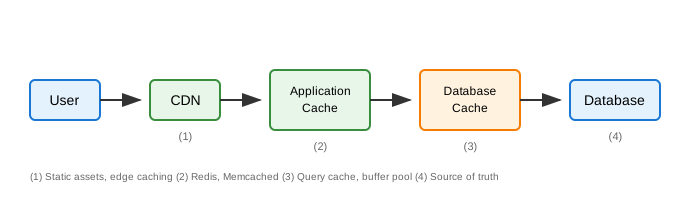
Caching Strategies
Cache-Aside (Lazy Loading)
public Product getProduct(String id) {
    // 1. Check cache
    Product product = cache.get("product:" + id);
    if (product != null) {
        return product;
    }

    // 2. Cache miss - fetch from DB
    product = database.findById(id);

    // 3. Populate cache
    if (product != null) {
        cache.set("product:" + id, product, Duration.ofMinutes(30));
    }

    return product;
}

// On update
public void updateProduct(Product product) {
    database.save(product);
    cache.delete("product:" + product.getId()); // Invalidate
}
| Pros | Cons |
|---|---|
| Only caches what's needed | Cache miss = slow |
| Simple to implement | Stale data possible |
| Resilient to cache failure | Three calls on miss |
Read-Through Cache
// Cache handles loading automatically
LoadingCache<String, Product> cache = Caffeine.newBuilder()
    .maximumSize(10_000)
    .expireAfterWrite(Duration.ofMinutes(30))
    .build(key -> database.findById(key)); // Loader function

Product product = cache.get(productId); // Auto-loads on miss
| Pros | Cons |
|---|---|
| Simpler application code | Cache library dependency |
| Consistent loading logic | Less control |
Write-Through Cache
public void saveProduct(Product product) {
    // Write to cache AND database (sync)
    cache.set("product:" + product.getId(), product);
    database.save(product);
}
| Pros | Cons |
|---|---|
| Cache always consistent | Write latency increased |
| No stale data | May cache unused data |
Write-Behind (Write-Back)
public void saveProduct(Product product) {
    // Write to cache immediately
    cache.set("product:" + product.getId(), product);

    // Async write to database
    writeQueue.add(product);
}

// Background worker
@Scheduled(fixedDelay = 1000)
public void flushToDatabase() {
    List<Product> batch = writeQueue.drain();
    database.batchSave(batch);
}
| Pros | Cons |
|---|---|
| Fast writes | Data loss risk if crash |
| Batch writes = efficient | Complex recovery |
| Reduced DB load | Inconsistency window |
Cache Invalidation Patterns
// Time-based (TTL)
cache.set(key, value, Duration.ofMinutes(5));

// Event-based
@EventListener
public void onProductUpdated(ProductUpdatedEvent event) {
    cache.delete("product:" + event.getProductId());
    cache.delete("category:" + event.getCategoryId() + ":products");
}

// Version-based
String key = "product:" + id + ":v" + version;

// Tag-based invalidation
cache.taggedSet("product:" + id, value, "category:" + categoryId);
cache.deleteByTag("category:" + categoryId);
Multi-Level Caching
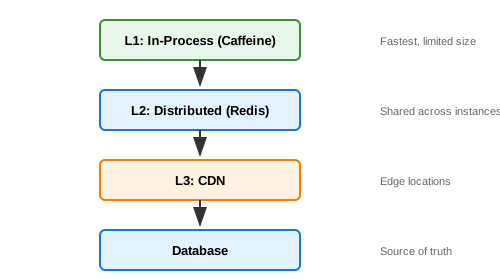
public Product getProduct(String id) {
    // L1: Local cache
    Product product = localCache.getIfPresent(id);
    if (product != null) return product;

    // L2: Distributed cache
    product = redisCache.get("product:" + id);
    if (product != null) {
        localCache.put(id, product);
        return product;
    }

    // L3: Database
    product = database.findById(id);
    if (product != null) {
        redisCache.set("product:" + id, product);
        localCache.put(id, product);
    }

    return product;
}
| Pros | Cons |
|---|---|
| Reduces cache load | Consistency complexity |
| Fastest possible reads | More memory usage |
| Reduces network calls | Cache coherence issues |
2. Read Replicas
Philosophy: "Distribute read load across multiple database copies"
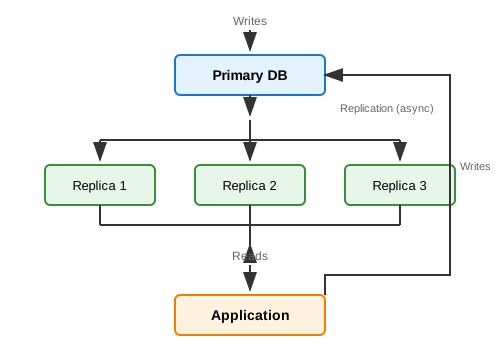
Implementation:
@Configuration
public class DatabaseConfig {

    @Bean
    @Primary
    public DataSource routingDataSource() {
        Map<Object, Object> dataSources = new HashMap<>();
        dataSources.put("primary", primaryDataSource());
        dataSources.put("replica", replicaDataSource());

        RoutingDataSource routing = new RoutingDataSource();
        routing.setTargetDataSources(dataSources);
        routing.setDefaultTargetDataSource(primaryDataSource());
        return routing;
    }
}

public class RoutingDataSource extends AbstractRoutingDataSource {
    @Override
    protected Object determineCurrentLookupKey() {
        return TransactionSynchronizationManager.isCurrentTransactionReadOnly()
            ? "replica" : "primary";
    }
}

// Usage
@Transactional(readOnly = true)  // Routes to replica
public List<Product> getProducts() {
    return productRepository.findAll();
}

@Transactional  // Routes to primary
public void saveProduct(Product product) {
    productRepository.save(product);
}
Replication Lag Handling:
// Read-your-writes consistency
public Order getOrder(String orderId, String userId) {
    // If user just created this order, read from primary
    if (recentWriteCache.contains(userId + ":" + orderId)) {
        return primaryRepo.findById(orderId);
    }
    return replicaRepo.findById(orderId);
}

public Order createOrder(Order order) {
    Order saved = primaryRepo.save(order);
    // Mark as recently written
    recentWriteCache.put(
        order.getUserId() + ":" + saved.getId(),
        true,
        Duration.ofSeconds(5)
    );
    return saved;
}
| Pros | Cons |
|---|---|
| Scales reads linearly | Replication lag |
| Improves availability | Eventual consistency |
| Geographic distribution | Write bottleneck remains |
| Simple to set up | Cost (more servers) |
3. CQRS (Command Query Responsibility Segregation)
Philosophy: "Separate read and write models optimized for their purpose"
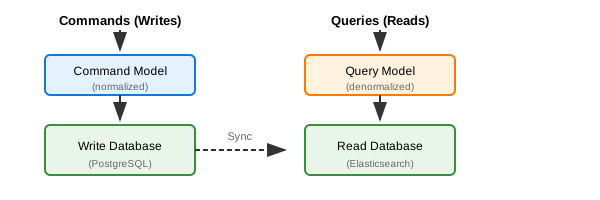
Implementation:
// Write Side (Commands)
@Entity
@Table(name = "orders")
public class Order {
    @Id private String id;
    private String customerId;
    private String status;
    @OneToMany private List<OrderItem> items;
}

@Service
public class OrderCommandService {
    @Transactional
    public void createOrder(CreateOrderCommand cmd) {
        Order order = new Order(cmd);
        orderRepository.save(order);

        // Publish event for read model sync
        eventPublisher.publish(new OrderCreatedEvent(order));
    }
}

// Read Side (Queries)
@Document(indexName = "orders")
public class OrderView {
    private String id;
    private String customerName;  // Denormalized
    private String customerEmail; // Denormalized
    private BigDecimal totalAmount;
    private List<OrderItemView> items;
    private String status;
}

@Service
public class OrderQueryService {
    public List<OrderView> searchOrders(OrderSearchCriteria criteria) {
        return elasticsearchRepo.search(criteria);
    }
}

// Event Handler (Sync)
@EventListener
public void onOrderCreated(OrderCreatedEvent event) {
    Customer customer = customerRepo.findById(event.getCustomerId());

    OrderView view = OrderView.builder()
        .id(event.getId())
        .customerName(customer.getName())
        .customerEmail(customer.getEmail())
        .totalAmount(event.calculateTotal())
        .items(mapItems(event.getItems()))
        .build();

    elasticsearchRepo.save(view);
}
| Pros | Cons |
|---|---|
| Optimized for each use case | Increased complexity |
| Independent scaling | Eventual consistency |
| Different storage per need | Sync logic required |
| Better read performance | More infrastructure |
When to use: - Complex queries on normalized data - Different read/write patterns - Need for search (Elasticsearch) - Reporting/analytics views
4. CDN (Content Delivery Network)
Philosophy: "Serve content from locations closest to users"
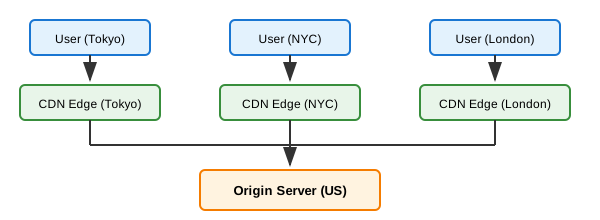
What to cache on CDN: - Static assets (JS, CSS, images) - API responses (with appropriate headers) - HTML pages (for static/semi-static content) - Video/media content
Implementation:
// Spring Boot - Cache Control Headers
@GetMapping("/api/products/{id}")
public ResponseEntity<Product> getProduct(@PathVariable String id) {
    Product product = productService.getProduct(id);

    return ResponseEntity.ok()
        .cacheControl(CacheControl.maxAge(Duration.ofMinutes(5)))
        .eTag(product.getVersion())
        .body(product);
}

// Different caching for different content
@GetMapping("/api/products")
public ResponseEntity<List<Product>> getProducts() {
    return ResponseEntity.ok()
        .cacheControl(CacheControl.maxAge(Duration.ofMinutes(1))
            .staleWhileRevalidate(Duration.ofMinutes(5)))
        .body(productService.getAllProducts());
}
CDN Configuration (Cloudflare example):
Page Rules:
- /static/* → Cache Level: Cache Everything, TTL: 1 year
- /api/products/* → Cache Level: Cache Everything, TTL: 5 min
- /api/user/* → Cache Level: Bypass (personalized)
| Pros | Cons |
|---|---|
| Dramatic latency reduction | Cache invalidation complexity |
| Reduces origin load | Cost for bandwidth |
| Global availability | Not for personalized content |
| DDoS protection | Stale content risk |
5. Materialized Views
Philosophy: "Pre-compute expensive queries"
-- Instead of joining every time:
SELECT c.name, SUM(o.amount) as total_orders
FROM customers c
JOIN orders o ON c.id = o.customer_id
GROUP BY c.id;

-- Create materialized view:
CREATE MATERIALIZED VIEW customer_order_summary AS
SELECT
    c.id as customer_id,
    c.name,
    COUNT(o.id) as order_count,
    SUM(o.amount) as total_amount
FROM customers c
LEFT JOIN orders o ON c.id = o.customer_id
GROUP BY c.id, c.name;

-- Refresh periodically
REFRESH MATERIALIZED VIEW customer_order_summary;

-- Query is now simple:
SELECT * FROM customer_order_summary WHERE customer_id = 123;
Application-Level Materialized Views:
// Store computed data in separate table
@Entity
@Table(name = "product_stats")
public class ProductStats {
    @Id private String productId;
    private int viewCount;
    private int purchaseCount;
    private double averageRating;
    private int reviewCount;
    private LocalDateTime lastUpdated;
}

// Update async when events occur
@EventListener
public void onProductViewed(ProductViewedEvent event) {
    productStatsRepository.incrementViewCount(event.getProductId());
}

@Scheduled(fixedDelay = 60000)
public void refreshStats() {
    // Recalculate from source tables
    productStatsRepository.refreshAllStats();
}
| Pros | Cons |
|---|---|
| Very fast reads | Storage overhead |
| Reduces join complexity | Refresh cost |
| Pre-aggregated data | Stale until refresh |
| Offloads computation |
6. Denormalization
Philosophy: "Store redundant data to avoid joins"
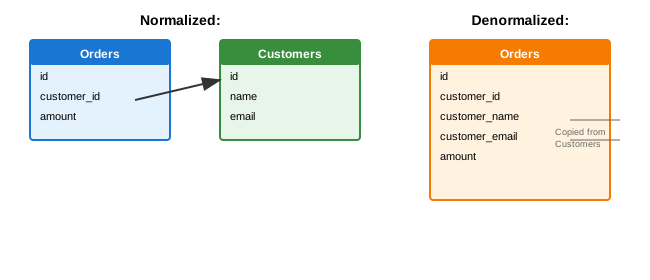
@Entity
public class Order {
    @Id private String id;
    private String customerId;

    // Denormalized fields
    private String customerName;
    private String customerEmail;

    private BigDecimal amount;
}

// Keep in sync
@EventListener
public void onCustomerUpdated(CustomerUpdatedEvent event) {
    orderRepository.updateCustomerDetails(
        event.getCustomerId(),
        event.getName(),
        event.getEmail()
    );
}
| Pros | Cons |
|---|---|
| Eliminates joins | Data duplication |
| Faster reads | Update complexity |
| Simpler queries | Inconsistency risk |
| More storage |
7. Data Partitioning (Sharding)
Philosophy: "Divide data so queries hit smaller datasets"
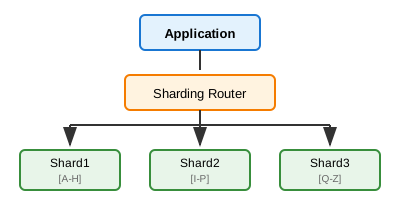
See "Scaling Writes" document for detailed sharding strategies
Comparison Matrix
| Strategy | Latency | Consistency | Complexity | Cost | Best For |
|---|---|---|---|---|---|
| Caching | Very Low | Eventual | Low-Medium | Low | Hot data |
| Read Replicas | Low | Eventual | Low | Medium | General read scaling |
| CQRS | Very Low | Eventual | High | High | Complex queries |
| CDN | Lowest | Eventual | Low | Medium | Static/semi-static |
| Materialized Views | Very Low | Eventual | Medium | Low | Aggregations |
| Denormalization | Low | Strong* | Medium | Low | Join-heavy queries |
| Sharding | Low | Strong | High | High | Large datasets |
*If updates handled correctly
Decision Tree
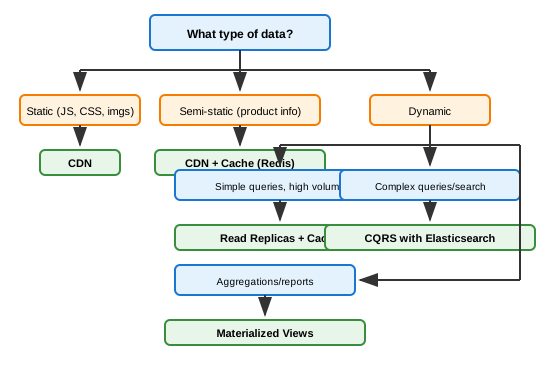
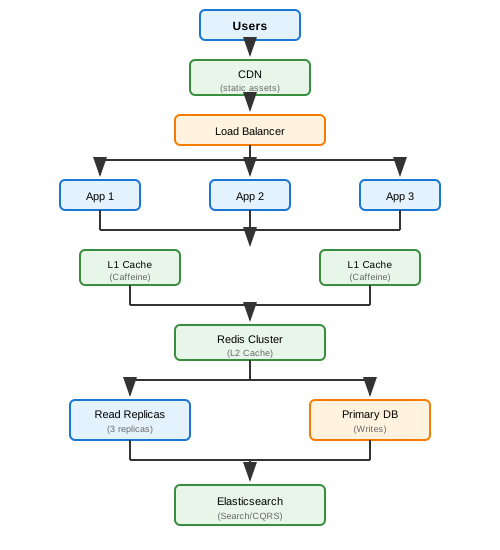
Scaling Reads Architecture Example
Key Takeaways
- Cache first - Most impactful and simplest
- Cache at multiple levels - L1 (local), L2 (distributed), CDN
- Use read replicas - Easy horizontal read scaling
- Consider CQRS - When read and write models differ significantly
- CDN for static content - Dramatic latency improvement
- Denormalize strategically - Trade storage for speed
- Materialized views for aggregations - Pre-compute expensive queries
- Always plan for cache invalidation - Hardest problem in caching