Real Time Updates
The Problem
How do clients receive updates from the server as soon as data changes, without constantly asking "is there anything new?"
Common Scenarios: - Chat applications (WhatsApp, Slack) - Live dashboards (stock prices, analytics) - Collaborative editing (Google Docs) - Gaming (multiplayer state sync) - Notifications (social media, alerts) - Live feeds (Twitter, news)
Options & Trade-offs
1. Short Polling
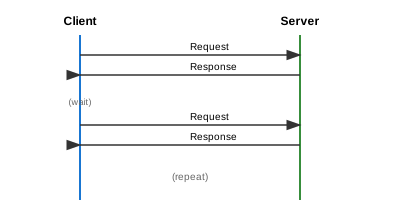
How it works: - Client repeatedly sends HTTP requests at fixed intervals - Server responds immediately with current state or empty response
Implementation:
// Client-side
setInterval(async () => {
    const response = await fetch('/api/updates');
    if (response.data) {
        updateUI(response.data);
    }
}, 5000); // Poll every 5 seconds
| Pros | Cons |
|---|---|
| Simple to implement | High latency (up to polling interval) |
| Works everywhere (HTTP) | Wasteful - many empty responses |
| Easy to scale horizontally | High server load |
| Stateless | Not truly real-time |
When to use: - Low-frequency updates (every few minutes) - Simple systems with few clients - When other options aren't available - Fallback mechanism
2. Long Polling (Comet)
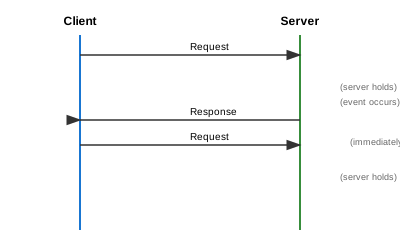
How it works: - Client sends request, server holds it open - Server responds only when new data is available (or timeout) - Client immediately sends another request after receiving response
Implementation:
// Client-side
async function longPoll() {
    try {
        const response = await fetch('/api/updates?timeout=30000');
        if (response.data) {
            updateUI(response.data);
        }
    } finally {
        longPoll(); // Immediately reconnect
    }
}

// Server-side (pseudo-code)
async function handleLongPoll(request) {
    const timeout = request.query.timeout || 30000;
    const data = await waitForUpdate(timeout);
    return data || { status: 'no-update' };
}
| Pros | Cons |
|---|---|
| Near real-time updates | Holding connections uses server resources |
| Less wasteful than short polling | Timeout handling complexity |
| Works with HTTP/1.1 | Not suitable for high-frequency updates |
| Better than polling for infrequent updates | Connection overhead on each response |
When to use: - Moderate update frequency - When WebSockets aren't available - Behind restrictive firewalls/proxies - Email-style notifications
3. Server-Sent Events (SSE)
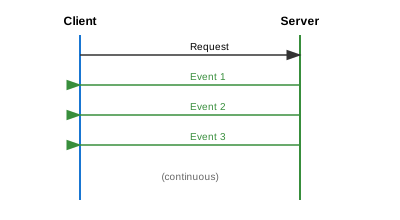
How it works:
- Client opens persistent HTTP connection
- Server pushes events over this single connection
- Uses text/event-stream content type
- Automatic reconnection built into browser API
Implementation:
// Client-side
const eventSource = new EventSource('/api/stream');

eventSource.onmessage = (event) => {
    const data = JSON.parse(event.data);
    updateUI(data);
};

eventSource.onerror = (error) => {
    console.error('SSE error:', error);
    // Browser auto-reconnects
};

// Server-side (Node.js)
app.get('/api/stream', (req, res) => {
    res.setHeader('Content-Type', 'text/event-stream');
    res.setHeader('Cache-Control', 'no-cache');
    res.setHeader('Connection', 'keep-alive');

    const sendEvent = (data) => {
        res.write(`data: ${JSON.stringify(data)}\n\n`);
    };

    // Subscribe to updates
    eventEmitter.on('update', sendEvent);

    req.on('close', () => {
        eventEmitter.off('update', sendEvent);
    });
});
Event Format:
| Pros | Cons |
|---|---|
| Simple API (browser native) | Unidirectional (server → client only) |
| Automatic reconnection | Limited browser connections (~6 per domain) |
| Built-in event IDs for resuming | Text-only (no binary) |
| Works over HTTP/2 | Not supported in all environments |
| Lightweight |
When to use: - One-way data flow (server to client) - Live feeds, notifications - Stock tickers, dashboards - When simplicity is priority
4. WebSockets
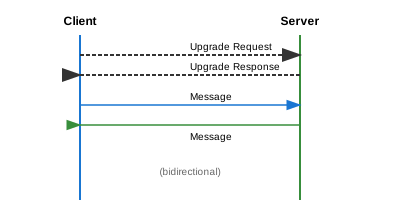
How it works: - HTTP upgrade handshake establishes persistent TCP connection - Full-duplex communication (both directions simultaneously) - Low-latency message passing - Requires connection state management
Implementation:
// Client-side
const socket = new WebSocket('wss://example.com/ws');

socket.onopen = () => {
    socket.send(JSON.stringify({ type: 'subscribe', channel: 'updates' }));
};

socket.onmessage = (event) => {
    const data = JSON.parse(event.data);
    updateUI(data);
};

socket.onclose = (event) => {
    // Implement reconnection logic
    setTimeout(() => reconnect(), 1000);
};

// Server-side (Node.js with ws library)
const WebSocket = require('ws');
const wss = new WebSocket.Server({ port: 8080 });

wss.on('connection', (ws) => {
    ws.on('message', (message) => {
        const data = JSON.parse(message);
        handleMessage(ws, data);
    });

    ws.on('close', () => {
        cleanupConnection(ws);
    });
});

// Broadcast to all clients
function broadcast(data) {
    wss.clients.forEach((client) => {
        if (client.readyState === WebSocket.OPEN) {
            client.send(JSON.stringify(data));
        }
    });
}
| Pros | Cons |
|---|---|
| True bidirectional | More complex to implement |
| Very low latency | Stateful connections (harder to scale) |
| Efficient for high-frequency updates | Need sticky sessions or pub/sub |
| Binary and text support | Firewall/proxy issues possible |
| Single connection for both directions | Connection management overhead |
When to use: - Chat applications - Multiplayer games - Collaborative editing - High-frequency bidirectional updates - Trading platforms
5. WebRTC (Peer-to-Peer)
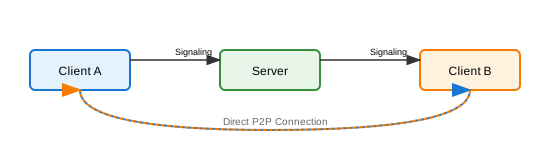
How it works: - Server only used for initial signaling (connection setup) - Direct peer-to-peer communication after setup - Supports audio, video, and arbitrary data - Uses ICE, STUN, TURN for NAT traversal
| Pros | Cons |
|---|---|
| Lowest latency (direct connection) | Complex setup (ICE, STUN, TURN) |
| Reduces server load | NAT traversal challenges |
| Great for media streaming | Not suitable for many-to-many |
| End-to-end encryption possible | Fallback to TURN adds latency |
When to use: - Video/audio calls - Screen sharing - P2P file transfer - Low-latency gaming (2 players)
6. Push Notifications
For Mobile/Desktop Apps: - APNs (Apple Push Notification Service) - FCM (Firebase Cloud Messaging) - Web Push API (browsers)
How it works: - App registers with push service, gets device token - Server sends notification to push service with token - Push service delivers to device - Works even when app is closed
| Pros | Cons |
|---|---|
| Works when app is closed | Requires platform integration |
| Battery efficient | Delivery not guaranteed |
| Native OS integration | Size limits on payload |
| No persistent connection needed | Privacy concerns |
When to use: - Mobile apps needing background updates - Important alerts and notifications - When user isn't actively using app
Scaling Real-Time Systems
Challenge: Horizontal Scaling with Stateful Connections
Problem: WebSocket connections are stateful. User A connects to Server 1, User B to Server 2. How does User A's message reach User B?
Solution 1: Sticky Sessions
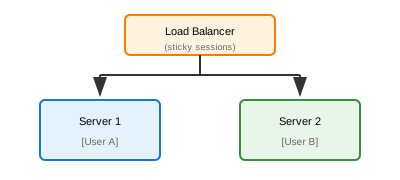
- Load balancer routes user to same server
- Simple but limits scalability
- Server failure = lost connections
Solution 2: Pub/Sub Backbone
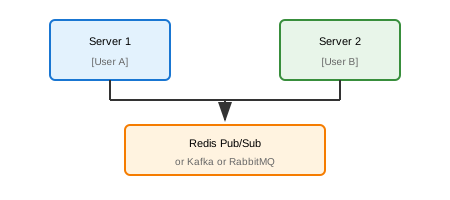
Implementation:
// When message received on Server 1
redisPublisher.publish('chat:room123', JSON.stringify(message));

// All servers subscribe
redisSubscriber.subscribe('chat:room123');
redisSubscriber.on('message', (channel, message) => {
    // Broadcast to local WebSocket clients in this room
    broadcastToRoom(channel, JSON.parse(message));
});
Solution 3: Dedicated Real-Time Service
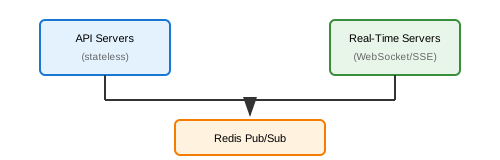
- Separate concerns
- Scale independently
- Use managed services (Pusher, Ably, Socket.io)
Comparison Matrix
| Criteria | Short Poll | Long Poll | SSE | WebSocket | WebRTC |
|---|---|---|---|---|---|
| Latency | High | Medium | Low | Very Low | Lowest |
| Complexity | Very Low | Low | Low | Medium | High |
| Scalability | Easy | Medium | Easy | Hard | N/A |
| Direction | Client→Server | Client→Server | Server→Client | Bidirectional | Bidirectional |
| Binary Data | Yes | Yes | No | Yes | Yes |
| Browser Support | Universal | Universal | Good | Good | Good |
| Mobile Battery | Poor | Fair | Good | Good | Fair |
| Firewall Friendly | Yes | Yes | Yes | Sometimes | No |
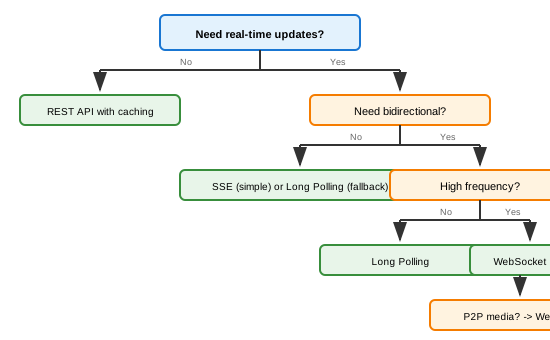
Decision Tree
Real-World Architecture Examples
Slack
- Primary: WebSocket for real-time messages
- Fallback: Long polling
- Backend: Pub/sub with Kafka
- Mobile: Push notifications when app backgrounded
Discord
- Primary: WebSocket with custom gateway protocol
- Voice: WebRTC
- Scale: Sharded connections by guild
Google Docs
- Collaboration: WebSocket for OT (Operational Transform)
- Presence: SSE for user cursors
- Fallback: Long polling
Stock Trading Platform
- Prices: WebSocket for live quotes
- Orders: REST API with confirmation
- Alerts: Push notifications
Key Takeaways
- Start simple - Polling might be enough for low-frequency updates
- SSE for one-way - When you only need server→client
- WebSocket for bidirectional - Chat, gaming, collaboration
- Always have fallbacks - Not all networks support WebSockets
- Pub/Sub for scale - Decouple servers with message broker
- Consider managed services - Pusher, Ably, Firebase for faster development