Handling Large Blobs
The Problem
How do you efficiently store, transfer, and serve large binary objects: - Images, videos, audio files - Documents (PDFs, spreadsheets) - Backups and archives - Large datasets - User-generated content
Challenges: - Memory constraints (can't load entire file) - Network timeouts and failures - Storage costs - Bandwidth optimization - Global delivery performance
Options & Trade-offs
1. Object Storage (S3-style)
Philosophy: "Use purpose-built storage for blobs"
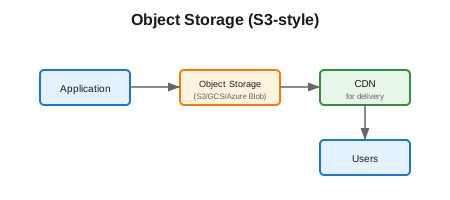
Services: - AWS S3 - Google Cloud Storage - Azure Blob Storage - MinIO (self-hosted) - Cloudflare R2
Implementation:
@Service
public class FileStorageService {
    private final S3Client s3Client;
    private final String bucketName = "my-app-files";

    // Upload with multipart for large files
    public String upload(String key, InputStream inputStream, long size) {
        if (size > 100_000_000) { // > 100MB
            return multipartUpload(key, inputStream, size);
        }

        PutObjectRequest request = PutObjectRequest.builder()
            .bucket(bucketName)
            .key(key)
            .build();

        s3Client.putObject(request, RequestBody.fromInputStream(inputStream, size));
        return getUrl(key);
    }

    private String multipartUpload(String key, InputStream inputStream, long size) {
        // 1. Initiate multipart upload
        CreateMultipartUploadRequest createRequest = CreateMultipartUploadRequest.builder()
            .bucket(bucketName)
            .key(key)
            .build();

        String uploadId = s3Client.createMultipartUpload(createRequest).uploadId();

        // 2. Upload parts
        List<CompletedPart> parts = new ArrayList<>();
        byte[] buffer = new byte[10_000_000]; // 10MB parts
        int partNumber = 1;
        int bytesRead;

        while ((bytesRead = inputStream.read(buffer)) != -1) {
            UploadPartRequest uploadPartRequest = UploadPartRequest.builder()
                .bucket(bucketName)
                .key(key)
                .uploadId(uploadId)
                .partNumber(partNumber)
                .build();

            String etag = s3Client.uploadPart(uploadPartRequest,
                RequestBody.fromBytes(Arrays.copyOf(buffer, bytesRead))).eTag();

            parts.add(CompletedPart.builder()
                .partNumber(partNumber++)
                .eTag(etag)
                .build());
        }

        // 3. Complete upload
        CompleteMultipartUploadRequest completeRequest = CompleteMultipartUploadRequest.builder()
            .bucket(bucketName)
            .key(key)
            .uploadId(uploadId)
            .multipartUpload(CompletedMultipartUpload.builder().parts(parts).build())
            .build();

        s3Client.completeMultipartUpload(completeRequest);
        return getUrl(key);
    }
}
| Pros | Cons |
|---|---|
| Infinite scale | Latency (not local) |
| Highly durable (11 9s) | Cost for egress |
| Managed service | Vendor lock-in |
| Built-in CDN integration | |
| Lifecycle policies |
2. Signed URLs (Pre-signed URLs)
Philosophy: "Let clients upload/download directly to storage"
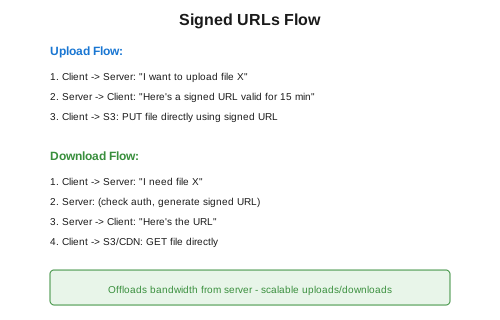
Implementation:
@RestController
public class FileController {
    private final S3Presigner presigner;

    // Generate upload URL
    @PostMapping("/api/files/upload-url")
    public UploadUrlResponse getUploadUrl(@RequestBody UploadRequest request) {
        String key = generateKey(request.getFileName());

        PutObjectRequest objectRequest = PutObjectRequest.builder()
            .bucket(bucketName)
            .key(key)
            .contentType(request.getContentType())
            .build();

        PutObjectPresignRequest presignRequest = PutObjectPresignRequest.builder()
            .signatureDuration(Duration.ofMinutes(15))
            .putObjectRequest(objectRequest)
            .build();

        PresignedPutObjectRequest presignedRequest = presigner.presignPutObject(presignRequest);

        return new UploadUrlResponse(
            presignedRequest.url().toString(),
            key,
            presignedRequest.expiration()
        );
    }

    // Generate download URL
    @GetMapping("/api/files/{key}/download-url")
    public DownloadUrlResponse getDownloadUrl(@PathVariable String key) {
        GetObjectRequest objectRequest = GetObjectRequest.builder()
            .bucket(bucketName)
            .key(key)
            .build();

        GetObjectPresignRequest presignRequest = GetObjectPresignRequest.builder()
            .signatureDuration(Duration.ofHours(1))
            .getObjectRequest(objectRequest)
            .build();

        PresignedGetObjectRequest presignedRequest = presigner.presignGetObject(presignRequest);

        return new DownloadUrlResponse(
            presignedRequest.url().toString(),
            presignedRequest.expiration()
        );
    }
}
Client-side Upload (JavaScript):
async function uploadFile(file) {
    // 1. Get signed URL from backend
    const response = await fetch('/api/files/upload-url', {
        method: 'POST',
        headers: { 'Content-Type': 'application/json' },
        body: JSON.stringify({
            fileName: file.name,
            contentType: file.type
        })
    });
    const { uploadUrl, key } = await response.json();

    // 2. Upload directly to S3
    await fetch(uploadUrl, {
        method: 'PUT',
        headers: { 'Content-Type': file.type },
        body: file
    });

    // 3. Notify backend upload complete
    await fetch('/api/files/complete', {
        method: 'POST',
        headers: { 'Content-Type': 'application/json' },
        body: JSON.stringify({ key })
    });
}
| Pros | Cons |
|---|---|
| Offloads bandwidth from server | URL management |
| Scalable uploads/downloads | Time-limited access |
| Reduces server costs | CORS configuration |
| Direct to storage | Security considerations |
3. Chunked Upload/Download
Philosophy: "Break large files into manageable pieces"
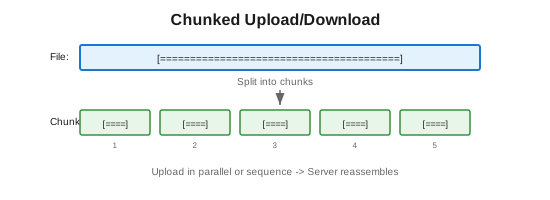
Implementation:
@RestController
public class ChunkedUploadController {

    private final Map<String, UploadSession> sessions = new ConcurrentHashMap<>();

    // 1. Initialize upload
    @PostMapping("/api/upload/init")
    public UploadSession initUpload(@RequestBody InitUploadRequest request) {
        String uploadId = UUID.randomUUID().toString();
        int totalChunks = (int) Math.ceil((double) request.getFileSize() / CHUNK_SIZE);

        UploadSession session = new UploadSession(
            uploadId,
            request.getFileName(),
            request.getFileSize(),
            totalChunks,
            new ConcurrentHashMap<>()
        );

        sessions.put(uploadId, session);
        return session;
    }

    // 2. Upload individual chunks
    @PostMapping("/api/upload/{uploadId}/chunk/{chunkIndex}")
    public ChunkResponse uploadChunk(
            @PathVariable String uploadId,
            @PathVariable int chunkIndex,
            @RequestBody byte[] chunkData) {

        UploadSession session = sessions.get(uploadId);
        if (session == null) {
            throw new NotFoundException("Upload session not found");
        }

        // Store chunk (could be S3, temp file, etc.)
        String chunkKey = uploadId + "/chunk-" + chunkIndex;
        storageService.storeChunk(chunkKey, chunkData);

        // Calculate checksum for verification
        String checksum = calculateMD5(chunkData);
        session.getChunks().put(chunkIndex, checksum);

        return new ChunkResponse(chunkIndex, checksum, session.getProgress());
    }

    // 3. Complete upload
    @PostMapping("/api/upload/{uploadId}/complete")
    public CompleteResponse completeUpload(@PathVariable String uploadId) {
        UploadSession session = sessions.get(uploadId);

        // Verify all chunks received
        if (session.getChunks().size() != session.getTotalChunks()) {
            throw new IncompleteUploadException("Missing chunks");
        }

        // Reassemble file
        String finalKey = reassembleFile(session);

        // Cleanup
        sessions.remove(uploadId);
        deleteChunks(uploadId);

        return new CompleteResponse(finalKey, session.getFileSize());
    }

    // 4. Resume upload (check which chunks exist)
    @GetMapping("/api/upload/{uploadId}/status")
    public UploadStatusResponse getUploadStatus(@PathVariable String uploadId) {
        UploadSession session = sessions.get(uploadId);
        return new UploadStatusResponse(
            session.getUploadedChunks(),
            session.getMissingChunks()
        );
    }
}
Client-side Chunked Upload:
async function chunkedUpload(file, chunkSize = 5 * 1024 * 1024) {
    // Initialize upload
    const initResponse = await fetch('/api/upload/init', {
        method: 'POST',
        headers: { 'Content-Type': 'application/json' },
        body: JSON.stringify({
            fileName: file.name,
            fileSize: file.size
        })
    });
    const { uploadId, totalChunks } = await initResponse.json();

    // Upload chunks (with retry logic)
    const uploadChunk = async (index, retries = 3) => {
        const start = index * chunkSize;
        const end = Math.min(start + chunkSize, file.size);
        const chunk = file.slice(start, end);

        try {
            const response = await fetch(`/api/upload/${uploadId}/chunk/${index}`, {
                method: 'POST',
                body: chunk
            });
            return response.json();
        } catch (error) {
            if (retries > 0) {
                await delay(1000);
                return uploadChunk(index, retries - 1);
            }
            throw error;
        }
    };

    // Upload chunks in parallel (limited concurrency)
    const concurrency = 3;
    for (let i = 0; i < totalChunks; i += concurrency) {
        const batch = [];
        for (let j = i; j < Math.min(i + concurrency, totalChunks); j++) {
            batch.push(uploadChunk(j));
        }
        await Promise.all(batch);
        updateProgress((i + concurrency) / totalChunks);
    }

    // Complete upload
    return fetch(`/api/upload/${uploadId}/complete`, { method: 'POST' });
}
| Pros | Cons |
|---|---|
| Resumable uploads | More complex |
| Parallel upload | Server-side reassembly |
| Progress tracking | Temp storage needed |
| Memory efficient | More API calls |
| Works with poor connections |
4. Streaming
Philosophy: "Process data as it flows, don't load entirely"
Server-side Streaming:
@GetMapping("/api/files/{key}/stream")
public ResponseEntity<StreamingResponseBody> streamFile(@PathVariable String key) {
    S3Object s3Object = s3Client.getObject(GetObjectRequest.builder()
        .bucket(bucketName)
        .key(key)
        .build());

    StreamingResponseBody responseBody = outputStream -> {
        try (InputStream inputStream = s3Object.response().body()) {
            byte[] buffer = new byte[8192];
            int bytesRead;
            while ((bytesRead = inputStream.read(buffer)) != -1) {
                outputStream.write(buffer, 0, bytesRead);
                outputStream.flush();
            }
        }
    };

    return ResponseEntity.ok()
        .contentType(MediaType.parseMediaType(s3Object.response().contentType()))
        .contentLength(s3Object.response().contentLength())
        .header(HttpHeaders.CONTENT_DISPOSITION,
                "attachment; filename=\"" + key + "\"")
        .body(responseBody);
}

// Range requests (for video seeking)
@GetMapping("/api/files/{key}/stream")
public ResponseEntity<StreamingResponseBody> streamWithRange(
        @PathVariable String key,
        @RequestHeader(value = HttpHeaders.RANGE, required = false) String rangeHeader) {

    S3ObjectMetadata metadata = getMetadata(key);
    long fileSize = metadata.getContentLength();

    if (rangeHeader != null) {
        // Parse range: "bytes=0-999"
        long[] range = parseRange(rangeHeader, fileSize);
        long start = range[0];
        long end = range[1];
        long contentLength = end - start + 1;

        StreamingResponseBody body = outputStream -> {
            streamRange(key, start, end, outputStream);
        };

        return ResponseEntity.status(HttpStatus.PARTIAL_CONTENT)
            .header(HttpHeaders.CONTENT_RANGE,
                    String.format("bytes %d-%d/%d", start, end, fileSize))
            .contentLength(contentLength)
            .body(body);
    }

    // Full file
    return streamFullFile(key, fileSize);
}
| Pros | Cons |
|---|---|
| Memory efficient | Connection held open |
| Supports seeking (range) | Error handling complex |
| Real-time delivery | No caching (usually) |
| Works with any size |
5. Content Delivery Network (CDN)
Philosophy: "Serve files from edge locations near users"
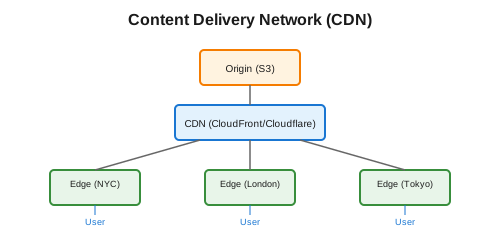
Configuration:
// CloudFront signed URLs
public String getCloudFrontSignedUrl(String key, Duration expiration) {
    Date expirationDate = Date.from(Instant.now().plus(expiration));

    return CloudFrontUrlSigner.getSignedURLWithCannedPolicy(
        Protocol.https,
        cloudFrontDomain,
        new File(privateKeyPath),
        key,
        keyPairId,
        expirationDate
    );
}

// Signed cookies for multiple files
public CookiesForCannedPolicy getSignedCookies(String resourcePath) {
    return CloudFrontCookieSigner.getCookiesForCannedPolicy(
        Protocol.https,
        cloudFrontDomain,
        privateKey,
        resourcePath + "*",
        keyPairId,
        Date.from(Instant.now().plusHours(24))
    );
}
Cache Configuration (CloudFront):
{
    "CacheBehaviors": {
        "Items": [
            {
                "PathPattern": "/static/*",
                "TTL": 31536000,
                "Compress": true
            },
            {
                "PathPattern": "/api/*",
                "TTL": 0,
                "ForwardedValues": {
                    "Headers": ["Authorization"]
                }
            }
        ]
    }
}
| Pros | Cons |
|---|---|
| Lowest latency | Cost |
| Global delivery | Cache invalidation |
| DDoS protection | Configuration complexity |
| Automatic scaling | |
| Compression |
6. Image/Video Processing
Philosophy: "Transform and optimize media on-the-fly or ahead of time"
Services: - Cloudinary - imgix - Cloudflare Images - AWS Lambda@Edge - Thumbor (self-hosted)
On-the-fly Transformation:
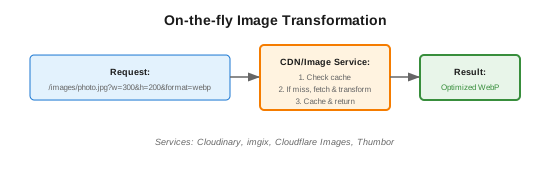
Implementation with imgix/Cloudinary:
public String getOptimizedImageUrl(String originalUrl, ImageParams params) {
    // Cloudinary example
    return cloudinary.url()
        .transformation(new Transformation()
            .width(params.getWidth())
            .height(params.getHeight())
            .crop("fill")
            .gravity("face")
            .quality("auto")
            .fetchFormat("auto"))
        .generate(originalUrl);
}

// Usage: Returns URL like:
// https://res.cloudinary.com/demo/image/upload/w_300,h_200,c_fill,g_face,q_auto,f_auto/photo.jpg
Pre-generating Variants:
@Async
public void processUploadedImage(String originalKey) {
    // Generate common sizes
    List<ImageVariant> variants = List.of(
        new ImageVariant("thumb", 150, 150),
        new ImageVariant("small", 300, 300),
        new ImageVariant("medium", 600, 600),
        new ImageVariant("large", 1200, 1200)
    );

    BufferedImage original = loadImage(originalKey);

    for (ImageVariant variant : variants) {
        BufferedImage resized = resize(original, variant.width, variant.height);
        String variantKey = getVariantKey(originalKey, variant.name);
        uploadImage(variantKey, resized, "webp"); // Modern format
    }
}
Video Processing:
// AWS Elastic Transcoder or MediaConvert
public void transcodeVideo(String inputKey) {
    CreateJobRequest request = CreateJobRequest.builder()
        .input(JobInput.builder()
            .key(inputKey)
            .build())
        .outputs(
            CreateJobOutput.builder()
                .key(inputKey.replace(".mp4", "-720p.mp4"))
                .presetId("720p-preset")
                .build(),
            CreateJobOutput.builder()
                .key(inputKey.replace(".mp4", "-480p.mp4"))
                .presetId("480p-preset")
                .build(),
            CreateJobOutput.builder()
                .key(inputKey.replace(".mp4", "-hls/"))
                .presetId("hls-preset")
                .build()
        )
        .build();

    transcoderClient.createJob(request);
}
7. Compression
Philosophy: "Reduce file size for faster transfers"
public class CompressionService {

    // Gzip compression for transfer
    public byte[] compress(byte[] data) throws IOException {
        ByteArrayOutputStream bos = new ByteArrayOutputStream();
        try (GZIPOutputStream gzip = new GZIPOutputStream(bos)) {
            gzip.write(data);
        }
        return bos.toByteArray();
    }

    // Store compressed, decompress on read
    public void storeCompressed(String key, InputStream input) {
        PutObjectRequest request = PutObjectRequest.builder()
            .bucket(bucketName)
            .key(key)
            .contentEncoding("gzip")
            .build();

        // Compress while uploading
        try (GZIPOutputStream gzip = new GZIPOutputStream(outputStream)) {
            input.transferTo(gzip);
        }
    }
}
Image Compression:
// Using different formats
public void optimizeImage(BufferedImage image, String outputPath) {
    // WebP (best for web)
    ImageIO.write(image, "webp", new File(outputPath + ".webp"));

    // AVIF (newer, better compression)
    // Requires additional library

    // JPEG with quality setting
    ImageWriter writer = ImageIO.getImageWritersByFormatName("jpeg").next();
    ImageWriteParam param = writer.getDefaultWriteParam();
    param.setCompressionMode(ImageWriteParam.MODE_EXPLICIT);
    param.setCompressionQuality(0.85f);
}
8. Deduplication
Philosophy: "Don't store the same content twice"
Content-Addressable Storage:
public class DeduplicatedStorage {

    public String store(byte[] data) {
        // Hash content to get key
        String hash = sha256(data);
        String key = "content/" + hash;

        // Check if already exists
        if (!exists(key)) {
            s3Client.putObject(
                PutObjectRequest.builder()
                    .bucket(bucketName)
                    .key(key)
                    .build(),
                RequestBody.fromBytes(data)
            );
        }

        // Return hash as reference
        return hash;
    }

    public byte[] retrieve(String hash) {
        return s3Client.getObjectAsBytes(GetObjectRequest.builder()
            .bucket(bucketName)
            .key("content/" + hash)
            .build())
            .asByteArray();
    }
}

// File metadata stored separately
@Entity
public class FileMetadata {
    @Id private String id;
    private String fileName;
    private String contentHash; // Reference to actual content
    private String userId;
    private long size;
    private Instant uploadedAt;
}
| Pros | Cons |
|---|---|
| Saves storage cost | Hash computation |
| Instant "upload" for duplicates | Reference counting for delete |
| Efficient for similar files |
Comparison Matrix
| Approach | Scalability | Complexity | Cost | Best For |
|---|---|---|---|---|
| Object Storage | Excellent | Low | Medium | General blob storage |
| Signed URLs | Excellent | Low | Low | Direct client access |
| Chunked Upload | Excellent | Medium | Low | Large file uploads |
| Streaming | Good | Medium | Low | Video/audio delivery |
| CDN | Excellent | Low | Medium | Global delivery |
| Image Processing | Excellent | Low | Medium | Media-heavy apps |
| Compression | Good | Low | Low | All blob storage |
| Deduplication | Good | Medium | Low | User-generated content |
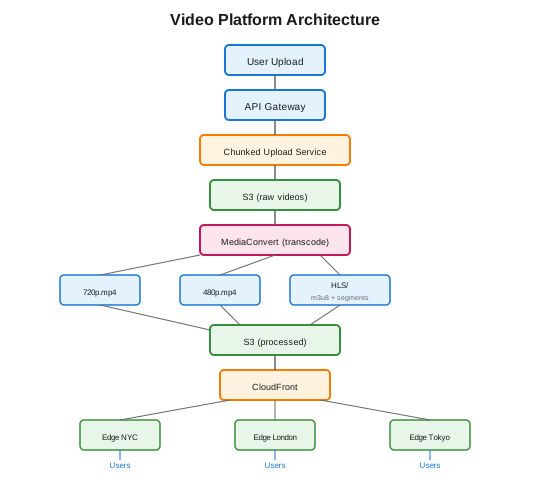
Architecture Example: Video Platform
Key Takeaways
- Use object storage - Don't store blobs in databases
- Signed URLs - Offload bandwidth from your servers
- Chunked upload - Essential for large files and resumability
- CDN everything - Dramatically improves global performance
- Process media - Transform images/videos for efficiency
- Compress appropriately - Modern formats (WebP, AVIF) save bandwidth
- Deduplicate - Save storage costs for user-generated content
- Stream, don't load - Never load entire file in memory