Technology Reference: Redis
What is Redis?
Redis (Remote Dictionary Server) is an open-source, in-memory data structure store used as a database, cache, message broker, and streaming engine.
- Type: In-memory key-value store
- Written in: C
- License: BSD (open source), Redis Source Available License (v7+)
- Protocol: RESP (Redis Serialization Protocol) over TCP
- Default Port: 6379
Core Features
Data Structures
| Type | Description | Commands |
|---|---|---|
| Strings | Binary-safe, max 512MB | SET, GET, INCR, APPEND |
| Lists | Linked lists of strings | LPUSH, RPUSH, LPOP, LRANGE |
| Sets | Unordered unique strings | SADD, SMEMBERS, SINTER, SUNION |
| Sorted Sets | Sets with score ordering | ZADD, ZRANGE, ZRANK, ZRANGEBYSCORE |
| Hashes | Field-value pairs | HSET, HGET, HMSET, HGETALL |
| Bitmaps | Bit-level operations | SETBIT, GETBIT, BITCOUNT |
| HyperLogLog | Probabilistic cardinality | PFADD, PFCOUNT, PFMERGE |
| Streams | Append-only log | XADD, XREAD, XRANGE, XGROUP |
| Geospatial | Location data | GEOADD, GEODIST, GEORADIUS |
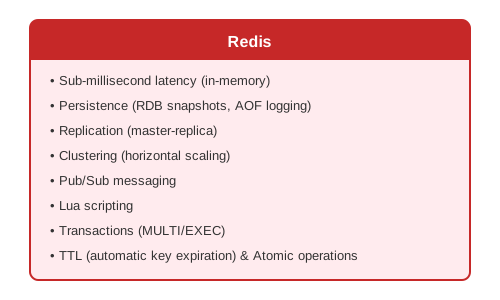
Key Features
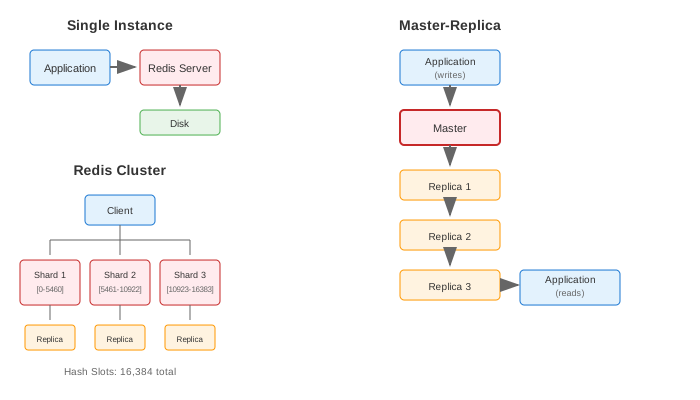
Architecture
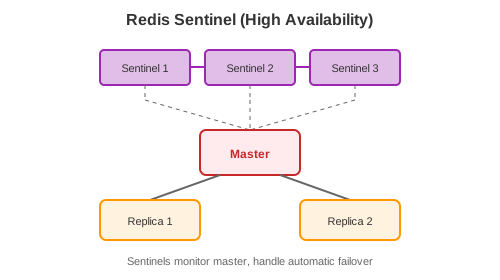
Redis Sentinel (High Availability)
Common Use Cases
1. Caching
// Cache-aside pattern
public User getUser(String userId) {
    String cacheKey = "user:" + userId;

    // Try cache
    String cached = redis.get(cacheKey);
    if (cached != null) {
        return deserialize(cached);
    }

    // Cache miss - fetch from DB
    User user = database.findById(userId);

    // Populate cache with TTL
    redis.setex(cacheKey, 3600, serialize(user)); // 1 hour TTL

    return user;
}
2. Session Storage
// Store session
public void createSession(String sessionId, Session session) {
    String key = "session:" + sessionId;
    redis.hset(key, Map.of(
        "userId", session.getUserId(),
        "email", session.getEmail(),
        "createdAt", session.getCreatedAt().toString()
    ));
    redis.expire(key, 86400); // 24 hours
}

// Retrieve session
public Session getSession(String sessionId) {
    Map<String, String> data = redis.hgetAll("session:" + sessionId);
    if (data.isEmpty()) return null;
    return Session.fromMap(data);
}
3. Rate Limiting
// Fixed window rate limiting
public boolean isAllowed(String clientId, int limit, int windowSeconds) {
    String key = "ratelimit:" + clientId + ":" + (System.currentTimeMillis() / 1000 / windowSeconds);

    long count = redis.incr(key);
    if (count == 1) {
        redis.expire(key, windowSeconds);
    }

    return count <= limit;
}

// Sliding window with sorted set
public boolean isAllowedSlidingWindow(String clientId, int limit, int windowSeconds) {
    String key = "ratelimit:" + clientId;
    long now = System.currentTimeMillis();
    long windowStart = now - (windowSeconds * 1000);

    // Remove old entries
    redis.zremrangeByScore(key, 0, windowStart);

    // Count current window
    long count = redis.zcard(key);

    if (count < limit) {
        redis.zadd(key, now, UUID.randomUUID().toString());
        redis.expire(key, windowSeconds);
        return true;
    }

    return false;
}
4. Distributed Locking
// Simple lock
public boolean acquireLock(String lockKey, String lockValue, int ttlSeconds) {
    String result = redis.set(lockKey, lockValue,
        SetParams.setParams().nx().ex(ttlSeconds));
    return "OK".equals(result);
}

// Release lock (only if we own it)
public boolean releaseLock(String lockKey, String lockValue) {
    String script = """
        if redis.call('get', KEYS[1]) == ARGV[1] then
            return redis.call('del', KEYS[1])
        else
            return 0
        end
    """;
    Long result = redis.eval(script, List.of(lockKey), List.of(lockValue));
    return result == 1;
}
5. Leaderboard
// Add/update score
public void updateScore(String leaderboard, String playerId, double score) {
    redis.zadd(leaderboard, score, playerId);
}

// Get top N players
public List<String> getTopPlayers(String leaderboard, int n) {
    return redis.zrevrange(leaderboard, 0, n - 1);
}

// Get player rank
public Long getPlayerRank(String leaderboard, String playerId) {
    return redis.zrevrank(leaderboard, playerId); // 0-based
}

// Get players around a specific player
public List<Tuple> getPlayersAround(String leaderboard, String playerId, int range) {
    Long rank = redis.zrevrank(leaderboard, playerId);
    if (rank == null) return Collections.emptyList();

    long start = Math.max(0, rank - range);
    long end = rank + range;
    return redis.zrevrangeWithScores(leaderboard, start, end);
}
6. Pub/Sub Messaging
// Publisher
public void publishMessage(String channel, String message) {
    redis.publish(channel, message);
}

// Subscriber
public void subscribe(String channel) {
    redis.subscribe(new JedisPubSub() {
        @Override
        public void onMessage(String channel, String message) {
            processMessage(message);
        }
    }, channel);
}
7. Queue / Task Processing
// Producer
public void enqueueTask(String queue, Task task) {
    redis.rpush(queue, serialize(task));
}

// Consumer (blocking)
public Task dequeueTask(String queue, int timeoutSeconds) {
    List<String> result = redis.blpop(timeoutSeconds, queue);
    if (result != null) {
        return deserialize(result.get(1));
    }
    return null;
}

// Reliable queue with RPOPLPUSH
public Task dequeueReliable(String queue, String processingQueue) {
    String task = redis.rpoplpush(queue, processingQueue);
    return task != null ? deserialize(task) : null;
}

public void completeTask(String processingQueue, String task) {
    redis.lrem(processingQueue, 1, task);
}
8. Real-time Analytics
// Count unique visitors (HyperLogLog)
public void trackVisitor(String page, String visitorId) {
    String key = "visitors:" + page + ":" + LocalDate.now();
    redis.pfadd(key, visitorId);
    redis.expire(key, 86400 * 7); // Keep for 7 days
}

public long getUniqueVisitors(String page, LocalDate date) {
    return redis.pfcount("visitors:" + page + ":" + date);
}

// Bitmap for daily active users
public void trackDailyActive(String userId, LocalDate date) {
    String key = "dau:" + date;
    int userIdInt = Math.abs(userId.hashCode());
    redis.setbit(key, userIdInt, true);
}

public long getDailyActiveCount(LocalDate date) {
    return redis.bitcount("dau:" + date);
}
Persistence Options
RDB (Snapshotting)
# redis.conf
save 900 1      # Save if 1 key changed in 900 seconds
save 300 10     # Save if 10 keys changed in 300 seconds
save 60 10000   # Save if 10000 keys changed in 60 seconds
| Pros | Cons |
|---|---|
| Compact single file | Data loss between snapshots |
| Fast restart | Fork can be slow for large datasets |
| Good for backups |
AOF (Append-Only File)
| Pros | Cons |
|---|---|
| More durable | Larger file size |
| Configurable sync | Slower restart |
| Human-readable |
Hybrid (RDB + AOF)
Best of both worlds: RDB for fast loading, AOF for durability.
Redis Cluster
Sharding
- 16,384 hash slots distributed across nodes
- Key → CRC16(key) mod 16384 → slot → node
- Hash tags for co-location:
{user:123}:profile,{user:123}:orders
Configuration
Client-Side
// Jedis Cluster
Set<HostAndPort> nodes = Set.of(
    new HostAndPort("node1", 6379),
    new HostAndPort("node2", 6379),
    new HostAndPort("node3", 6379)
);
JedisCluster cluster = new JedisCluster(nodes);

// Operations work the same
cluster.set("key", "value");
Trade-offs
| Pros | Cons |
|---|---|
| Extremely fast (sub-ms latency) | Limited by RAM |
| Rich data structures | Single-threaded command execution |
| Simple protocol | Cluster adds complexity |
| Built-in replication | No built-in encryption (pre-6.0) |
| Atomic operations | Persistence has trade-offs |
| Pub/Sub built-in | Pub/Sub is fire-and-forget |
| Lua scripting | Limited query capabilities |
| Active community | Memory fragmentation possible |
Performance Characteristics
| Metric | Value |
|---|---|
| Throughput | 100,000+ ops/sec (single node) |
| Latency | < 1ms (typical) |
| Max key size | 512 MB |
| Max value size | 512 MB |
| Max keys | 2^32 (~4 billion) |
| Cluster max nodes | 1000 |
When to Use Redis
Good For: - Caching (session, query results, page fragments) - Real-time leaderboards - Rate limiting - Pub/Sub messaging - Distributed locks - Counters and analytics - Queue/job processing - Geospatial queries
Not Good For: - Primary database (data too large for RAM) - Complex queries (joins, aggregations) - Strong consistency requirements - Large blob storage - Long-term archival
Redis vs Alternatives
| Feature | Redis | Memcached | Hazelcast |
|---|---|---|---|
| Data Structures | Many | Key-Value only | Many |
| Persistence | Yes | No | Yes |
| Clustering | Yes | Client-side | Yes |
| Pub/Sub | Yes | No | Yes |
| Replication | Yes | No | Yes |
| Transactions | Basic | No | Yes |
| Language | C | C | Java |
Best Practices
- Use appropriate data structures - Don't store JSON when hash works
- Set TTL on keys - Prevent memory bloat
- Use pipelining - Batch commands for efficiency
- Avoid large keys - Keep keys small
- Use connection pooling - Don't create connections per request
- Monitor memory - Set
maxmemoryand eviction policy - Use hash tags in cluster - Co-locate related keys
- Lua for atomic operations - Complex logic that must be atomic
Common Commands Cheat Sheet
# Strings
SET key value [EX seconds] [NX|XX]
GET key
INCR key
DECR key

# Hashes
HSET key field value
HGET key field
HMSET key field1 val1 field2 val2
HGETALL key

# Lists
LPUSH key value
RPUSH key value
LPOP key
RPOP key
LRANGE key start stop

# Sets
SADD key member
SREM key member
SMEMBERS key
SINTER key1 key2

# Sorted Sets
ZADD key score member
ZRANGE key start stop [WITHSCORES]
ZRANK key member
ZREVRANK key member

# Keys
DEL key
EXISTS key
EXPIRE key seconds
TTL key
KEYS pattern

# Pub/Sub
PUBLISH channel message
SUBSCRIBE channel

# Transactions
MULTI
... commands ...
EXEC