Kafka
What is Kafka?
Apache Kafka is a distributed event streaming platform for high-performance data pipelines, streaming analytics, data integration, and mission-critical applications.
- Type: Distributed event streaming platform
- Written in: Scala and Java
- License: Apache 2.0
- Protocol: Custom binary protocol over TCP
- Default Ports: 9092 (broker), 2181 (ZooKeeper)
- Originally developed by: LinkedIn
Core Concepts
Terminology
| Concept | Description |
|---|---|
| Topic | Category/feed name for messages |
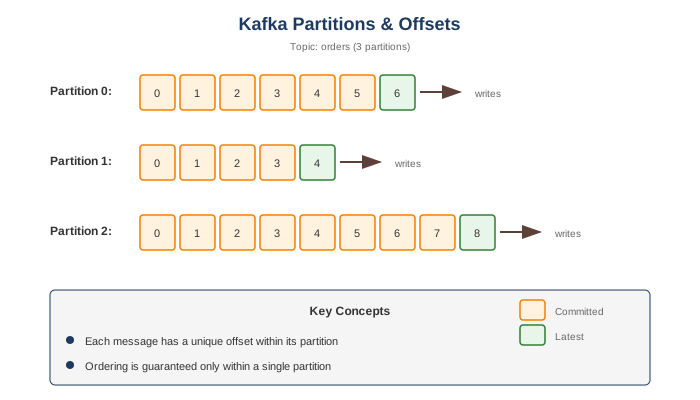
| Partition | Ordered, immutable sequence within a topic |
| Offset | Unique ID for each message in a partition |
| Producer | Publishes messages to topics |
| Consumer | Reads messages from topics |
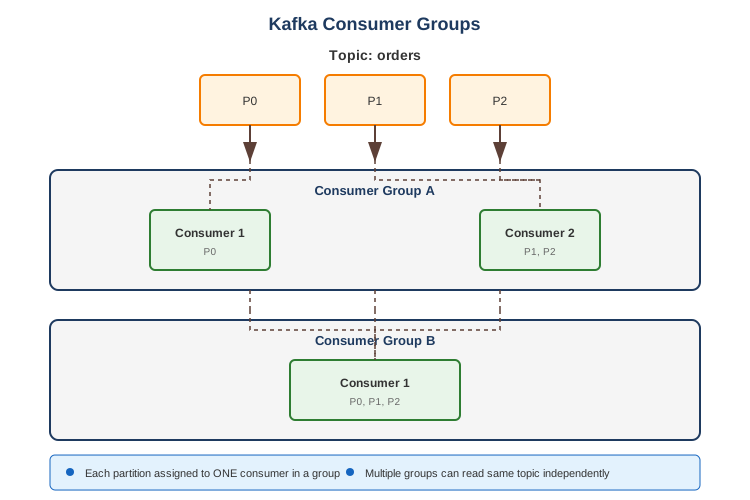
| Consumer Group | Set of consumers sharing work |
| Broker | Kafka server instance |
| Cluster | Group of brokers |
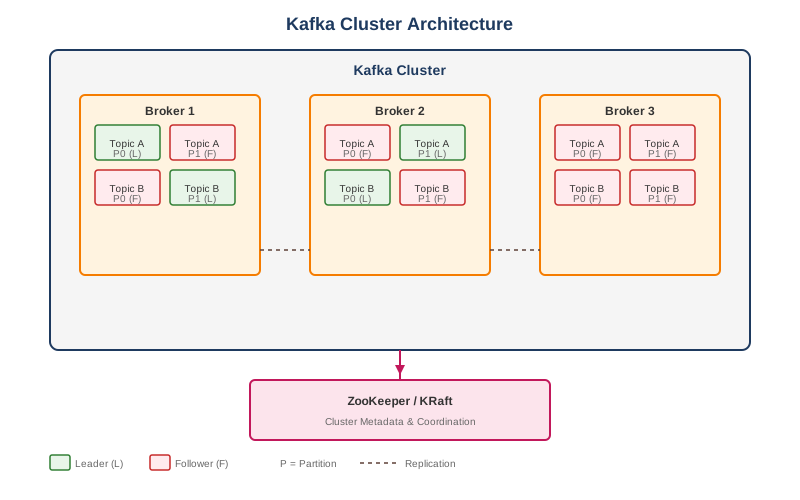
| Leader | Broker that handles reads/writes for a partition |
| Follower | Broker that replicates partition data |
| ZooKeeper/KRaft | Cluster coordination (ZK deprecated in favor of KRaft) |
Architecture
Partition & Offset
Consumer Groups
Core Features
Common Use Cases
1. Event-Driven Architecture
// Producer
@Service
public class OrderEventProducer {
    private final KafkaTemplate<String, OrderEvent> kafkaTemplate;

    public void publishOrderCreated(Order order) {
        OrderEvent event = OrderEvent.builder()
            .eventId(UUID.randomUUID().toString())
            .eventType("ORDER_CREATED")
            .orderId(order.getId())
            .customerId(order.getCustomerId())
            .amount(order.getAmount())
            .timestamp(Instant.now())
            .build();

        // Use order ID as key for partitioning (ordering per order)
        kafkaTemplate.send("orders", order.getId(), event);
    }
}

// Consumer
@Service
public class OrderEventConsumer {

    @KafkaListener(topics = "orders", groupId = "inventory-service")
    public void handleOrderEvent(OrderEvent event) {
        switch (event.getEventType()) {
            case "ORDER_CREATED" -> reserveInventory(event);
            case "ORDER_CANCELLED" -> releaseInventory(event);
        }
    }
}
2. Log Aggregation
// Logback Kafka Appender
// logback.xml
<appender name="KAFKA" class="com.github.danielwegener.logback.kafka.KafkaAppender">
    <encoder class="ch.qos.logback.classic.encoder.PatternLayoutEncoder">
        <pattern>%d{yyyy-MM-dd HH:mm:ss} [%thread] %-5level %logger{36} - %msg%n</pattern>
    </encoder>
    <topic>application-logs</topic>
    <keyingStrategy class="com.github.danielwegener.logback.kafka.keying.HostNameKeyingStrategy"/>
    <producerConfig>bootstrap.servers=kafka:9092</producerConfig>
</appender>

// Consumer (e.g., to Elasticsearch)
@KafkaListener(topics = "application-logs", groupId = "log-indexer")
public void indexLog(String logMessage) {
    elasticsearchClient.index(parseLog(logMessage));
}
3. Stream Processing
// Kafka Streams topology
@Bean
public KStream<String, Order> orderProcessingStream(StreamsBuilder builder) {
    KStream<String, Order> orders = builder.stream("orders");

    // Branch by order amount
    Map<String, KStream<String, Order>> branches = orders.split()
        .branch((key, order) -> order.getAmount() > 1000, Branched.as("high-value"))
        .branch((key, order) -> order.getAmount() > 100, Branched.as("medium-value"))
        .defaultBranch(Branched.as("low-value"));

    // High-value orders need manual approval
    branches.get("high-value")
        .mapValues(order -> OrderWithApproval.pending(order))
        .to("orders-pending-approval");

    // Others auto-approved
    branches.get("medium-value")
        .merge(branches.get("low-value"))
        .mapValues(order -> OrderWithApproval.approved(order))
        .to("orders-approved");

    return orders;
}

// Aggregation example
KTable<String, OrderStats> orderStats = orders
    .groupBy((key, order) -> order.getCustomerId())
    .windowedBy(TimeWindows.ofSizeWithNoGrace(Duration.ofHours(1)))
    .aggregate(
        OrderStats::new,
        (customerId, order, stats) -> stats.add(order),
        Materialized.as("order-stats-store")
    );
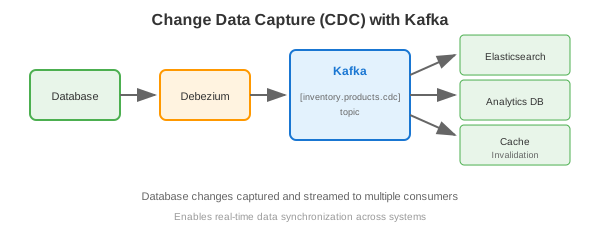
4. Change Data Capture (CDC)
5. Message Queue Replacement
// Producer with acknowledgment
@Service
public class TaskProducer {

    public CompletableFuture<SendResult<String, Task>> submitTask(Task task) {
        ProducerRecord<String, Task> record = new ProducerRecord<>(
            "tasks",
            task.getPriority().getPartition(), // Custom partitioning
            task.getId(),
            task
        );

        return kafkaTemplate.send(record);
    }
}

// Consumer with manual commit
@KafkaListener(
    topics = "tasks",
    groupId = "task-workers",
    containerFactory = "manualAckFactory"
)
public void processTask(Task task, Acknowledgment ack) {
    try {
        taskProcessor.process(task);
        ack.acknowledge(); // Manual commit after successful processing
    } catch (Exception e) {
        // Don't ack - message will be redelivered
        throw e;
    }
}
6. Real-Time Analytics
// Click stream processing
KStream<String, ClickEvent> clicks = builder.stream("clicks");

// Count clicks per page in 5-minute windows
KTable<Windowed<String>, Long> pageViews = clicks
    .groupBy((key, click) -> click.getPageUrl())
    .windowedBy(TimeWindows.ofSizeWithNoGrace(Duration.ofMinutes(5)))
    .count(Materialized.as("page-views-store"));

// Top pages (interactive query)
@GetMapping("/api/top-pages")
public List<PageViewCount> getTopPages() {
    ReadOnlyWindowStore<String, Long> store =
        streamsFactory.getKafkaStreams()
            .store(StoreQueryParameters.fromNameAndType(
                "page-views-store",
                QueryableStoreTypes.windowStore()
            ));

    Instant now = Instant.now();
    Instant windowStart = now.minus(Duration.ofMinutes(5));

    return StreamSupport.stream(
        store.fetchAll(windowStart, now).spliterator(), false)
        .sorted(Comparator.comparingLong(kv -> -kv.value))
        .limit(10)
        .map(kv -> new PageViewCount(kv.key.key(), kv.value))
        .collect(Collectors.toList());
}
Producer Configuration
@Configuration
public class KafkaProducerConfig {

    @Bean
    public ProducerFactory<String, Object> producerFactory() {
        Map<String, Object> config = new HashMap<>();

        // Basic
        config.put(ProducerConfig.BOOTSTRAP_SERVERS_CONFIG, "kafka:9092");
        config.put(ProducerConfig.KEY_SERIALIZER_CLASS_CONFIG, StringSerializer.class);
        config.put(ProducerConfig.VALUE_SERIALIZER_CLASS_CONFIG, JsonSerializer.class);

        // Reliability
        config.put(ProducerConfig.ACKS_CONFIG, "all"); // Wait for all replicas
        config.put(ProducerConfig.RETRIES_CONFIG, 3);
        config.put(ProducerConfig.ENABLE_IDEMPOTENCE_CONFIG, true);

        // Performance
        config.put(ProducerConfig.BATCH_SIZE_CONFIG, 16384);
        config.put(ProducerConfig.LINGER_MS_CONFIG, 10); // Wait up to 10ms for batching
        config.put(ProducerConfig.COMPRESSION_TYPE_CONFIG, "snappy");
        config.put(ProducerConfig.BUFFER_MEMORY_CONFIG, 33554432);

        return new DefaultKafkaProducerFactory<>(config);
    }
}
Acks Settings
| Setting | Durability | Latency | Description |
|---|---|---|---|
acks=0 |
Lowest | Lowest | Fire and forget |
acks=1 |
Medium | Medium | Wait for leader |
acks=all |
Highest | Highest | Wait for all replicas |
Consumer Configuration
@Configuration
public class KafkaConsumerConfig {

    @Bean
    public ConsumerFactory<String, Object> consumerFactory() {
        Map<String, Object> config = new HashMap<>();

        // Basic
        config.put(ConsumerConfig.BOOTSTRAP_SERVERS_CONFIG, "kafka:9092");
        config.put(ConsumerConfig.KEY_DESERIALIZER_CLASS_CONFIG, StringDeserializer.class);
        config.put(ConsumerConfig.VALUE_DESERIALIZER_CLASS_CONFIG, JsonDeserializer.class);
        config.put(ConsumerConfig.GROUP_ID_CONFIG, "my-consumer-group");

        // Offset management
        config.put(ConsumerConfig.AUTO_OFFSET_RESET_CONFIG, "earliest"); // or "latest"
        config.put(ConsumerConfig.ENABLE_AUTO_COMMIT_CONFIG, false); // Manual commit

        // Performance
        config.put(ConsumerConfig.MAX_POLL_RECORDS_CONFIG, 500);
        config.put(ConsumerConfig.FETCH_MIN_BYTES_CONFIG, 1024);
        config.put(ConsumerConfig.FETCH_MAX_WAIT_MS_CONFIG, 500);

        return new DefaultKafkaConsumerFactory<>(config);
    }
}
Offset Reset Strategies
| Setting | Behavior |
|---|---|
earliest |
Start from beginning of topic |
latest |
Start from end of topic |
none |
Throw exception if no offset found |
Exactly-Once Semantics
// Transactional producer
@Configuration
public class TransactionalProducerConfig {

    @Bean
    public ProducerFactory<String, Object> producerFactory() {
        Map<String, Object> config = new HashMap<>();
        config.put(ProducerConfig.BOOTSTRAP_SERVERS_CONFIG, "kafka:9092");
        config.put(ProducerConfig.ENABLE_IDEMPOTENCE_CONFIG, true);
        config.put(ProducerConfig.TRANSACTIONAL_ID_CONFIG, "my-transactional-id");
        config.put(ProducerConfig.ACKS_CONFIG, "all");

        return new DefaultKafkaProducerFactory<>(config);
    }
}

// Usage
@Transactional
public void processWithTransaction(Order order) {
    kafkaTemplate.executeInTransaction(operations -> {
        operations.send("orders", order);
        operations.send("audit", new AuditEvent(order));
        // Both messages commit or fail together
        return true;
    });
}

// Consumer with read-committed
config.put(ConsumerConfig.ISOLATION_LEVEL_CONFIG, "read_committed");
Topic Configuration
# Create topic
kafka-topics.sh --create \
  --bootstrap-server kafka:9092 \
  --topic my-topic \
  --partitions 12 \
  --replication-factor 3 \
  --config retention.ms=604800000 \
  --config cleanup.policy=delete

# Key configurations
retention.ms           # How long to keep messages
retention.bytes        # Max size before deletion
cleanup.policy         # delete or compact
segment.bytes          # Size of log segments
min.insync.replicas    # Min replicas for acks=all
Log Compaction
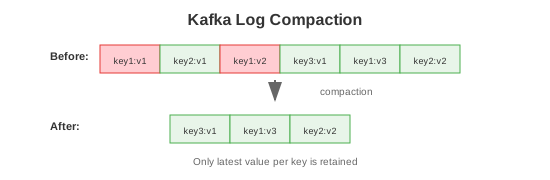
kafka-topics.sh --create \
  --topic user-profiles \
  --config cleanup.policy=compact \
  --config min.cleanable.dirty.ratio=0.5
Kafka Connect
// Source Connector (Database to Kafka)
{
    "name": "postgres-source",
    "config": {
        "connector.class": "io.debezium.connector.postgresql.PostgresConnector",
        "database.hostname": "postgres",
        "database.port": "5432",
        "database.user": "user",
        "database.password": "password",
        "database.dbname": "mydb",
        "table.include.list": "public.orders",
        "topic.prefix": "cdc"
    }
}

// Sink Connector (Kafka to Elasticsearch)
{
    "name": "elasticsearch-sink",
    "config": {
        "connector.class": "io.confluent.connect.elasticsearch.ElasticsearchSinkConnector",
        "topics": "orders",
        "connection.url": "http://elasticsearch:9200",
        "type.name": "_doc",
        "key.ignore": "true",
        "schema.ignore": "true"
    }
}
Schema Registry
// Producer with Avro
config.put(ProducerConfig.VALUE_SERIALIZER_CLASS_CONFIG,
    KafkaAvroSerializer.class);
config.put("schema.registry.url", "http://schema-registry:8081");

// Avro schema
{
    "type": "record",
    "name": "Order",
    "namespace": "com.example",
    "fields": [
        {"name": "id", "type": "string"},
        {"name": "customerId", "type": "string"},
        {"name": "amount", "type": "double"},
        {"name": "timestamp", "type": "long", "logicalType": "timestamp-millis"}
    ]
}
Trade-offs
| Pros | Cons |
|---|---|
| Extremely high throughput | Operational complexity |
| Durable and reliable | Learning curve |
| Horizontal scalability | No message priority |
| Ordering per partition | Consumer rebalancing can cause delays |
| Replay capability | No per-message TTL |
| Rich ecosystem | ZooKeeper dependency (pre-KRaft) |
| Exactly-once semantics | Expensive at scale (storage) |
| Connect & Streams APIs | Complex monitoring |
Performance Characteristics
| Metric | Typical Value |
|---|---|
| Throughput | 1M+ messages/sec (cluster) |
| Latency | 2-10ms (p99) |
| Message size limit | 1MB default (configurable) |
| Partitions per broker | 4,000 recommended max |
| Consumer groups | Thousands |
| Retention | Days to forever |
When to Use Kafka
Good For: - Event streaming - Log aggregation - Stream processing - Event sourcing - Metrics collection - Activity tracking - Commit log for distributed systems - High-throughput messaging
Not Good For: - Request-response patterns - Low message volume (overkill) - Message priority queues - Complex routing (use RabbitMQ) - Very low latency requirements (<1ms) - Simple task queues
Kafka vs Alternatives
| Feature | Kafka | RabbitMQ | AWS SQS | Pulsar |
|---|---|---|---|---|
| Throughput | Very High | High | Medium | Very High |
| Ordering | Per partition | Per queue | FIFO option | Per partition |
| Retention | Configurable | Until consumed | 14 days | Configurable |
| Replay | Yes | No | No | Yes |
| Routing | Limited | Flexible | Limited | Limited |
| Exactly-once | Yes | No | No | Yes |
| Managed | Confluent, MSK | CloudAMQP | AWS | StreamNative |
Best Practices
- Partition key design - Use keys that distribute evenly
- Right-size partitions - More partitions = more parallelism (but overhead)
- Replication factor ≥ 3 - For production durability
- min.insync.replicas = 2 - With acks=all for strong durability
- Idempotent producers - Enable for reliability
- Manual offset commits - After successful processing
- Monitor consumer lag - Detect slow consumers
- Schema evolution - Use Schema Registry
- Compacted topics - For changelog/state topics
- Dead letter queues - Handle poison pills
Common Commands
# Topics
kafka-topics.sh --list --bootstrap-server kafka:9092
kafka-topics.sh --describe --topic my-topic --bootstrap-server kafka:9092
kafka-topics.sh --delete --topic my-topic --bootstrap-server kafka:9092

# Produce
kafka-console-producer.sh --topic my-topic --bootstrap-server kafka:9092

# Consume
kafka-console-consumer.sh --topic my-topic --from-beginning --bootstrap-server kafka:9092
kafka-console-consumer.sh --topic my-topic --group my-group --bootstrap-server kafka:9092

# Consumer groups
kafka-consumer-groups.sh --list --bootstrap-server kafka:9092
kafka-consumer-groups.sh --describe --group my-group --bootstrap-server kafka:9092
kafka-consumer-groups.sh --reset-offsets --group my-group --topic my-topic --to-earliest --execute

# Performance test
kafka-producer-perf-test.sh --topic test --num-records 1000000 --record-size 1000 --throughput -1