Flink
What is Apache Flink?
Apache Flink is a distributed stream processing framework for stateful computations over unbounded and bounded data streams with exactly-once semantics.
- Type: Distributed stream processing engine
- Written in: Java and Scala
- License: Apache 2.0
- Default Ports: 8081 (Web UI), 6123 (RPC)
- Originally developed by: TU Berlin
Core Concepts
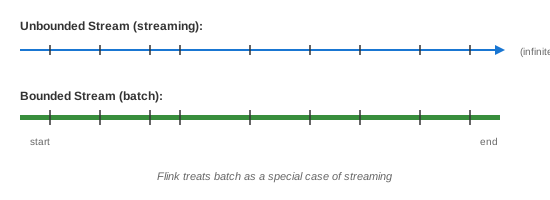
Stream vs Batch
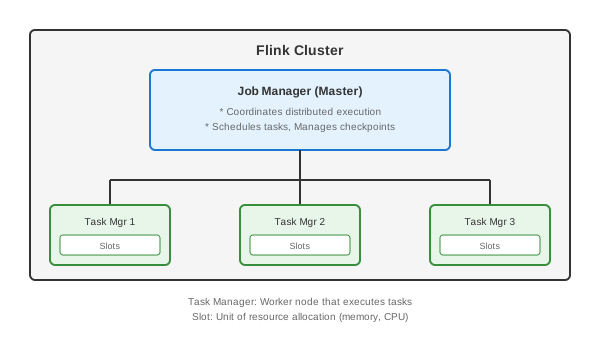
Architecture
Key Concepts
| Concept | Description |
|---|---|
| DataStream | Core abstraction for streaming data |
| Operator | Transformation on streams (map, filter, etc.) |
| State | Data maintained across events |
| Checkpoint | Consistent snapshot of state |
| Savepoint | Manual checkpoint for upgrades |
| Watermark | Progress indicator for event time |
| Window | Grouping of events by time/count |
| Source | Data input (Kafka, files, etc.) |
| Sink | Data output (Kafka, DB, etc.) |
Core Features
Apache Flink offers: - True streaming (event-at-a-time) - Exactly-once state consistency - Event time processing - Stateful computations - Flexible windowing - Fault tolerance (checkpointing) - Low latency (milliseconds) - High throughput (millions events/sec) - Unified batch and streaming - SQL support (Flink SQL) - Complex Event Processing (CEP) - Machine Learning (FlinkML)
Time Semantics
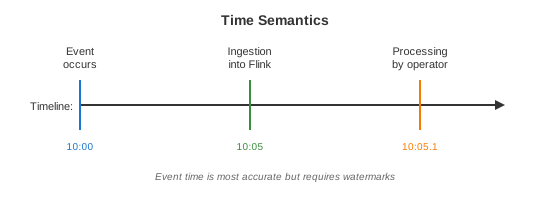
Types of Time
Watermarks
// Watermarks indicate progress of event time
// "All events with timestamp <= watermark have arrived"

DataStream<Event> stream = env
    .fromSource(kafkaSource, WatermarkStrategy
        .<Event>forBoundedOutOfOrderness(Duration.ofSeconds(5))
        .withTimestampAssigner((event, timestamp) -> event.getTimestamp()),
        "Kafka Source");

// Watermark = max event time seen - 5 seconds
// Late events (timestamp < watermark) can be handled specially
Common Use Cases
1. Real-Time Analytics
StreamExecutionEnvironment env = StreamExecutionEnvironment.getExecutionEnvironment();

DataStream<ClickEvent> clicks = env
    .fromSource(kafkaSource, WatermarkStrategy.forMonotonousTimestamps(), "clicks");

// Real-time page view counts
DataStream<PageViewCount> pageViews = clicks
    .keyBy(ClickEvent::getPageUrl)
    .window(TumblingEventTimeWindows.of(Time.minutes(1)))
    .aggregate(new CountAggregate());

// Output to dashboard
pageViews.addSink(new DashboardSink());

env.execute("Page View Analytics");
2. Fraud Detection
// Using Flink CEP (Complex Event Processing)
Pattern<Transaction, ?> fraudPattern = Pattern
    .<Transaction>begin("first")
        .where(new SimpleCondition<Transaction>() {
            @Override
            public boolean filter(Transaction t) {
                return t.getAmount() > 1000;
            }
        })
    .next("second")
        .where(new SimpleCondition<Transaction>() {
            @Override
            public boolean filter(Transaction t) {
                return t.getAmount() > 1000;
            }
        })
    .within(Time.minutes(5));

PatternStream<Transaction> patternStream = CEP.pattern(
    transactions.keyBy(Transaction::getUserId),
    fraudPattern
);

DataStream<FraudAlert> alerts = patternStream.select(
    (Map<String, List<Transaction>> pattern) -> {
        return new FraudAlert(
            pattern.get("first").get(0).getUserId(),
            "Multiple large transactions detected"
        );
    }
);
3. ETL / Data Pipeline
// Read from Kafka, transform, write to Elasticsearch
DataStream<RawEvent> rawEvents = env
    .fromSource(kafkaSource, WatermarkStrategy.noWatermarks(), "raw-events");

DataStream<EnrichedEvent> enriched = rawEvents
    // Filter invalid events
    .filter(event -> event.isValid())
    // Parse and transform
    .map(event -> parseEvent(event))
    // Enrich with user data (async I/O)
    .transform("async-enrichment",
        TypeInformation.of(EnrichedEvent.class),
        new AsyncEnrichmentOperator());

// Write to Elasticsearch
enriched.sinkTo(elasticsearchSink);
4. Sessionization
DataStream<UserActivity> activities = env.fromSource(source, watermarkStrategy, "activities");

DataStream<UserSession> sessions = activities
    .keyBy(UserActivity::getUserId)
    .window(EventTimeSessionWindows.withGap(Time.minutes(30)))
    .process(new ProcessWindowFunction<UserActivity, UserSession, String, TimeWindow>() {
        @Override
        public void process(String userId, Context context,
                           Iterable<UserActivity> activities, Collector<UserSession> out) {

            List<UserActivity> activityList = new ArrayList<>();
            activities.forEach(activityList::add);

            UserSession session = UserSession.builder()
                .userId(userId)
                .startTime(context.window().getStart())
                .endTime(context.window().getEnd())
                .activities(activityList)
                .pageViews(countPageViews(activityList))
                .build();

            out.collect(session);
        }
    });
5. Streaming SQL
// Table API / SQL
StreamTableEnvironment tableEnv = StreamTableEnvironment.create(env);

// Register Kafka source as table
tableEnv.executeSql("""
    CREATE TABLE orders (
        order_id STRING,
        customer_id STRING,
        amount DECIMAL(10, 2),
        order_time TIMESTAMP(3),
        WATERMARK FOR order_time AS order_time - INTERVAL '5' SECOND
    ) WITH (
        'connector' = 'kafka',
        'topic' = 'orders',
        'properties.bootstrap.servers' = 'kafka:9092',
        'format' = 'json'
    )
""");

// Query with SQL
Table result = tableEnv.sqlQuery("""
    SELECT
        customer_id,
        TUMBLE_START(order_time, INTERVAL '1' HOUR) AS window_start,
        COUNT(*) AS order_count,
        SUM(amount) AS total_amount
    FROM orders
    GROUP BY
        customer_id,
        TUMBLE(order_time, INTERVAL '1' HOUR)
""");

// Convert back to DataStream
DataStream<Row> resultStream = tableEnv.toDataStream(result);
6. Machine Learning Inference
// Real-time ML scoring
DataStream<Transaction> transactions = env.fromSource(kafkaSource, watermarkStrategy, "txns");

// Load ML model
MLModel model = loadModel("s3://models/fraud-detector-v2.pmml");

DataStream<ScoredTransaction> scored = transactions
    .map(new RichMapFunction<Transaction, ScoredTransaction>() {
        private transient MLModel model;

        @Override
        public void open(Configuration parameters) {
            model = loadModel("s3://models/fraud-detector-v2.pmml");
        }

        @Override
        public ScoredTransaction map(Transaction txn) {
            double score = model.predict(txn.toFeatures());
            return new ScoredTransaction(txn, score);
        }
    });

// Alert on high-risk transactions
scored.filter(t -> t.getScore() > 0.9)
    .addSink(new AlertSink());
Windowing
Window Types
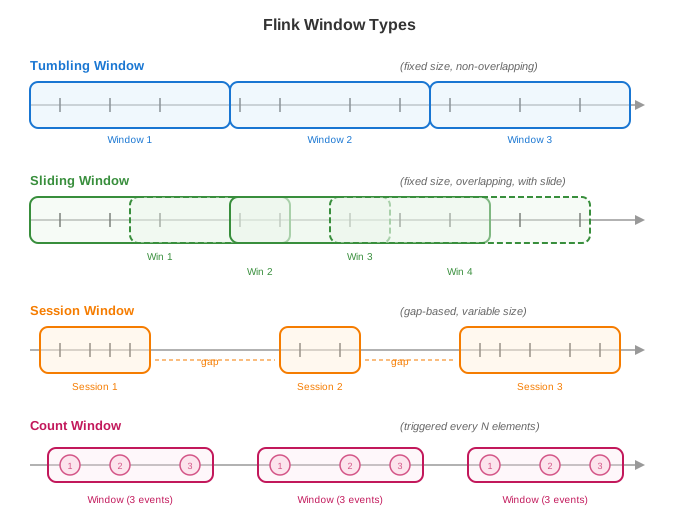
// Tumbling Window (fixed, non-overlapping)
stream.keyBy(...)
    .window(TumblingEventTimeWindows.of(Time.minutes(5)))

// Sliding Window (overlapping)
stream.keyBy(...)
    .window(SlidingEventTimeWindows.of(Time.minutes(10), Time.minutes(5)))

// Session Window (gap-based)
stream.keyBy(...)
    .window(EventTimeSessionWindows.withGap(Time.minutes(10)))

// Count Window
stream.keyBy(...)
    .countWindow(100)  // Every 100 elements
Window Functions
// Reduce (incremental)
.window(TumblingEventTimeWindows.of(Time.hours(1)))
.reduce((a, b) -> new Event(a.getCount() + b.getCount()))

// Aggregate (incremental with custom accumulator)
.window(TumblingEventTimeWindows.of(Time.hours(1)))
.aggregate(new AggregateFunction<Event, Accumulator, Result>() {
    @Override
    public Accumulator createAccumulator() { return new Accumulator(); }

    @Override
    public Accumulator add(Event value, Accumulator acc) {
        acc.count++;
        acc.sum += value.getValue();
        return acc;
    }

    @Override
    public Result getResult(Accumulator acc) {
        return new Result(acc.count, acc.sum / acc.count);
    }

    @Override
    public Accumulator merge(Accumulator a, Accumulator b) {
        return new Accumulator(a.count + b.count, a.sum + b.sum);
    }
})

// Process (full window access)
.window(TumblingEventTimeWindows.of(Time.hours(1)))
.process(new ProcessWindowFunction<Event, Result, String, TimeWindow>() {
    @Override
    public void process(String key, Context ctx, Iterable<Event> events, Collector<Result> out) {
        // Access all events in window
        // Access window metadata via ctx.window()
    }
})
State Management
State Types
// Value State
ValueStateDescriptor<Long> descriptor = new ValueStateDescriptor<>("count", Long.class);
ValueState<Long> countState = getRuntimeContext().getState(descriptor);

countState.value();      // Get
countState.update(10L);  // Set
countState.clear();      // Clear

// List State
ListStateDescriptor<Event> listDescriptor = new ListStateDescriptor<>("events", Event.class);
ListState<Event> eventsState = getRuntimeContext().getListState(listDescriptor);

eventsState.add(event);
eventsState.get();  // Returns Iterable
eventsState.update(newList);

// Map State
MapStateDescriptor<String, Long> mapDescriptor = new MapStateDescriptor<>("counts", String.class, Long.class);
MapState<String, Long> countsState = getRuntimeContext().getMapState(mapDescriptor);

countsState.put(key, value);
countsState.get(key);
countsState.contains(key);
countsState.entries();  // Iterate
Stateful Processing Example
public class CountWithState extends KeyedProcessFunction<String, Event, CountResult> {

    private ValueState<Long> countState;
    private ValueState<Long> lastTimestampState;

    @Override
    public void open(Configuration parameters) {
        countState = getRuntimeContext().getState(
            new ValueStateDescriptor<>("count", Long.class, 0L));
        lastTimestampState = getRuntimeContext().getState(
            new ValueStateDescriptor<>("lastTimestamp", Long.class));
    }

    @Override
    public void processElement(Event event, Context ctx, Collector<CountResult> out) throws Exception {
        Long currentCount = countState.value();
        currentCount++;
        countState.update(currentCount);

        lastTimestampState.update(event.getTimestamp());

        // Register timer
        ctx.timerService().registerEventTimeTimer(event.getTimestamp() + 60000);

        out.collect(new CountResult(ctx.getCurrentKey(), currentCount));
    }

    @Override
    public void onTimer(long timestamp, OnTimerContext ctx, Collector<CountResult> out) {
        // Timer fired - emit final count or cleanup
        Long count = countState.value();
        out.collect(new CountResult(ctx.getCurrentKey(), count, true));
    }
}
Checkpointing & Fault Tolerance
// Enable checkpointing
env.enableCheckpointing(60000); // Every 60 seconds

// Configure checkpointing
CheckpointConfig config = env.getCheckpointConfig();
config.setCheckpointingMode(CheckpointingMode.EXACTLY_ONCE);
config.setMinPauseBetweenCheckpoints(30000);
config.setCheckpointTimeout(600000);
config.setMaxConcurrentCheckpoints(1);
config.setExternalizedCheckpointCleanup(
    ExternalizedCheckpointCleanup.RETAIN_ON_CANCELLATION);

// State backend
env.setStateBackend(new HashMapStateBackend());
env.getCheckpointConfig().setCheckpointStorage("s3://my-bucket/checkpoints");

// Or RocksDB for large state
env.setStateBackend(new EmbeddedRocksDBStateBackend());
Savepoints
# Create savepoint
flink savepoint <jobId> s3://my-bucket/savepoints

# Resume from savepoint
flink run -s s3://my-bucket/savepoints/savepoint-xxx my-job.jar
Connectors
Kafka
KafkaSource<Event> source = KafkaSource.<Event>builder()
    .setBootstrapServers("kafka:9092")
    .setTopics("events")
    .setGroupId("flink-consumer")
    .setStartingOffsets(OffsetsInitializer.earliest())
    .setValueOnlyDeserializer(new EventDeserializer())
    .build();

KafkaSink<Event> sink = KafkaSink.<Event>builder()
    .setBootstrapServers("kafka:9092")
    .setRecordSerializer(KafkaRecordSerializationSchema.builder()
        .setTopic("output")
        .setValueSerializationSchema(new EventSerializer())
        .build())
    .setDeliveryGuarantee(DeliveryGuarantee.EXACTLY_ONCE)
    .build();
JDBC
JdbcSink.sink(
    "INSERT INTO orders (id, amount) VALUES (?, ?)",
    (statement, order) -> {
        statement.setString(1, order.getId());
        statement.setBigDecimal(2, order.getAmount());
    },
    JdbcExecutionOptions.builder()
        .withBatchSize(1000)
        .withBatchIntervalMs(200)
        .build(),
    new JdbcConnectionOptions.JdbcConnectionOptionsBuilder()
        .withUrl("jdbc:postgresql://localhost:5432/db")
        .withDriverName("org.postgresql.Driver")
        .withUsername("user")
        .withPassword("password")
        .build()
);
Trade-offs
| Pros | Cons |
|---|---|
| True streaming (low latency) | Complex to operate |
| Exactly-once semantics | Steep learning curve |
| Powerful state management | Resource intensive |
| Flexible windowing | Debugging can be hard |
| Event time processing | Cluster management |
| Unified batch/streaming | Memory pressure with large state |
| SQL support | |
| Rich ecosystem |
Performance Characteristics
| Metric | Typical Value |
|---|---|
| Latency | Milliseconds |
| Throughput | Millions events/sec |
| State size | Terabytes (with RocksDB) |
| Checkpoint interval | 1-10 minutes typical |
| Recovery time | Seconds to minutes |
When to Use Flink
Good For: - Real-time analytics - Event-driven applications - Fraud detection - Anomaly detection - ETL pipelines - Complex event processing - Machine learning inference - Session analysis
Not Good For: - Simple batch jobs (use Spark) - Micro-batching is acceptable (use Spark Streaming) - Simple message transformation (use Kafka Streams) - Very small scale (overkill)
Flink vs Alternatives
| Feature | Flink | Spark Streaming | Kafka Streams | Storm |
|---|---|---|---|---|
| Model | True streaming | Micro-batch | True streaming | True streaming |
| Latency | Milliseconds | Seconds | Milliseconds | Milliseconds |
| State | Excellent | Good | Good | Limited |
| Exactly-once | Yes | Yes | Yes | At-least-once |
| SQL | Yes | Yes | KSQL | No |
| Deployment | Standalone/K8s | YARN/K8s | Embedded | Standalone |
| Complexity | High | Medium | Low | Medium |
Best Practices
- Use event time - For accurate results with out-of-order events
- Size watermarks correctly - Balance latency vs completeness
- Enable checkpointing - For fault tolerance
- Use incremental aggregations - When possible (reduce/aggregate)
- Manage state size - Use state TTL, RocksDB for large state
- Monitor backpressure - Indicates processing bottlenecks
- Handle late data - Use side outputs or allowed lateness
- Test with realistic data - Use Flink's test utilities
- Version your savepoints - For safe upgrades
- Use parallelism wisely - Match source partitions