Cassandra
What is Apache Cassandra?
Apache Cassandra is a distributed, wide-column NoSQL database designed for high availability and linear scalability with no single point of failure.
- Type: Wide-column / Column-family NoSQL database
- Written in: Java
- License: Apache 2.0
- Protocol: CQL (Cassandra Query Language) over TCP
- Default Ports: 9042 (CQL), 7000 (inter-node)
- Originally developed by: Facebook (2008)
Core Concepts
Data Model
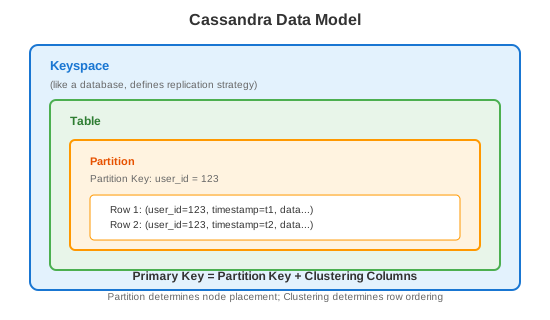
Primary Key = Partition Key + Clustering Columns
Terminology
| Concept | Description |
|---|---|
| Keyspace | Top-level namespace (like database) |
| Table | Collection of rows |
| Partition Key | Determines which node stores data |
| Clustering Column | Sorts rows within a partition |
| Primary Key | Partition key + clustering columns |
| Partition | Unit of data distribution |
| Node | Single Cassandra server |
| Ring | Cluster topology |
| Token | Hash value for data distribution |
Architecture
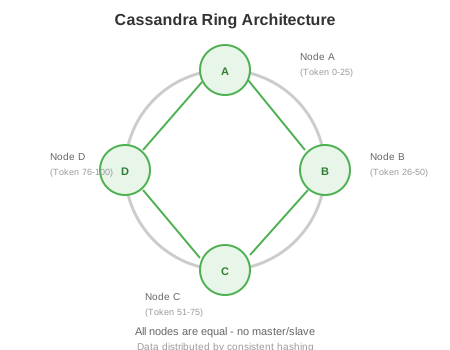
All nodes are equal - no master/slave. Data distributed by consistent hashing. Each node owns a range of tokens.
Replication
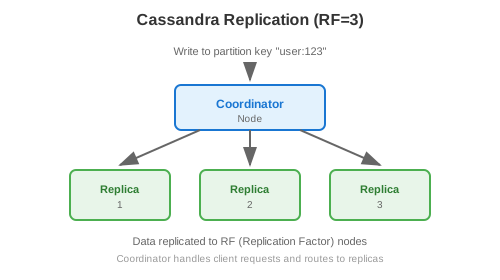
Data replicated to RF nodes. Coordinator handles client requests.
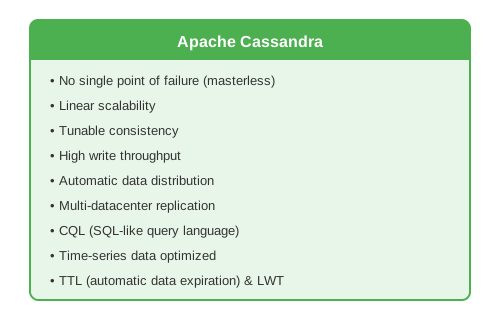
Core Features
Common Use Cases
1. Time-Series Data
-- User activity timeline
CREATE TABLE user_activity (
    user_id UUID,
    activity_time TIMESTAMP,
    activity_type TEXT,
    details MAP<TEXT, TEXT>,
    PRIMARY KEY (user_id, activity_time)
) WITH CLUSTERING ORDER BY (activity_time DESC);

-- Insert activity
INSERT INTO user_activity (user_id, activity_time, activity_type, details)
VALUES (123e4567-e89b-12d3-a456-426614174000,
        '2024-01-15 10:30:00',
        'page_view',
        {'page': '/products', 'duration': '30'});

-- Get recent activities
SELECT * FROM user_activity
WHERE user_id = 123e4567-e89b-12d3-a456-426614174000
LIMIT 50;
2. IoT Sensor Data
-- Sensor readings with time-based partitioning
CREATE TABLE sensor_readings (
    sensor_id TEXT,
    date DATE,
    reading_time TIMESTAMP,
    temperature DOUBLE,
    humidity DOUBLE,
    PRIMARY KEY ((sensor_id, date), reading_time)
) WITH CLUSTERING ORDER BY (reading_time DESC);

-- Query day's readings
SELECT * FROM sensor_readings
WHERE sensor_id = 'sensor-001'
AND date = '2024-01-15'
AND reading_time >= '2024-01-15 00:00:00'
AND reading_time < '2024-01-15 12:00:00';
3. Messaging / Chat
-- Messages table
CREATE TABLE messages (
    conversation_id UUID,
    message_time TIMEUUID,
    sender_id UUID,
    content TEXT,
    PRIMARY KEY (conversation_id, message_time)
) WITH CLUSTERING ORDER BY (message_time DESC);

-- Get recent messages
SELECT * FROM messages
WHERE conversation_id = ?
LIMIT 50;

-- With TTL (auto-delete after 30 days)
INSERT INTO messages (conversation_id, message_time, sender_id, content)
VALUES (?, now(), ?, ?)
USING TTL 2592000;
4. User Profiles / Sessions
-- User sessions
CREATE TABLE user_sessions (
    session_id TEXT PRIMARY KEY,
    user_id UUID,
    created_at TIMESTAMP,
    last_accessed TIMESTAMP,
    session_data TEXT
);

-- With TTL for auto-expiration
INSERT INTO user_sessions (session_id, user_id, created_at, last_accessed, session_data)
VALUES ('sess_abc123', 123e4567-e89b-12d3-a456-426614174000,
        toTimestamp(now()), toTimestamp(now()), '{}')
USING TTL 86400;  -- 24 hours
5. Product Catalog
-- Products by category
CREATE TABLE products_by_category (
    category TEXT,
    product_id UUID,
    name TEXT,
    price DECIMAL,
    description TEXT,
    attributes MAP<TEXT, TEXT>,
    PRIMARY KEY (category, product_id)
);

-- Products by ID (for direct lookup)
CREATE TABLE products_by_id (
    product_id UUID PRIMARY KEY,
    category TEXT,
    name TEXT,
    price DECIMAL,
    description TEXT,
    attributes MAP<TEXT, TEXT>
);

-- Query by category
SELECT * FROM products_by_category WHERE category = 'electronics';
6. Leaderboards
-- Gaming leaderboard (with bucketing)
CREATE TABLE leaderboard (
    game_id TEXT,
    bucket INT,  -- Top N in each bucket
    score BIGINT,
    user_id UUID,
    username TEXT,
    PRIMARY KEY ((game_id, bucket), score, user_id)
) WITH CLUSTERING ORDER BY (score DESC);

-- Get top players
SELECT * FROM leaderboard
WHERE game_id = 'game1' AND bucket = 0
LIMIT 100;
Data Modeling Principles
1. Query-First Design
❌ Traditional (normalize, then query)
   Entities → Relationships → Tables → Queries

✓ Cassandra (know queries first)
   Queries → Tables (one table per query pattern)
2. Denormalization
-- Instead of joins, denormalize data
-- Query 1: Get orders by customer
CREATE TABLE orders_by_customer (
    customer_id UUID,
    order_time TIMESTAMP,
    order_id UUID,
    product_name TEXT,  -- Denormalized from products
    amount DECIMAL,
    PRIMARY KEY (customer_id, order_time)
) WITH CLUSTERING ORDER BY (order_time DESC);

-- Query 2: Get orders by product
CREATE TABLE orders_by_product (
    product_id UUID,
    order_time TIMESTAMP,
    order_id UUID,
    customer_name TEXT,  -- Denormalized from customers
    amount DECIMAL,
    PRIMARY KEY (product_id, order_time)
) WITH CLUSTERING ORDER BY (order_time DESC);
3. Partition Sizing
Partition too large:
- Hotspots
- Slow queries
- Memory pressure

Partition too small:
- Too many partitions
- Overhead

Sweet spot: 10MB - 100MB per partition
Max: ~2 billion cells per partition
4. Bucketing for Large Partitions
-- Problem: All user's data in one partition
CREATE TABLE user_events (
    user_id UUID,
    event_time TIMESTAMP,
    data TEXT,
    PRIMARY KEY (user_id, event_time)
);

-- Solution: Bucket by time
CREATE TABLE user_events (
    user_id UUID,
    month TEXT,  -- "2024-01"
    event_time TIMESTAMP,
    data TEXT,
    PRIMARY KEY ((user_id, month), event_time)
);
Consistency Levels
Write Consistency
| Level | Description | Use Case |
|---|---|---|
ANY |
Write to any node (including hints) | Maximum availability |
ONE |
Write to one replica | Fast writes, eventual consistency |
TWO |
Write to two replicas | Moderate consistency |
THREE |
Write to three replicas | Higher consistency |
QUORUM |
Write to majority (RF/2 + 1) | Strong consistency |
LOCAL_QUORUM |
Quorum in local DC | Multi-DC with local consistency |
EACH_QUORUM |
Quorum in each DC | Strong multi-DC consistency |
ALL |
Write to all replicas | Maximum consistency, lowest availability |
Read Consistency
| Level | Description | Use Case |
|---|---|---|
ONE |
Read from one replica | Fast reads |
QUORUM |
Read from majority | Strong consistency |
LOCAL_QUORUM |
Quorum in local DC | Multi-DC |
ALL |
Read from all replicas | Maximum consistency |
Consistency Formula
For strong consistency:
READ_CL + WRITE_CL > REPLICATION_FACTOR

Example (RF=3):
- QUORUM (2) + QUORUM (2) = 4 > 3 ✓
- ONE (1) + QUORUM (2) = 3 = 3 ✗
- ONE (1) + ALL (3) = 4 > 3 ✓
Write Path
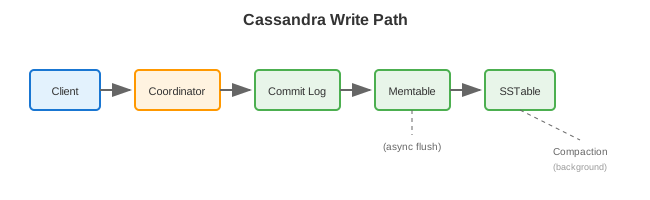
Components
| Component | Description |
|---|---|
| Commit Log | Append-only WAL for durability |
| Memtable | In-memory write buffer |
| SSTable | Immutable on-disk sorted files |
| Compaction | Merges SSTables, removes tombstones |
Java Driver Usage
// Connect
CqlSession session = CqlSession.builder()
    .addContactPoint(new InetSocketAddress("cassandra", 9042))
    .withLocalDatacenter("datacenter1")
    .withKeyspace("myapp")
    .build();

// Prepared statements (reuse!)
PreparedStatement insertUser = session.prepare(
    "INSERT INTO users (id, name, email) VALUES (?, ?, ?)");

PreparedStatement getUser = session.prepare(
    "SELECT * FROM users WHERE id = ?");

// Insert
BoundStatement bound = insertUser.bind(
    UUID.randomUUID(), "John Doe", "[email protected]");
session.execute(bound);

// Query
ResultSet rs = session.execute(getUser.bind(userId));
Row row = rs.one();
if (row != null) {
    String name = row.getString("name");
    String email = row.getString("email");
}

// Async
CompletionStage<AsyncResultSet> future = session.executeAsync(getUser.bind(userId));
future.thenAccept(resultSet -> {
    Row row = resultSet.one();
    // process row
});

// Batch (for same partition only!)
BatchStatement batch = BatchStatement.newInstance(BatchType.LOGGED)
    .add(insertUser.bind(id1, "User1", "[email protected]"))
    .add(insertUser.bind(id1, "User1 Updated", "[email protected]"));
session.execute(batch);
Trade-offs
| Pros | Cons |
|---|---|
| No single point of failure | No joins |
| Linear scalability | Limited query flexibility |
| High write throughput | Query-first data modeling |
| Multi-DC replication | Denormalization required |
| Tunable consistency | Eventual consistency by default |
| Automatic partitioning | Operational complexity |
| TTL support | No aggregations (native) |
| Time-series optimized | Secondary indexes limited |
Performance Characteristics
| Metric | Typical Value |
|---|---|
| Write latency | 1-5ms |
| Read latency | 1-10ms |
| Throughput | 10,000+ ops/sec/node |
| Storage | Petabytes |
| Nodes | 3 to 1000+ |
| Partition size | 10-100MB recommended |
Anti-Patterns
-- ❌ SELECT without partition key (full table scan)
SELECT * FROM users WHERE email = '[email protected]';

-- ❌ High cardinality partition key (too many small partitions)
PRIMARY KEY (uuid_for_each_row)

-- ❌ Unbounded partition growth
PRIMARY KEY (user_id)  -- All user's data forever

-- ❌ Using IN with many values
SELECT * FROM users WHERE user_id IN (1,2,3,4,5,...100);

-- ❌ Cross-partition batch
BEGIN BATCH
  INSERT INTO users (id, name) VALUES (1, 'A');
  INSERT INTO users (id, name) VALUES (2, 'B');  -- Different partition!
APPLY BATCH;

-- ❌ Using ALLOW FILTERING in production
SELECT * FROM users WHERE age > 25 ALLOW FILTERING;
When to Use Cassandra
Good For: - Time-series data - IoT sensor data - User activity/events - Messaging applications - Product catalogs - Session management - High write throughput - Multi-datacenter deployments
Not Good For: - Ad-hoc queries - Complex relationships (use RDBMS) - Transactions across partitions - Aggregations (use Spark on top) - Small datasets (overkill) - Frequently changing schemas
Cassandra vs Alternatives
| Feature | Cassandra | MongoDB | DynamoDB | ScyllaDB |
|---|---|---|---|---|
| Data Model | Wide-column | Document | Key-value | Wide-column |
| Consistency | Tunable | Tunable | Strong/Eventual | Tunable |
| Scalability | Linear | Horizontal | Automatic | Linear |
| Joins | No | Limited | No | No |
| Query Language | CQL | MQL | API | CQL |
| Managed | DataStax Astra | Atlas | AWS | Scylla Cloud |
| Written In | Java | C++ | - | C++ |
Best Practices
- Design for queries - Know access patterns first
- Right-size partitions - 10-100MB, avoid hotspots
- Use prepared statements - Always, for performance
- Avoid ALLOW FILTERING - Design tables to avoid it
- Use LOCAL_QUORUM - For multi-DC deployments
- Set appropriate TTL - For time-bound data
- Use UUIDs or TIMEUUIDs - For unique IDs
- Monitor compaction - Can impact performance
- Repair regularly - Ensure consistency
- Limit partition tombstones - Can cause performance issues
CQL Cheat Sheet
-- Keyspace
CREATE KEYSPACE myapp WITH replication = {
    'class': 'NetworkTopologyStrategy',
    'dc1': 3, 'dc2': 3
};

-- Table
CREATE TABLE users (
    id UUID PRIMARY KEY,
    name TEXT,
    email TEXT
);

-- Table with clustering
CREATE TABLE events (
    user_id UUID,
    event_time TIMESTAMP,
    event_type TEXT,
    PRIMARY KEY (user_id, event_time)
) WITH CLUSTERING ORDER BY (event_time DESC);

-- Insert
INSERT INTO users (id, name, email) VALUES (uuid(), 'John', '[email protected]');

-- Insert with TTL
INSERT INTO users (id, name, email) VALUES (uuid(), 'John', '[email protected]')
USING TTL 86400;

-- Update
UPDATE users SET name = 'Jane' WHERE id = ?;

-- Delete
DELETE FROM users WHERE id = ?;

-- Select
SELECT * FROM users WHERE id = ?;
SELECT * FROM events WHERE user_id = ? AND event_time > '2024-01-01';

-- Secondary index (use sparingly)
CREATE INDEX ON users (email);

-- Materialized view
CREATE MATERIALIZED VIEW users_by_email AS
    SELECT * FROM users
    WHERE email IS NOT NULL AND id IS NOT NULL
    PRIMARY KEY (email, id);