PostgreSQL
What is PostgreSQL?
PostgreSQL (Postgres) is a powerful, open-source object-relational database system with over 35 years of active development, known for reliability, feature robustness, and extensibility.
- Type: Relational Database (RDBMS)
- Written in: C
- License: PostgreSQL License (permissive, similar to MIT/BSD)
- Protocol: PostgreSQL wire protocol over TCP
- Default Port: 5432
- ACID: Full compliance
Core Features
PostgreSQL offers: - ACID transactions - Advanced data types (JSON, Arrays, UUID, etc.) - Full-text search - Extensibility (custom types, functions, operators) - MVCC (Multi-Version Concurrency Control) - Rich indexing (B-tree, GiST, GIN, BRIN, Hash) - Foreign Data Wrappers - Table partitioning - Replication (streaming, logical) - Procedural languages (PL/pgSQL, PL/Python, etc.) - CTEs and Window Functions - Materialized Views - Row-level security
Architecture
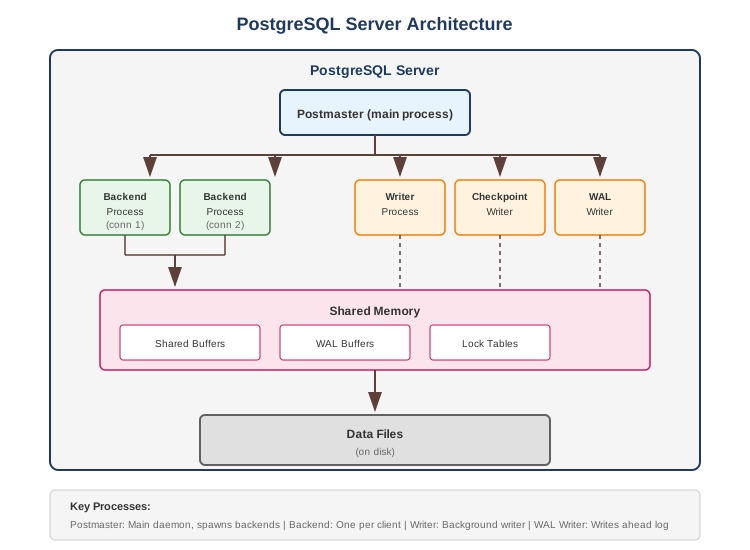
Key Processes
| Process | Description |
|---|---|
| Postmaster | Main daemon, spawns backends |
| Backend | One per client connection |
| Writer | Background writer for dirty pages |
| Checkpointer | Creates checkpoints |
| WAL Writer | Writes WAL to disk |
| Autovacuum | Cleans up dead tuples |
Data Types
Standard Types
-- Numeric
INTEGER, BIGINT, SMALLINT
DECIMAL(10,2), NUMERIC(10,2)
REAL, DOUBLE PRECISION
SERIAL, BIGSERIAL (auto-increment)

-- Character
VARCHAR(255), CHAR(10)
TEXT (unlimited)

-- Date/Time
DATE, TIME, TIMESTAMP
TIMESTAMPTZ (with timezone)
INTERVAL

-- Boolean
BOOLEAN (true/false/null)

-- Binary
BYTEA

-- UUID
UUID
Advanced Types
-- JSON
JSON (text storage)
JSONB (binary, indexable)

-- Arrays
INTEGER[], TEXT[]
CREATE TABLE t (tags TEXT[]);
INSERT INTO t VALUES (ARRAY['a', 'b', 'c']);
SELECT * FROM t WHERE 'a' = ANY(tags);

-- Composite Types
CREATE TYPE address AS (
    street TEXT,
    city TEXT,
    zip TEXT
);

-- Range Types
INT4RANGE, TSRANGE, DATERANGE
SELECT '[2024-01-01, 2024-01-31]'::daterange;

-- Network Types
INET, CIDR, MACADDR

-- Geometric Types
POINT, LINE, CIRCLE, POLYGON
Indexing
Index Types
| Type | Use Case |
|---|---|
| B-tree | Default, equality and range queries |
| Hash | Equality only |
| GiST | Geometric, full-text search |
| GIN | Arrays, JSONB, full-text |
| BRIN | Large sequential data (time-series) |
Index Examples
-- B-tree (default)
CREATE INDEX idx_users_email ON users(email);

-- Unique
CREATE UNIQUE INDEX idx_users_email_unique ON users(email);

-- Composite
CREATE INDEX idx_orders_user_date ON orders(user_id, created_at DESC);

-- Partial (filtered)
CREATE INDEX idx_active_users ON users(email) WHERE status = 'active';

-- Expression
CREATE INDEX idx_users_lower_email ON users(LOWER(email));

-- GIN for JSONB
CREATE INDEX idx_users_metadata ON users USING GIN(metadata);

-- GIN for array
CREATE INDEX idx_posts_tags ON posts USING GIN(tags);

-- BRIN for time-series
CREATE INDEX idx_events_time ON events USING BRIN(created_at);

-- Concurrent (no lock)
CREATE INDEX CONCURRENTLY idx_users_name ON users(name);
Index Usage Analysis
-- Check if index is used
EXPLAIN ANALYZE SELECT * FROM users WHERE email = '[email protected]';

-- Index statistics
SELECT
    schemaname, tablename, indexname,
    idx_scan, idx_tup_read, idx_tup_fetch
FROM pg_stat_user_indexes;

-- Unused indexes
SELECT indexrelid::regclass AS index,
       relid::regclass AS table
FROM pg_stat_user_indexes
WHERE idx_scan = 0;
Query Optimization
EXPLAIN ANALYZE
EXPLAIN (ANALYZE, BUFFERS, FORMAT TEXT)
SELECT * FROM orders
WHERE user_id = 123
AND created_at > '2024-01-01';

-- Output interpretation:
-- Seq Scan: Full table scan (usually bad)
-- Index Scan: Using index (good)
-- Index Only Scan: All data from index (best)
-- Bitmap Heap Scan: Multiple index scans combined
-- Hash Join: Hash-based join
-- Nested Loop: For each row in outer, scan inner
-- Merge Join: Both sides sorted
Common Optimizations
-- Use covering index
CREATE INDEX idx_orders_user_covering
ON orders(user_id) INCLUDE (status, total);

-- Use partial index
CREATE INDEX idx_pending_orders
ON orders(user_id) WHERE status = 'pending';

-- Statistics update
ANALYZE table_name;

-- Table maintenance
VACUUM ANALYZE table_name;

-- Parallel query (check settings)
SHOW max_parallel_workers_per_gather;
Transactions & Concurrency
Transaction Isolation Levels
-- Read Uncommitted (same as Read Committed in Postgres)
-- Read Committed (default)
-- Repeatable Read
-- Serializable

SET TRANSACTION ISOLATION LEVEL SERIALIZABLE;

BEGIN;
-- operations
COMMIT;
-- or ROLLBACK;
Locking
-- Row-level lock (SELECT FOR UPDATE)
SELECT * FROM accounts WHERE id = 1 FOR UPDATE;

-- Skip locked rows
SELECT * FROM tasks WHERE status = 'pending'
FOR UPDATE SKIP LOCKED
LIMIT 1;

-- Advisory locks (application-level)
SELECT pg_advisory_lock(12345);
-- do work
SELECT pg_advisory_unlock(12345);
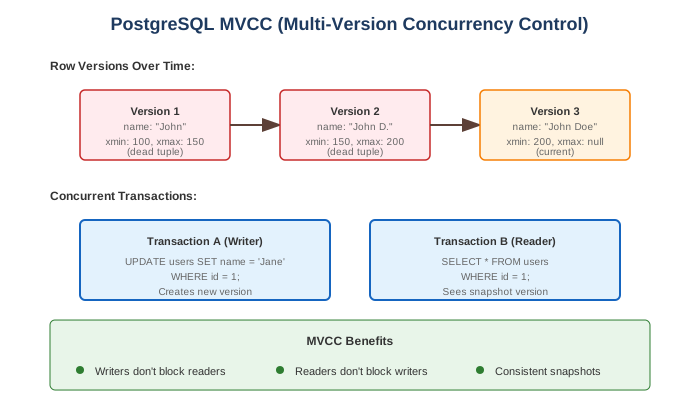
MVCC
Common Use Cases
1. JSON/Document Storage
-- JSONB column
CREATE TABLE products (
    id SERIAL PRIMARY KEY,
    name VARCHAR(255),
    metadata JSONB
);

-- Insert
INSERT INTO products (name, metadata) VALUES (
    'iPhone',
    '{"color": "black", "storage": 256, "features": ["5G", "Face ID"]}'
);

-- Query JSON
SELECT * FROM products WHERE metadata->>'color' = 'black';
SELECT * FROM products WHERE metadata @> '{"storage": 256}';
SELECT * FROM products WHERE metadata->'features' ? '5G';

-- JSON operators
->   Extract JSON object field
->>  Extract as text
#>   Extract at path
#>>  Extract at path as text
@>   Contains
?    Key exists
?|   Any key exists
?&   All keys exist

-- Index JSONB
CREATE INDEX idx_products_metadata ON products USING GIN(metadata);
2. Full-Text Search
-- Create search column
ALTER TABLE articles ADD COLUMN search_vector TSVECTOR;

-- Populate search vector
UPDATE articles SET search_vector =
    setweight(to_tsvector('english', coalesce(title, '')), 'A') ||
    setweight(to_tsvector('english', coalesce(body, '')), 'B');

-- Create GIN index
CREATE INDEX idx_articles_search ON articles USING GIN(search_vector);

-- Search
SELECT title, ts_rank(search_vector, query) AS rank
FROM articles, plainto_tsquery('english', 'postgresql database') query
WHERE search_vector @@ query
ORDER BY rank DESC;

-- Auto-update with trigger
CREATE TRIGGER articles_search_update
BEFORE INSERT OR UPDATE ON articles
FOR EACH ROW EXECUTE FUNCTION
    tsvector_update_trigger(search_vector, 'pg_catalog.english', title, body);
3. Table Partitioning
-- Range partitioning by date
CREATE TABLE events (
    id BIGSERIAL,
    event_time TIMESTAMP NOT NULL,
    data JSONB
) PARTITION BY RANGE (event_time);

-- Create partitions
CREATE TABLE events_2024_01 PARTITION OF events
    FOR VALUES FROM ('2024-01-01') TO ('2024-02-01');
CREATE TABLE events_2024_02 PARTITION OF events
    FOR VALUES FROM ('2024-02-01') TO ('2024-03-01');

-- Automatic partition creation (pg_partman extension)
-- or application-level partition management

-- List partitioning
CREATE TABLE sales (
    id SERIAL,
    region TEXT,
    amount DECIMAL
) PARTITION BY LIST (region);

CREATE TABLE sales_east PARTITION OF sales FOR VALUES IN ('east');
CREATE TABLE sales_west PARTITION OF sales FOR VALUES IN ('west');
4. Window Functions
-- Running total
SELECT
    date,
    amount,
    SUM(amount) OVER (ORDER BY date) AS running_total
FROM transactions;

-- Rank within partition
SELECT
    department,
    employee,
    salary,
    RANK() OVER (PARTITION BY department ORDER BY salary DESC) AS dept_rank
FROM employees;

-- Moving average
SELECT
    date,
    value,
    AVG(value) OVER (
        ORDER BY date
        ROWS BETWEEN 6 PRECEDING AND CURRENT ROW
    ) AS moving_avg_7day
FROM metrics;

-- Lead/Lag
SELECT
    date,
    value,
    LAG(value, 1) OVER (ORDER BY date) AS prev_value,
    LEAD(value, 1) OVER (ORDER BY date) AS next_value
FROM metrics;
5. Common Table Expressions (CTEs)
-- Simple CTE
WITH active_users AS (
    SELECT * FROM users WHERE status = 'active'
)
SELECT * FROM active_users WHERE created_at > '2024-01-01';

-- Recursive CTE (org hierarchy)
WITH RECURSIVE org_hierarchy AS (
    -- Base case
    SELECT id, name, manager_id, 1 AS level
    FROM employees
    WHERE manager_id IS NULL

    UNION ALL

    -- Recursive case
    SELECT e.id, e.name, e.manager_id, oh.level + 1
    FROM employees e
    JOIN org_hierarchy oh ON e.manager_id = oh.id
)
SELECT * FROM org_hierarchy ORDER BY level, name;
6. Materialized Views
-- Create materialized view
CREATE MATERIALIZED VIEW sales_summary AS
SELECT
    date_trunc('day', order_date) AS day,
    product_id,
    SUM(quantity) AS total_quantity,
    SUM(amount) AS total_amount
FROM orders
GROUP BY 1, 2;

-- Index on materialized view
CREATE INDEX idx_sales_summary_day ON sales_summary(day);

-- Refresh (blocking)
REFRESH MATERIALIZED VIEW sales_summary;

-- Refresh concurrently (needs unique index)
CREATE UNIQUE INDEX idx_sales_summary_unique ON sales_summary(day, product_id);
REFRESH MATERIALIZED VIEW CONCURRENTLY sales_summary;
Replication
Replication
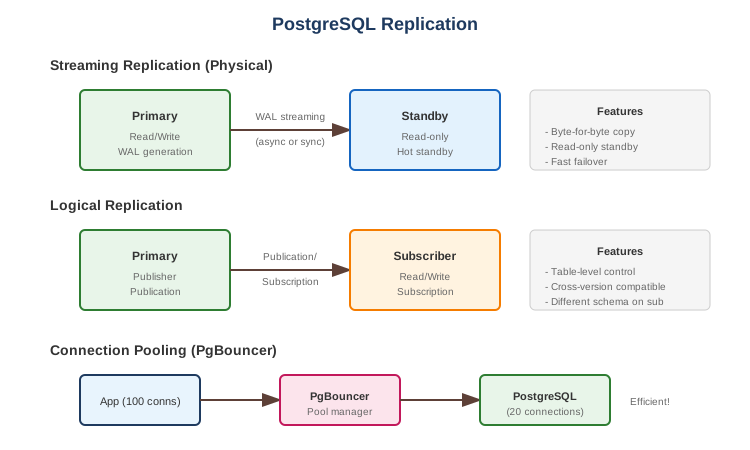
-- Primary: Create publication
CREATE PUBLICATION my_pub FOR TABLE users, orders;

-- Subscriber: Create subscription
CREATE SUBSCRIPTION my_sub
CONNECTION 'host=primary dbname=mydb'
PUBLICATION my_pub;
Connection Pooling
Connection pooling (using PgBouncer or pgpool-II) significantly reduces connection overhead by reusing database connections across multiple client requests.
PgBouncer Modes
| Mode | Description |
|---|---|
| Session | Connection held for session duration |
| Transaction | Connection returned after each transaction |
| Statement | Connection returned after each statement |
Trade-offs
| Pros | Cons |
|---|---|
| ACID compliant | Vertical scaling primarily |
| Rich feature set | Complex replication setup |
| Excellent data integrity | Higher memory usage |
| Advanced data types | Vacuum maintenance needed |
| Extensible | Write amplification |
| Strong community | Connection overhead |
| Free and open source |
Performance Characteristics
| Metric | Typical Value |
|---|---|
| Read latency | 1-10ms |
| Write latency | 1-10ms |
| Connections | Hundreds (with pooling: thousands) |
| Table size | Terabytes |
| Row size | 1.6GB max |
| Columns | 1600 max |
When to Use PostgreSQL
Good For: - Transactional workloads - Complex queries - Data integrity critical - JSON/document storage - Full-text search - Geospatial (PostGIS) - Time-series (TimescaleDB) - General-purpose database
Not Good For: - Massive horizontal scale writes - Simple key-value (use Redis) - Document-first (consider MongoDB) - Time-series at extreme scale (consider InfluxDB) - Real-time analytics (consider ClickHouse)
PostgreSQL vs Alternatives
| Feature | PostgreSQL | MySQL | MongoDB | Oracle |
|---|---|---|---|---|
| ACID | Full | Full | Multi-doc | Full |
| JSON | Excellent | Good | Native | Good |
| Replication | Good | Good | Excellent | Excellent |
| Partitioning | Good | Good | Automatic | Excellent |
| Full-text | Good | Good | Good | Excellent |
| License | Open | Open/Commercial | SSPL | Commercial |
| Extensions | Excellent | Limited | Limited | Limited |
Best Practices
- Use connection pooling - PgBouncer or pgpool-II
- Proper indexing - Analyze query patterns
- VACUUM regularly - Use autovacuum
- Monitor slow queries - pg_stat_statements
- Use EXPLAIN ANALYZE - Before deploying queries
- Partition large tables - Time-series, logs
- Use appropriate types - TIMESTAMPTZ, UUID, JSONB
- Set work_mem appropriately - For complex queries
- Use read replicas - For read scaling
- Backup strategy - pg_dump, pg_basebackup, WAL archiving
Configuration Tuning
# Memory
shared_buffers = 25% of RAM
effective_cache_size = 75% of RAM
work_mem = 64MB  # Per operation, be careful
maintenance_work_mem = 512MB

# WAL
wal_buffers = 64MB
checkpoint_completion_target = 0.9
max_wal_size = 4GB

# Query Planning
random_page_cost = 1.1  # SSD
effective_io_concurrency = 200  # SSD

# Connections
max_connections = 200  # Use pooling for more

# Parallelism
max_parallel_workers_per_gather = 4
max_parallel_workers = 8
Essential Commands
-- Database
CREATE DATABASE mydb;
\c mydb  -- connect
DROP DATABASE mydb;

-- Tables
\dt  -- list tables
\d table_name  -- describe table

-- Size
SELECT pg_size_pretty(pg_database_size('mydb'));
SELECT pg_size_pretty(pg_total_relation_size('table_name'));

-- Active queries
SELECT * FROM pg_stat_activity WHERE state = 'active';

-- Kill query
SELECT pg_cancel_backend(pid);  -- Graceful
SELECT pg_terminate_backend(pid);  -- Force

-- Locks
SELECT * FROM pg_locks WHERE NOT granted;

-- Table bloat
SELECT schemaname, tablename, n_dead_tup, n_live_tup
FROM pg_stat_user_tables
WHERE n_dead_tup > 1000;

-- Index usage
SELECT * FROM pg_stat_user_indexes;

-- Cache hit ratio
SELECT
    sum(heap_blks_hit) / (sum(heap_blks_hit) + sum(heap_blks_read)) AS ratio
FROM pg_statio_user_tables;