MySQL
What is MySQL?
MySQL is the world's most popular open-source relational database management system (RDBMS), known for its reliability, ease of use, and performance. It's widely used for web applications and is a core component of the LAMP stack.
- Type: Relational Database (RDBMS)
- Written in: C, C++
- License: GPL (Community) / Commercial (Enterprise)
- Protocol: MySQL wire protocol over TCP
- Default Port: 3306
- ACID: Full compliance (with InnoDB)
- Owned by: Oracle Corporation
Core Features
MySQL offers: - ACID transactions (InnoDB) - Multiple storage engines (InnoDB, MyISAM, Memory) - Replication (async, semi-sync, group replication) - Partitioning - Full-text search - JSON support - Stored procedures, triggers, views - User-defined functions - Query caching - Connection pooling - SSL/TLS encryption - Role-based access control
Architecture
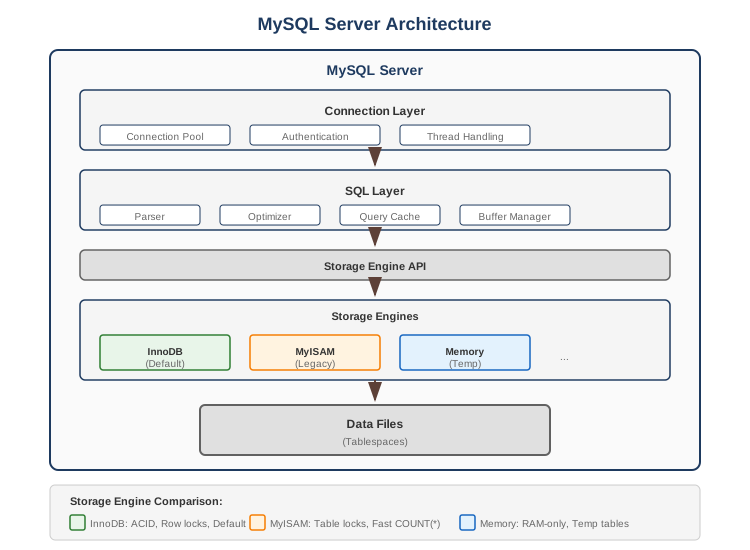
InnoDB Architecture
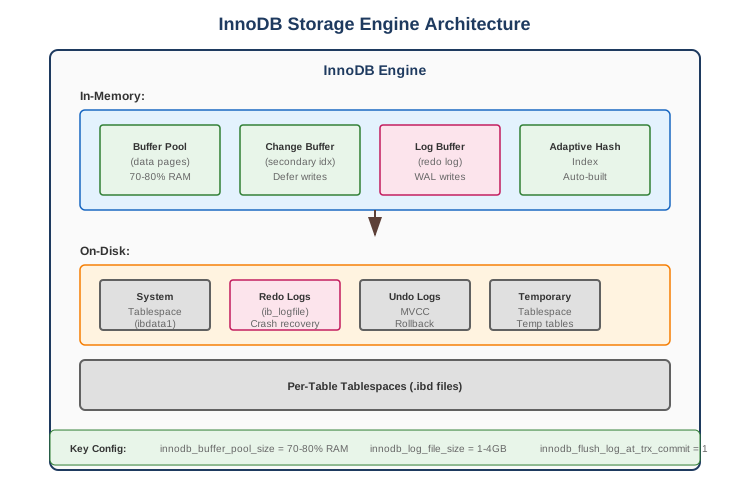
Storage Engines
| Engine | ACID | Transactions | Locking | Use Case |
|---|---|---|---|---|
| InnoDB | Yes | Yes | Row-level | Default, general purpose |
| MyISAM | No | No | Table-level | Legacy, read-heavy |
| Memory | No | No | Table-level | Temporary, caching |
| Archive | No | No | Row-level | Logging, archival |
| NDB | Yes | Yes | Row-level | MySQL Cluster |
InnoDB vs MyISAM
| Feature | InnoDB | MyISAM |
|---|---|---|
| Transactions | Yes | No |
| Foreign Keys | Yes | No |
| Crash Recovery | Yes | Limited |
| Locking | Row-level | Table-level |
| Full-text Search | Yes (5.6+) | Yes |
| Count(*) Speed | Slower | Fast (stored) |
| Storage | Larger | Smaller |
Data Types
Numeric Types
-- Integer types
TINYINT      -- 1 byte (-128 to 127)
SMALLINT     -- 2 bytes (-32768 to 32767)
MEDIUMINT    -- 3 bytes
INT/INTEGER  -- 4 bytes (-2B to 2B)
BIGINT       -- 8 bytes

-- Decimal types
DECIMAL(10,2)  -- Exact precision (for money)
FLOAT          -- 4 bytes, approximate
DOUBLE         -- 8 bytes, approximate

-- Auto-increment
id INT AUTO_INCREMENT PRIMARY KEY
id BIGINT AUTO_INCREMENT PRIMARY KEY
String Types
-- Fixed/Variable length
CHAR(255)      -- Fixed length, padded
VARCHAR(255)   -- Variable length (max 65535 bytes)

-- Text types
TINYTEXT       -- 255 bytes
TEXT           -- 65KB
MEDIUMTEXT     -- 16MB
LONGTEXT       -- 4GB

-- Binary
BINARY(255)
VARBINARY(255)
BLOB, MEDIUMBLOB, LONGBLOB
Date/Time Types
DATE           -- 'YYYY-MM-DD'
TIME           -- 'HH:MM:SS'
DATETIME       -- 'YYYY-MM-DD HH:MM:SS' (no timezone)
TIMESTAMP      -- UTC, auto-converts to session timezone
YEAR           -- YYYY

-- Auto-updating timestamps
created_at DATETIME DEFAULT CURRENT_TIMESTAMP
updated_at DATETIME DEFAULT CURRENT_TIMESTAMP ON UPDATE CURRENT_TIMESTAMP
JSON Type (MySQL 5.7+)
-- JSON column
CREATE TABLE products (
    id INT PRIMARY KEY,
    attributes JSON
);

-- Insert JSON
INSERT INTO products VALUES (1, '{"color": "red", "size": "L"}');

-- Query JSON
SELECT
    attributes->>'$.color' AS color,
    attributes->'$.size' AS size
FROM products
WHERE JSON_EXTRACT(attributes, '$.color') = 'red';

-- JSON functions
JSON_EXTRACT(json, '$.path')
JSON_SET(json, '$.path', value)
JSON_INSERT(json, '$.path', value)
JSON_REMOVE(json, '$.path')
JSON_CONTAINS(json, value, '$.path')
JSON_ARRAY(), JSON_OBJECT()
Indexing
Index Types
| Type | Description | Use Case |
|---|---|---|
| B-tree | Default, balanced tree | Equality, range queries |
| Hash | Hash table (Memory only) | Exact matches |
| Full-text | Text search | Natural language search |
| Spatial | R-tree | Geospatial data |
Index Examples
-- Primary key (clustered index in InnoDB)
CREATE TABLE users (
    id INT PRIMARY KEY,
    email VARCHAR(255)
);

-- Unique index
CREATE UNIQUE INDEX idx_users_email ON users(email);

-- Composite index
CREATE INDEX idx_orders_user_date ON orders(user_id, created_at);
-- Supports: WHERE user_id = ? AND created_at > ?
-- Supports: WHERE user_id = ?
-- Does NOT support: WHERE created_at > ? (leftmost prefix rule)

-- Covering index
CREATE INDEX idx_covering ON orders(user_id, status, total);
-- SELECT status, total FROM orders WHERE user_id = ?
-- Can be satisfied entirely from index

-- Prefix index (for long strings)
CREATE INDEX idx_users_email_prefix ON users(email(20));

-- Descending index (MySQL 8.0+)
CREATE INDEX idx_orders_date_desc ON orders(created_at DESC);

-- Full-text index
CREATE FULLTEXT INDEX idx_articles_content ON articles(title, body);
SELECT * FROM articles
WHERE MATCH(title, body) AGAINST('mysql performance' IN NATURAL LANGUAGE MODE);

-- Invisible index (for testing)
CREATE INDEX idx_test ON users(name) INVISIBLE;
ALTER INDEX idx_test VISIBLE;
Index Analysis
-- Check if index is used
EXPLAIN SELECT * FROM users WHERE email = '[email protected]';
EXPLAIN ANALYZE SELECT * FROM users WHERE email = '[email protected]';

-- Show index info
SHOW INDEX FROM users;

-- Index usage statistics (Performance Schema)
SELECT * FROM performance_schema.table_io_waits_summary_by_index_usage
WHERE object_schema = 'mydb' AND object_name = 'users';

-- Unused indexes
SELECT * FROM sys.schema_unused_indexes;

-- Redundant indexes
SELECT * FROM sys.schema_redundant_indexes;
Query Optimization
EXPLAIN Output
EXPLAIN SELECT * FROM orders o
JOIN users u ON o.user_id = u.id
WHERE o.status = 'pending';

-- Key columns:
-- type: ALL (bad), index, range, ref, eq_ref, const (best)
-- possible_keys: Indexes that could be used
-- key: Index actually used
-- rows: Estimated rows to examine
-- Extra: Using where, Using index, Using filesort, Using temporary
Optimization Tips
-- Use covering index
SELECT user_id, status FROM orders WHERE user_id = 123;
-- With: INDEX(user_id, status) - no table lookup needed

-- Avoid SELECT *
SELECT id, name, email FROM users;  -- Better than SELECT *

-- Use LIMIT for pagination
SELECT * FROM orders ORDER BY created_at DESC LIMIT 20 OFFSET 100;
-- Better: Keyset pagination
SELECT * FROM orders WHERE created_at < ? ORDER BY created_at DESC LIMIT 20;

-- Avoid functions on indexed columns
-- Bad:
SELECT * FROM users WHERE YEAR(created_at) = 2024;
-- Good:
SELECT * FROM users WHERE created_at >= '2024-01-01' AND created_at < '2025-01-01';

-- Use EXISTS instead of IN for subqueries
-- Instead of:
SELECT * FROM orders WHERE user_id IN (SELECT id FROM users WHERE status = 'active');
-- Use:
SELECT * FROM orders o WHERE EXISTS (
    SELECT 1 FROM users u WHERE u.id = o.user_id AND u.status = 'active'
);

-- Batch INSERT
INSERT INTO logs (message, created_at) VALUES
('msg1', NOW()),
('msg2', NOW()),
('msg3', NOW());
-- Much faster than individual INSERTs
Transactions & Locking
Transaction Isolation Levels
-- Read Uncommitted (dirty reads possible)
SET TRANSACTION ISOLATION LEVEL READ UNCOMMITTED;

-- Read Committed (no dirty reads)
SET TRANSACTION ISOLATION LEVEL READ COMMITTED;

-- Repeatable Read (default in MySQL)
SET TRANSACTION ISOLATION LEVEL REPEATABLE READ;

-- Serializable (strictest)
SET TRANSACTION ISOLATION LEVEL SERIALIZABLE;
Isolation Level Comparison
| Level | Dirty Read | Non-repeatable Read | Phantom Read |
|---|---|---|---|
| Read Uncommitted | Yes | Yes | Yes |
| Read Committed | No | Yes | Yes |
| Repeatable Read | No | No | No* |
| Serializable | No | No | No |
*InnoDB prevents phantom reads in Repeatable Read using gap locking
Locking Examples
-- Shared lock (read lock)
SELECT * FROM accounts WHERE id = 1 LOCK IN SHARE MODE;
-- or (MySQL 8.0+)
SELECT * FROM accounts WHERE id = 1 FOR SHARE;

-- Exclusive lock (write lock)
SELECT * FROM accounts WHERE id = 1 FOR UPDATE;

-- Skip locked rows (queue processing)
SELECT * FROM tasks WHERE status = 'pending'
FOR UPDATE SKIP LOCKED
LIMIT 1;

-- No wait (fail immediately if locked)
SELECT * FROM accounts WHERE id = 1
FOR UPDATE NOWAIT;

-- Transaction example
START TRANSACTION;
SELECT balance FROM accounts WHERE id = 1 FOR UPDATE;
UPDATE accounts SET balance = balance - 100 WHERE id = 1;
UPDATE accounts SET balance = balance + 100 WHERE id = 2;
COMMIT;
Deadlock Handling
-- View recent deadlocks
SHOW ENGINE INNODB STATUS;

-- Deadlock prevention:
-- 1. Access tables in same order
-- 2. Keep transactions short
-- 3. Use lower isolation level if possible
-- 4. Add appropriate indexes

-- Application handling
try {
    executeTransaction();
} catch (DeadlockException e) {
    // Retry transaction
    executeTransaction();
}
Replication
Replication Types
1. Asynchronous Replication (default): Primary writes to binary log, replicas may lag behind.
2. Semi-synchronous Replication: Primary waits for ACK from at least one replica before committing.
3. Group Replication (MySQL 5.7.17+): Paxos-based consensus with multi-primary or single-primary mode.
Replication Setup
-- On Primary
-- Enable binary logging in my.cnf
[mysqld]
server-id = 1
log_bin = mysql-bin
binlog_format = ROW

-- Create replication user
CREATE USER 'repl'@'%' IDENTIFIED BY 'password';
GRANT REPLICATION SLAVE ON *.* TO 'repl'@'%';

-- Get binary log position
SHOW MASTER STATUS;

-- On Replica
CHANGE REPLICATION SOURCE TO
    SOURCE_HOST='primary_host',
    SOURCE_USER='repl',
    SOURCE_PASSWORD='password',
    SOURCE_LOG_FILE='mysql-bin.000001',
    SOURCE_LOG_POS=154;

START REPLICA;
SHOW REPLICA STATUS\G
Read/Write Splitting
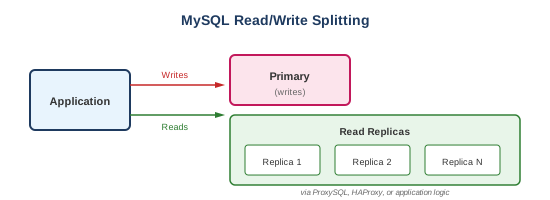
Partitioning
Partition Types
-- Range partitioning
CREATE TABLE orders (
    id INT,
    order_date DATE,
    amount DECIMAL(10,2)
)
PARTITION BY RANGE (YEAR(order_date)) (
    PARTITION p2022 VALUES LESS THAN (2023),
    PARTITION p2023 VALUES LESS THAN (2024),
    PARTITION p2024 VALUES LESS THAN (2025),
    PARTITION pmax VALUES LESS THAN MAXVALUE
);

-- List partitioning
CREATE TABLE orders (
    id INT,
    region VARCHAR(20)
)
PARTITION BY LIST COLUMNS (region) (
    PARTITION p_east VALUES IN ('NY', 'NJ', 'PA'),
    PARTITION p_west VALUES IN ('CA', 'WA', 'OR'),
    PARTITION p_other VALUES IN ('TX', 'FL')
);

-- Hash partitioning
CREATE TABLE sessions (
    id INT,
    user_id INT,
    data TEXT
)
PARTITION BY HASH(user_id)
PARTITIONS 8;

-- Key partitioning (hash on primary key)
CREATE TABLE cache (
    id INT PRIMARY KEY,
    data TEXT
)
PARTITION BY KEY()
PARTITIONS 4;
Partition Management
-- Add partition
ALTER TABLE orders ADD PARTITION (
    PARTITION p2025 VALUES LESS THAN (2026)
);

-- Drop partition (fast delete!)
ALTER TABLE orders DROP PARTITION p2022;

-- Reorganize partitions
ALTER TABLE orders REORGANIZE PARTITION pmax INTO (
    PARTITION p2025 VALUES LESS THAN (2026),
    PARTITION pmax VALUES LESS THAN MAXVALUE
);

-- Check partition pruning
EXPLAIN SELECT * FROM orders WHERE order_date = '2024-01-15';
-- Should show: partitions: p2024
Common Use Cases
1. User Management
CREATE TABLE users (
    id BIGINT AUTO_INCREMENT PRIMARY KEY,
    email VARCHAR(255) NOT NULL,
    password_hash VARCHAR(255) NOT NULL,
    name VARCHAR(255),
    status ENUM('active', 'inactive', 'suspended') DEFAULT 'active',
    created_at DATETIME DEFAULT CURRENT_TIMESTAMP,
    updated_at DATETIME DEFAULT CURRENT_TIMESTAMP ON UPDATE CURRENT_TIMESTAMP,
    UNIQUE KEY idx_email (email),
    KEY idx_status (status)
) ENGINE=InnoDB;
2. E-commerce Orders
CREATE TABLE orders (
    id BIGINT AUTO_INCREMENT PRIMARY KEY,
    user_id BIGINT NOT NULL,
    status ENUM('pending', 'paid', 'shipped', 'delivered', 'cancelled'),
    total DECIMAL(10,2),
    created_at DATETIME DEFAULT CURRENT_TIMESTAMP,
    KEY idx_user_id (user_id),
    KEY idx_status_created (status, created_at),
    FOREIGN KEY (user_id) REFERENCES users(id)
) ENGINE=InnoDB;

CREATE TABLE order_items (
    id BIGINT AUTO_INCREMENT PRIMARY KEY,
    order_id BIGINT NOT NULL,
    product_id BIGINT NOT NULL,
    quantity INT NOT NULL,
    price DECIMAL(10,2) NOT NULL,
    KEY idx_order_id (order_id),
    FOREIGN KEY (order_id) REFERENCES orders(id)
) ENGINE=InnoDB;
3. Session Storage
CREATE TABLE sessions (
    id VARCHAR(128) PRIMARY KEY,
    user_id BIGINT,
    data TEXT,
    expires_at DATETIME NOT NULL,
    KEY idx_expires (expires_at),
    KEY idx_user (user_id)
) ENGINE=InnoDB;

-- Cleanup expired sessions
DELETE FROM sessions WHERE expires_at < NOW();

-- Or use MySQL Event Scheduler
CREATE EVENT cleanup_sessions
ON SCHEDULE EVERY 1 HOUR
DO DELETE FROM sessions WHERE expires_at < NOW();
4. Audit Logging
CREATE TABLE audit_log (
    id BIGINT AUTO_INCREMENT,
    table_name VARCHAR(64),
    record_id BIGINT,
    action ENUM('INSERT', 'UPDATE', 'DELETE'),
    old_values JSON,
    new_values JSON,
    user_id BIGINT,
    created_at DATETIME DEFAULT CURRENT_TIMESTAMP,
    PRIMARY KEY (id, created_at)
)
PARTITION BY RANGE (TO_DAYS(created_at)) (
    PARTITION p_2024_01 VALUES LESS THAN (TO_DAYS('2024-02-01')),
    PARTITION p_2024_02 VALUES LESS THAN (TO_DAYS('2024-03-01')),
    -- ...
    PARTITION p_future VALUES LESS THAN MAXVALUE
);
Performance Tuning
Key Configuration Parameters
[mysqld]
# InnoDB Buffer Pool (70-80% of RAM for dedicated server)
innodb_buffer_pool_size = 12G
innodb_buffer_pool_instances = 8

# Log files
innodb_log_file_size = 1G
innodb_log_buffer_size = 64M

# Flush behavior
innodb_flush_log_at_trx_commit = 1  # ACID compliant
# Set to 2 for better performance (risk: 1 sec of data on crash)

innodb_flush_method = O_DIRECT

# Connections
max_connections = 500
thread_cache_size = 100

# Query cache (deprecated in 8.0, disable in 5.7)
query_cache_type = 0
query_cache_size = 0

# Temp tables
tmp_table_size = 256M
max_heap_table_size = 256M

# Sort/Join buffers
sort_buffer_size = 4M
join_buffer_size = 4M
read_buffer_size = 2M

# Binary log
binlog_format = ROW
sync_binlog = 1  # ACID compliant
expire_logs_days = 7
Monitoring Queries
-- Slow query log
SET GLOBAL slow_query_log = 'ON';
SET GLOBAL long_query_time = 1;  -- seconds

-- Current processes
SHOW PROCESSLIST;
SHOW FULL PROCESSLIST;

-- Kill long-running query
KILL <process_id>;

-- Table statistics
SHOW TABLE STATUS LIKE 'users';

-- InnoDB status
SHOW ENGINE INNODB STATUS\G

-- Buffer pool stats
SELECT * FROM information_schema.INNODB_BUFFER_POOL_STATS;

-- Performance Schema
SELECT * FROM performance_schema.events_statements_summary_by_digest
ORDER BY SUM_TIMER_WAIT DESC LIMIT 10;
Trade-offs
| Pros | Cons |
|---|---|
| Mature and battle-tested | Vertical scaling primarily |
| Excellent tooling ecosystem | Complex replication setup |
| Wide hosting support | Query optimizer less advanced than PostgreSQL |
| Fast reads with proper indexing | No native JSON indexing (GIN) |
| Strong community | Fewer data types than PostgreSQL |
| Multiple storage engines | Oracle ownership concerns |
| Easy to learn | No native table inheritance |
MySQL vs Alternatives
| Feature | MySQL | PostgreSQL | MariaDB | Oracle |
|---|---|---|---|---|
| ACID | Yes (InnoDB) | Yes | Yes | Yes |
| JSON | Good | Excellent | Good | Good |
| Replication | Good | Good | Good | Excellent |
| Partitioning | Good | Good | Good | Excellent |
| Full-text | Good | Good | Good | Excellent |
| License | GPL/Commercial | PostgreSQL | GPL | Commercial |
| Complexity | Low | Medium | Low | High |
| Cloud Support | Excellent | Excellent | Good | Excellent |
Best Practices
- Always use InnoDB - Unless you have a very specific reason not to
- Proper indexing - Analyze slow queries, add appropriate indexes
- Use connection pooling - Avoid connection overhead
- Normalize, then denormalize - Start normalized, denormalize for performance
- Use prepared statements - Prevent SQL injection, better performance
- Set appropriate character set - Use utf8mb4 for full Unicode support
- Monitor slow queries - Enable slow query log
- Regular backups - mysqldump, mysqlpump, or Percona XtraBackup
- Keep statistics updated - ANALYZE TABLE periodically
- Use EXPLAIN - Before deploying queries
Essential Commands
-- Database
CREATE DATABASE mydb CHARACTER SET utf8mb4 COLLATE utf8mb4_unicode_ci;
USE mydb;
DROP DATABASE mydb;

-- User management
CREATE USER 'app'@'%' IDENTIFIED BY 'password';
GRANT SELECT, INSERT, UPDATE, DELETE ON mydb.* TO 'app'@'%';
FLUSH PRIVILEGES;

-- Backup
mysqldump -u root -p mydb > backup.sql
mysqldump -u root -p --all-databases > all_backup.sql

-- Restore
mysql -u root -p mydb < backup.sql

-- Table maintenance
ANALYZE TABLE users;  -- Update statistics
OPTIMIZE TABLE users;  -- Defragment (locks table!)
CHECK TABLE users;     -- Check for errors
REPAIR TABLE users;    -- Repair MyISAM table

-- Show variables
SHOW VARIABLES LIKE 'innodb%';
SHOW GLOBAL STATUS LIKE 'Threads%';

-- Size queries
SELECT
    table_schema AS 'Database',
    ROUND(SUM(data_length + index_length) / 1024 / 1024, 2) AS 'Size (MB)'
FROM information_schema.tables
GROUP BY table_schema;